


Overview
A dependency graph is a visual or logical representation of tasks, components, or processes and the dependencies between them—basically, what must happen before what.
Think of it as a map of order and relationships that automation systems use to run things correctly, efficiently, and safely.
Components of Dependency Graphs
Nodes → tasks, jobs, steps, modules, or resources
Edges (arrows) → dependencies (Task A must finish before Task B starts)
So if B depends on A, the graph shows:
A → B
Let’s know more about dependencies with the help of an example
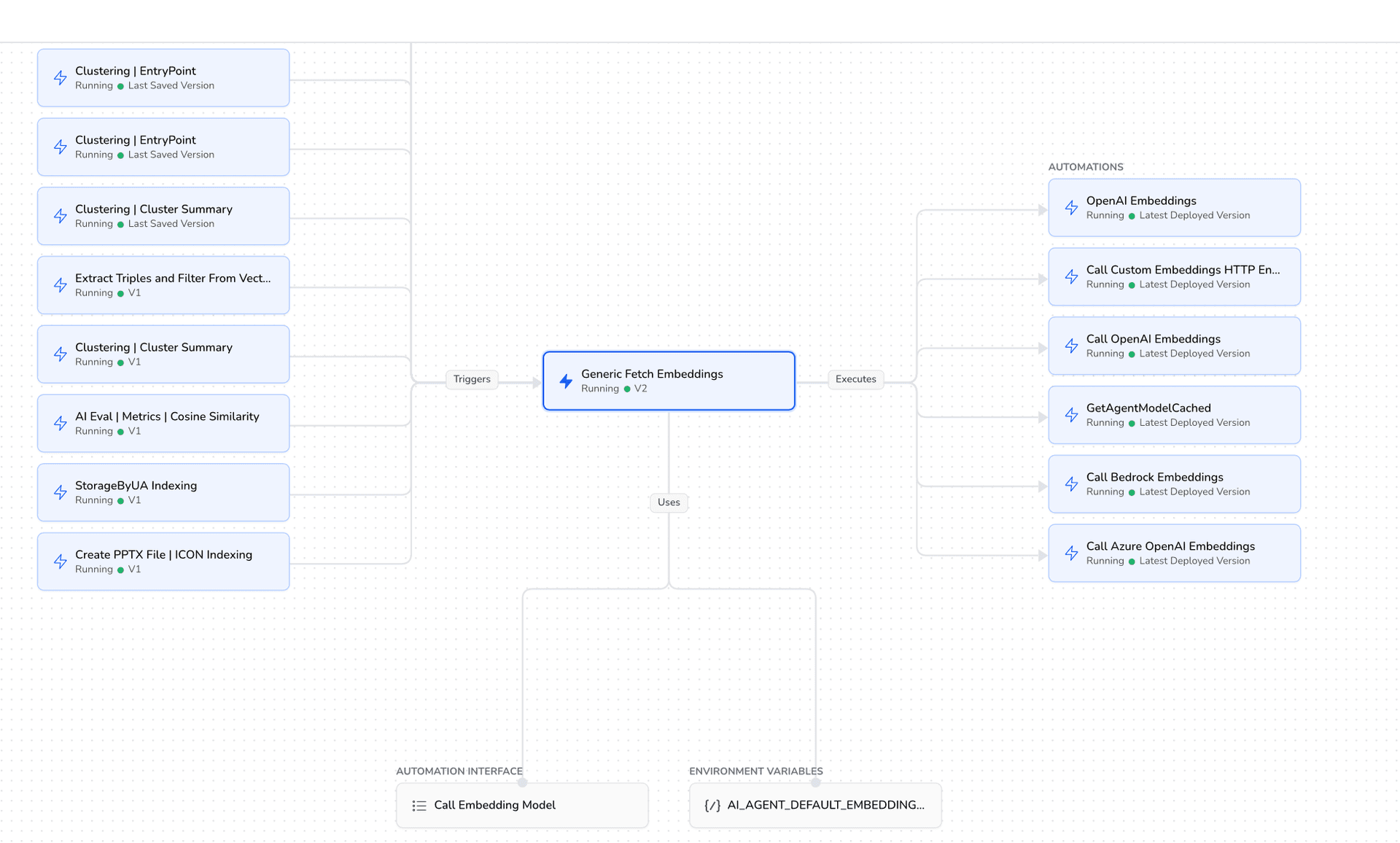
Nodes
Left side: different features and pipelines need embeddings
Centre: one shared, versioned abstraction that fetches embeddings
Right side: pluggable embedding providers (OpenAI, Azure OpenAI, Bedrock, custom HTTP, etc.)
Bottom: configuration + interface that decides which provider is actually used
2. Edges
A feature like clustering or indexing needs embeddings, so it calls Generic Fetch Embeddings (trigger) that:
Reads environment configuration
Resolves the embedding model via cache/interface
It executes the correct automation:
OpenAI / Azure / Bedrock / Custom
Embeddings are returned in a standard format.
The upstream workflow continues.
Why Dependency Graphs matter in automations?
1. Correct execution order
Automation often involves multiple steps:
Build → Test → Deploy
Data extraction → Transformation → Loading
A dependency graph ensures:
Tasks run only when prerequisites are complete
No step runs too early or out of sequence
2. Parallel execution
Tasks without dependencies can run at the same time.
Dependency graphs help automation tools:
Identify independent tasks
Execute them in parallel
Reduce total execution time
3. Failure handling
If a task fails:
The graph shows which downstream tasks must be skipped
Prevents cascading errors
Makes retries and rollbacks easier
4. Change impact analysis
When you modify a task:
The graph shows everything affected by that change
Helps avoid breaking the automation pipeline
Common use cases
CI/CD pipelines
Code compile → unit tests → integration tests → deployment
Tools use dependency graphs to decide execution order
2. Test automation
Environment setup → test execution → cleanup
Some tests depend on others or shared data
3. Data pipelines
Source availability → processing jobs → analytics/reporting