


AI Models lets you choose the models that power each stage of search: indexing your content, understanding queries, ranking results, and writing answers.
What is the AI Models section?
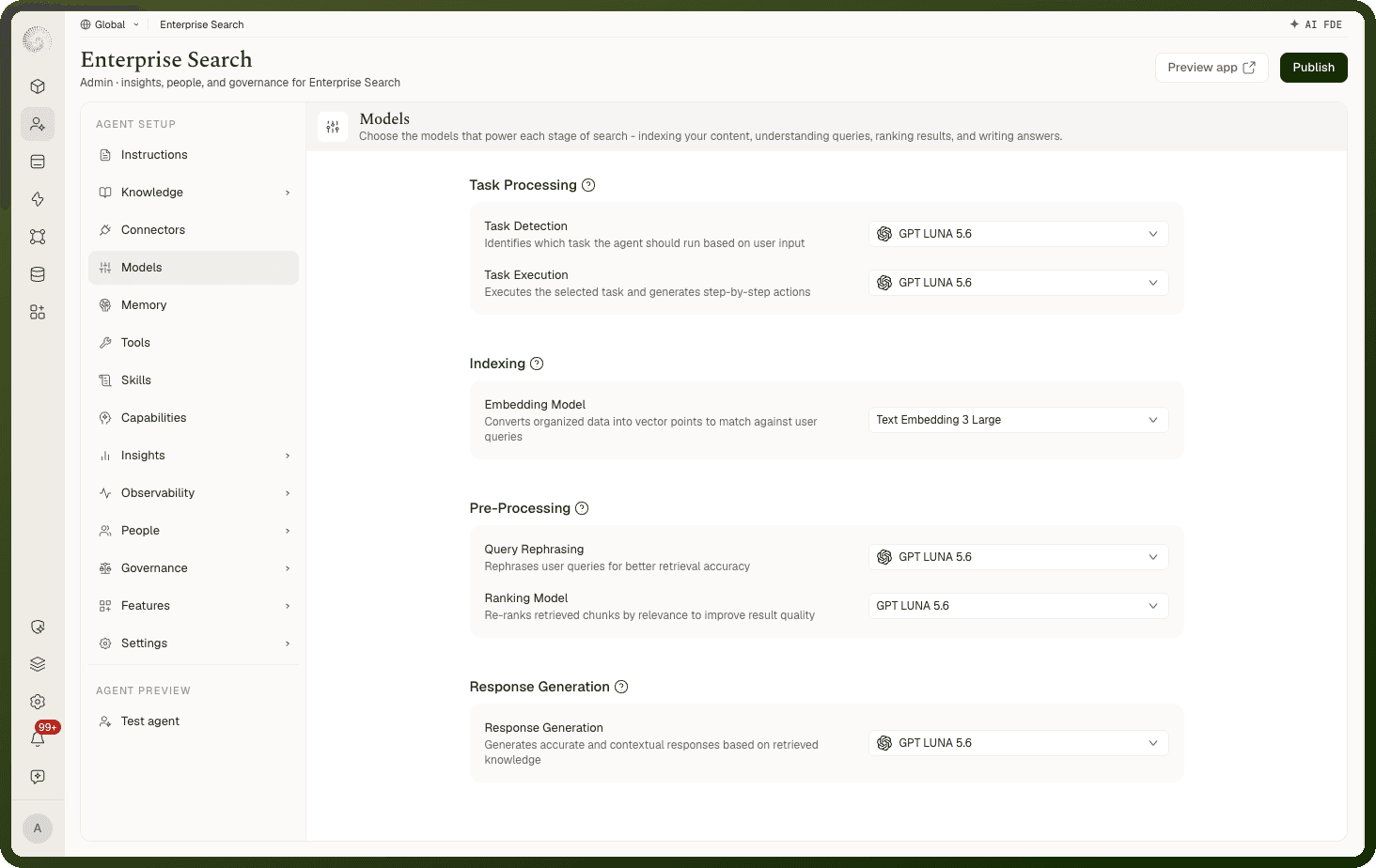
AI Models (labeled Models in the side-nav and on the screen) is a set of model pickers grouped by stage. There are no temperature, top-p, or token sliders here — those inference parameters belong to the model itself and are set in the Model Library when a model is registered. This screen is purely about which model does what. Changes save automatically — there's no Save button on this screen. Saved changes reach the live search experience only after you Publish; see Overview (Enterprise Search).
Which functions can I assign a model to?
Enterprise Search shows four model groups: Task Processing, Indexing, Pre-processing, and Response generation. The Guardrails model group from the full agent editor is not shown in Enterprise Search.
Group | Function | What it does |
|---|---|---|
Task Processing | Task Detection | Identifies which task the agent should run based on user input. |
Task Processing | Task Execution | Executes the selected task and generates step-by-step actions. |
Indexing | Embedding Model | Converts organized content into vector points to match against user queries. |
Pre-processing | Query Rephrasing | Rephrases user queries for better retrieval accuracy. |
Pre-processing | Ranking Model | Re-ranks retrieved chunks by relevance to improve result quality. |
Response generation | Response Generation | Generates accurate, contextual answers based on retrieved knowledge. |
Changing the Embedding Model triggers a full re-index of your content: models with different vector dimensions use separate indexes, so existing content is embedded again with the new model.
Each picker shows the model name and its provider icon. Use a stronger reasoning model where quality matters — task execution, response generation — and a lighter, faster model for simple checks like rephrasing and ranking, to balance cost and speed.
Where do the available models come from?
The model list in every picker is your workspace's catalog of registered models, managed in the Model Library. It reflects whatever models have been added and enabled there, filtered to the ones suited to each function — for example, only embedding models appear in the Embedding Model picker. Each function starts on the workspace default model, which is already filled in until you pick a different one. You can switch a model but not blank it out — every function must always have one assigned.
The Task Detection, Task Execution, Query Rephrasing, and Response Generation pickers have All, Routers, and Models tabs, so you can point those functions at a model router instead of a single model. A model router is a policy that picks between several underlying models for each request. The Embedding Model and Ranking Model pickers list single models only.