


API Policies are reusable governance and transformation rules applied to the requests and responses of your managed APIs — without changing the backing automation.
Overview
A policy is defined once and attached wherever it is needed — to an access profile, an API, or an API Group. The platform enforces it automatically on every matching call. Policies let you add rate limiting, authentication checks, validation, transformations, and access controls to any API without touching the automation that backs it. The same automation can be exposed with strict limits to a partner and looser ones internally just by attaching different policies.
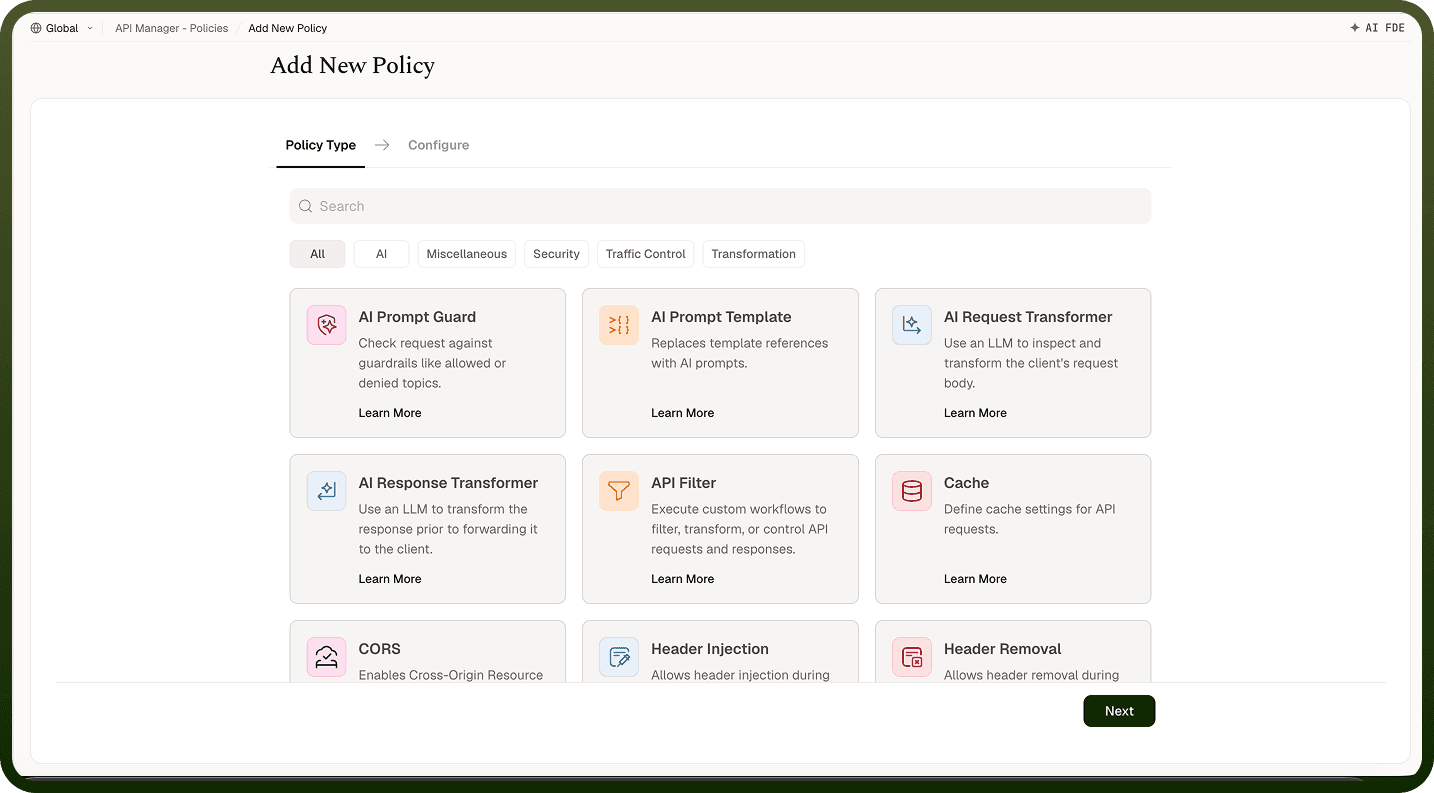
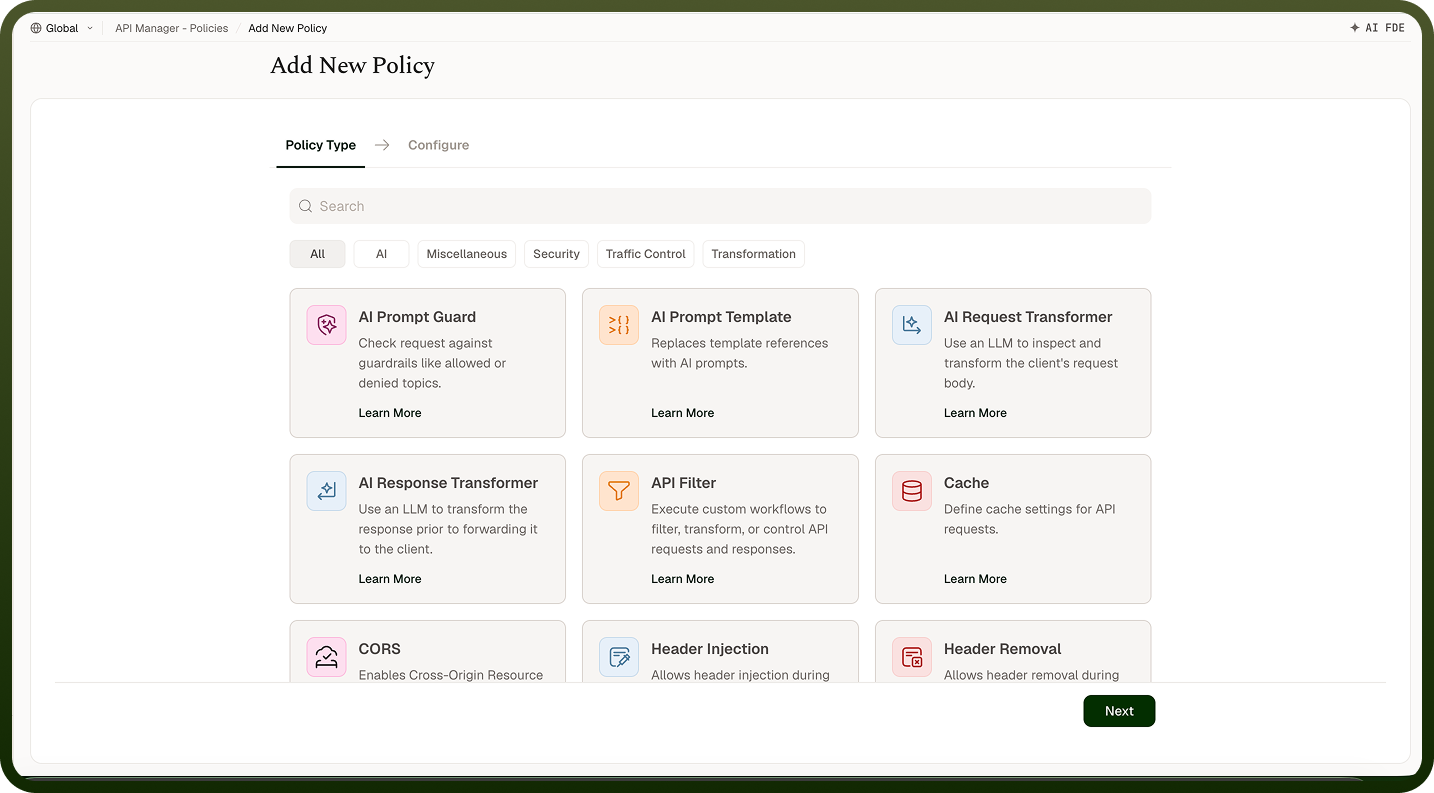
Policy Types
The available types cover the common API gateway needs. The types offered can vary by tenant.
Policy Type | What It Does |
|---|---|
Rate Limiting | Caps how many requests are allowed within a time window (see Rate Limiting & Quotas for detail). |
Usage Quota | Caps total requests over a longer period — a daily or monthly allowance. |
Request Validator | Checks the incoming request against the rules you set in the policy (allowed protocols and content types, parameter rules, and a JSON body schema) and rejects requests that don't conform before the backing resource runs. |
JWT Validation | Verifies a JWT present in the request — beyond or separate from the access profile's authentication method. |
CORS | Controls cross-origin browser access: allowed origins, methods, and headers. |
IP Based Access Control | Allows or blocks requests based on the caller's source IP address. |
Request Transformer | Modifies the incoming request — headers, body, or parameters — before the backing resource runs. |
Response Transformer | Modifies the outgoing response before it is returned to the caller. |
Timeout | Sets a custom request timeout for the APIs the policy covers. If no custom timeout is configured, calls are bounded by a default five-minute limit; confirm the maximum configurable value in the product UI before relying on it. |
Cache | Stores successful responses for a time-to-live, keyed by the cache keys you choose (see Cache Policy). |
API Filter | Runs one of your automations as part of the request pipeline to enforce bespoke rules or enrichments. |
Inbound vs Outbound Policies
Every policy has a direction:
Inbound — runs on the request, before the backing resource is invoked. Can reject the call or modify the request. Rate limiting, validation, CORS, JWT validation, IP control, and request transformers are inbound.
Outbound — runs on the response, after the resource produces it. Can modify what is returned. Response transformers are outbound.
This split is why a request can be blocked before your automation ever runs, and a successful result can still be reshaped on the way out.
Attaching Policies and Execution Order
Policies attach at three levels and run in this order on every request: access profile first, then API, then API Group. A single request can be subject to policies from all three levels simultaneously. If any inbound policy rejects the request, the chain stops — remaining policies do not run — and the caller receives that policy's status code (commonly 400 or 429). Any limit counted for the rejected request is rolled back so it does not reduce the caller's future allowance. Attach broad baseline rules at the API Group and tighten per API or per client as needed.
API Filter (Custom Automation) Policies
Beyond the built-in types, an API Filter policy runs one of your automations as part of the inbound request pipeline. The automation receives the request, evaluates your bespoke logic, and returns whether to proceed along with any changes to the request. This lets you enforce rules that the built-in types cannot cover — custom authorisation, dynamic routing decisions, enrichment from another system — using the same automation tools you already know. Response Transformer policies are the outbound equivalent: use them to modify the response after the backing resource runs. Use built-in types for standard API gateway concerns; use API Filter policies for business-specific governance.
Notes
Define policies once and reuse them — attach the same rate-limit policy to multiple access profiles rather than creating duplicates.
Apply a baseline rate limit at the API Group level and override per access profile for clients with different entitlements.
Without a CORS policy, the platform applies its default CORS headers. Attach a CORS policy when you need to restrict which origins, methods, and headers browsers may use.
Use request validator policies to enforce structural contracts at the gateway; use API Filter policies for business logic that depends on runtime data.
Test policies on a non-live API before applying them to a production API Group — a misconfigured policy can block all traffic.