


Indexing settings control how documents and other knowledge are broken down and stored so an agent can retrieve them accurately.
Overview
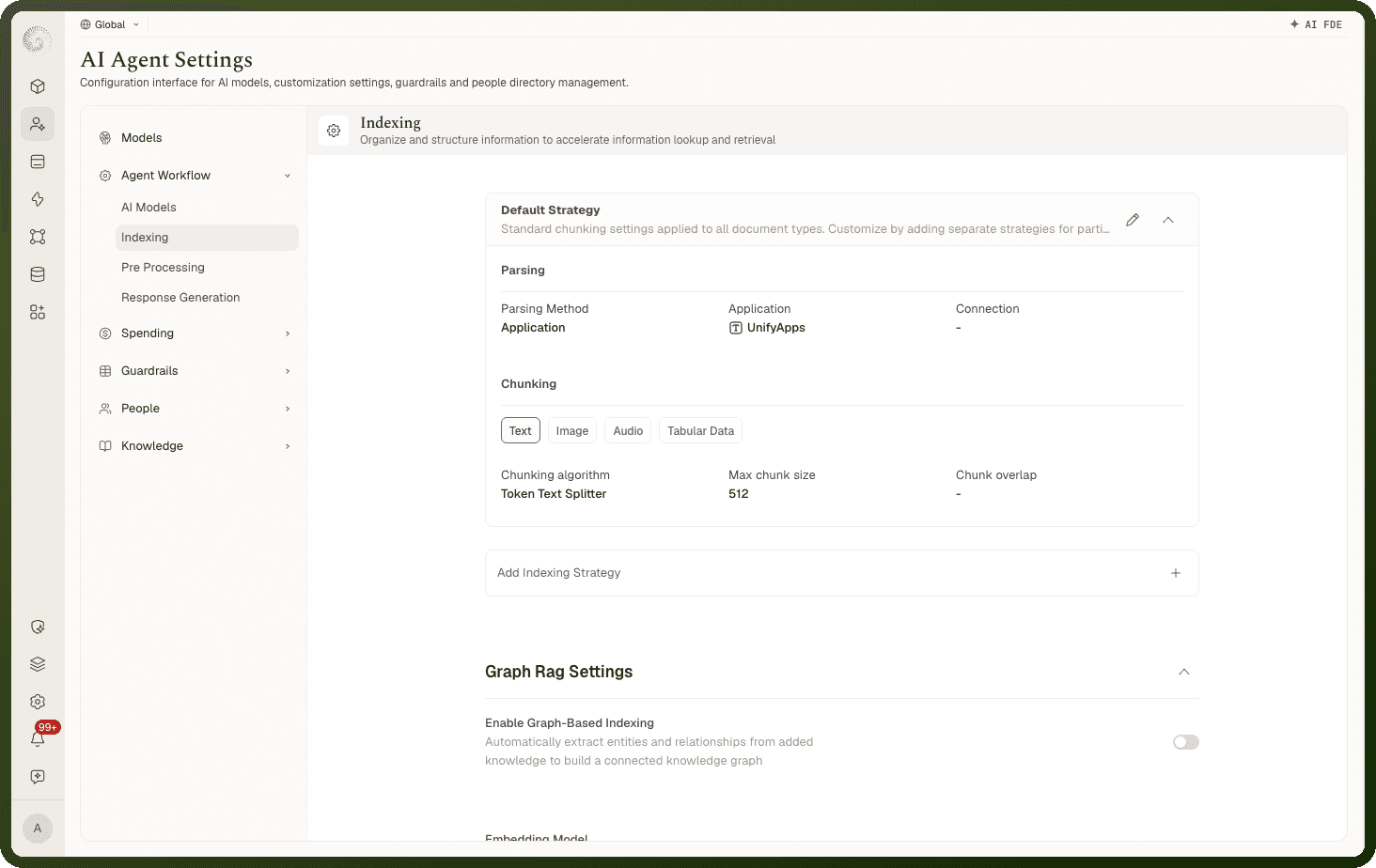
Indexing is described in-product as: "Organize and structure information to accelerate information lookup and retrieval." You set the storage and embedding model, a Default Strategy for parsing and chunking, optional per-format overrides, graph-based indexing, and chunk-level enrichment. These settings appear for agents, teams, and standalone knowledge sets. On a knowledge set, Storage (embedding model, retention) and Enrichment have their own side-nav items next to Indexing.
Note: Changing indexing settings re-indexes existing knowledge. On an agent, team, or workspace the section saves automatically. On a knowledge set or a single source, click Save, then Confirm & Save in the Confirm Changes prompt: "Changes made to indexing settings will result in re-indexing of all added knowledge."
Storage and Embedding Model
The Storage group holds the basics:
Field | Description |
|---|---|
Knowledge Store | The vector store for the indexed data. Open Search is the store, and the field is fixed. |
Embedding Model | "Converts organized data as vector points to match against user query." Defaults to your workspace's default embedding model; pick another from the catalog if needed. |
Retention Period | "Choose how long to keep your knowledge stored." |
How a Document Is Parsed
Under the Default Strategy, the Parsing step decides how raw files are read. Choose a Parsing Method:
Method | Description |
|---|---|
Application | "Utilise an external application" to parse the file (you pick the application and, if needed, a connection). |
Agentic | "Utilise Vision LLM for parsing" (you pick a parsing model). |
Automation | "Use custom workflow for parsing" (you pick an automation and version). |
Use Application for standard documents, Agentic for complex or visual layouts a vision model reads better, and Automation when you have a custom parsing pipeline.
At runtime the default application parser is the platform's built-in document reader (Docling); Unstructured and LlamaParse are among the alternative parsing applications. If a strategy's parser is missing or misconfigured, indexing falls back to the built-in reader rather than failing. Word documents and presentations are converted to PDF before parsing, and images extracted from documents can be described by a vision model and indexed alongside the text.
How Text Is Chunked
The Chunking step splits parsed text into retrievable pieces. Pick a Chunking algorithm — "Algorithm used to divide text into smaller and meaningful chunks": Recursive Character Text Splitter, Token Text Splitter (the default), Character Text Splitter, Language aware Text Splitter, Code Text Splitter, or Semantic Text Splitter.
Then set Max chunk size (default 512) and Chunk overlap ("Number of characters shared between adjacent chunks"). Some algorithms add options: the recursive splitter takes a Delimiter, the Semantic Text Splitter uses an embedding model plus a Threshold type (Standard Deviation, Inter Quartile, Gradient, or Percentile), and the Code Text Splitter takes a programming Language. You can also turn on Use Summarizing Model to "Create concise summaries of longer text chunks."
How Images, Audio, and Tables Are Handled
Each non-text content type has its own processing:
Image → Image to text (with a Text Extraction Model that "convert[s] text within images to text format").
Audio → Audio to text (with a Transcription Model that "converts spoken words in audio to written text").
Tabular data → Tables to Embedding ("Convert tabular data into vector representations", the default) or Tables to SQL ("Transform tabular data into SQL database structures for relational querying").
Which Settings Win When Source, Set, and Agent All Define Indexing?
Indexing settings can exist at several levels, and the most specific one wins. For parsing/chunking strategies: a per-source Mimetype override beats the agent's or knowledge set's per-format strategies, which beat the global (workspace) per-format strategies; if nothing matches the file's type, the Default Strategy applies, and absent any configuration the platform default is used (Token Text Splitter, max chunk size 512, built-in parser).
The embedding model resolves the same way — knowledge source, then knowledge set, then agent, then the workspace's default embedding model. Because embedding models with different vector dimensions use separate indexes in the knowledge store, changing the embedding model re-embeds everything — which is why changing indexing settings re-indexes your knowledge.
Per-Format Strategies, Graph-Based Indexing, and Enrichment
Three options extend the default strategy:
New Indexing Strategy — add a strategy that applies only to specific file types (a Mimetype override), so, say, PDFs and spreadsheets index differently.
Enable Graph-Based Indexing — "Automatically extract entities and relationships from added knowledge to build a connected knowledge graph," which supports relationship-aware retrieval.
Enrichment Strategies — add metadata to each chunk "to support accurate and context-driven retrieval." A strategy can compute values via Manual Value, LLM Powered generation, or an Automation.
Choosing Automation opens a three-step wizard so the automation and the enrichment schema line up:
Select Automation — "Select the callable automation to enrich the Knowledge." You can't move on until you've picked one.
Map Input Schema — "Map the Source Schema to the Automation input fields" — decide which parts of the chunk are handed to the automation.
Map Output Schema — "Map the Output Schema of the Automation to the Enrichment Schema" — decide which of the automation's returned fields become the chunk's enrichment fields.
Move forward with Next, step back with Back, and finish with Create (or Save when editing an existing strategy).
Enrichment runs during indexing, as each chunk is processed — the computed fields are stored on the chunk and can be used for metadata filtering at retrieval time and shown in citations. If PII masking is configured, sensitive values are redacted from chunks at this stage too, before anything is embedded or stored.
What If the Embedding Model's Connection Is Missing?
Indexing runs through the models you select — the embedding model, plus any parsing, transcription, or extraction models — and each model draws its credentials from a connection. If that connection has been deleted, deactivated, or replaced (for example an expired credential swapped for a new one), indexing can't reach the model and the source fails to index.
Fix it from the Model Library: the model shows a state like Connection Missing, Inactive Connection, or Connection Unavailable — use Switch Connection to point it at a working connection, then re-index.