


A setup trigger is the starting point of every automation — it defines what causes the automation to run, and the three available types are Webhook, Schedule, and Callable, each suited to a different initiation pattern.
Overview
Each trigger type starts an automation in a different way. Choose based on who or what needs to initiate the run: an external system pushing an event, a clock firing on a timetable, or another automation invoking shared logic.
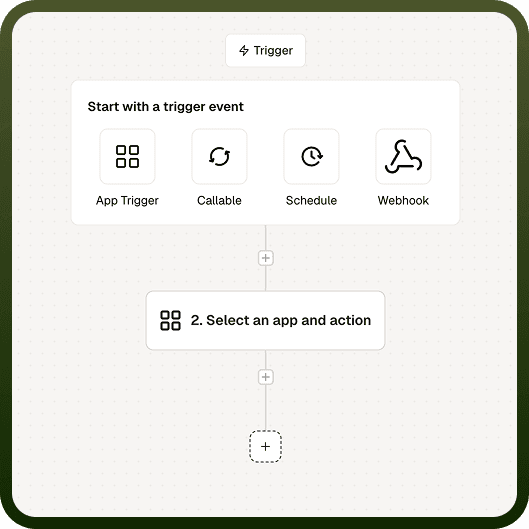
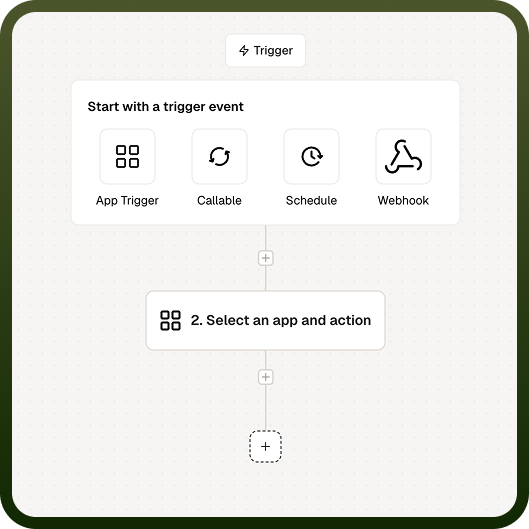
Trigger | What starts it | Key detail |
|---|---|---|
Webhook | An inbound HTTP request to the automation's unique URL | Request body, headers, and query parameters are available to downstream steps; send a response back with the Respond to Webhook node |
Schedule | A recurring timetable defined as an interval or cron expression | Timezone-aware; minimum interval is 15 seconds; runs can be set to sequential or concurrent |
Callable | Another automation (or an external API call) invoking it like a function | Can run synchronously (parent waits for result) or asynchronously (fire-and-forget); optionally runs in the calling user's context |
Webhook
The Webhook trigger gives your automation a unique URL that other systems can call. When an HTTP request hits that URL, the automation starts immediately, with the request's body, headers, and query parameters all available to the steps that follow. Use it to let an external app push events to you in real time — a form submission, a payment event, a message from another platform — instead of polling for changes.
You define the shape of the incoming data when configuring the trigger, so the rest of the automation can map fields from it cleanly. Incoming requests are validated against that data shape, so malformed payloads are caught before they reach your steps.
Responding to the caller
A webhook automation does not automatically return data to the caller. To send a response, add a Respond to Webhook node at the point in your automation where you want to reply. You control the status code and body the caller receives. Many webhook providers require a specific response to confirm delivery — if that applies to your integration, make sure a Respond to Webhook node runs on every execution path so the caller always gets an answer.
Schedule
The Schedule trigger runs an automation automatically on a recurring timetable — no incoming request or manual start needed. You define the recurrence in one of two ways:
Interval — "every N seconds / minutes / hours / days / weeks", for simple recurring jobs.
Cron expression — precise calendar timing such as "weekdays at 9:00", for jobs that need fine-grained control over when they fire.
The Schedule trigger is timezone-aware: you set the timezone the schedule should follow, and the platform fires it at the right local time, handling daylight-saving shifts automatically. Use it for digests, syncs, cleanups, reminders, and any job that should run on the clock.
Minimum interval
The shortest interval you can set is 15 seconds by default. If you enter an interval below this minimum, the schedule is rejected with a validation error — you cannot accidentally create a job that fires faster than allowed. Platform administrators can configure a longer minimum floor, so your environment may enforce a stricter limit than 15 seconds.
Overlapping runs
If a scheduled run has not finished by the time the next one is due, you control whether the next run starts immediately or waits for the previous one to complete:
Sequential — the next run does not start until the previous one finishes. Use this when runs touch the same data and must not collide.
Concurrent — runs can overlap. Use this when runs are independent and fast and you prioritize throughput over ordering.
Callable
A Callable is a reusable automation that other automations — or an external API — can invoke like a function. You define its inputs and outputs once, then call it from many places instead of copying the same steps everywhere. Use callables to factor out shared logic (such as "create a customer", "score a lead", or "send the standard onboarding sequence") so it lives in one place and every caller stays in sync.
Synchronous vs asynchronous
When you call a Callable, you choose how the parent automation should behave while it runs:
Synchronous — the parent waits for the callable to finish and receives its outputs before moving on. If the callable fails, that error propagates to the parent so the parent can handle it. Use sync when you need the result, or need to know it succeeded, before continuing.
Asynchronous — the parent fires the callable and moves on immediately, receiving only a simple acknowledgement (a success flag), not the callable's real outputs. The child runs independently, and its errors stay isolated — a failure in the async child does not fail the parent. Use async for fire-and-forget work such as notifications or background processing where the parent should not wait or be affected.
User context
A Callable can run in the calling user's context when configured to do so, meaning its actions are performed and permission-checked as that user rather than as a generic service identity. This matters when the callable reads or writes data that is access-controlled per user — running in user context keeps those permission checks correct. If you want consistent, centralized behavior regardless of who triggered the call, run the callable without that option so it behaves the same for every caller.
Choosing a Trigger
Use the table below as a starting point when deciding which trigger fits your use case.
Scenario | Recommended trigger |
|---|---|
An external service needs to push events to you in real time (form submissions, payment events, platform messages) | Webhook |
You need to run a recurring job on a fixed clock — digests, syncs, cleanups, reminders | Schedule |
You want to reuse shared logic across multiple automations without duplicating steps | Callable |
You need to launch a background task from a parent automation and keep the parent moving | Callable (async) |
You need the result of a sub-task before the parent automation can continue | Callable (sync) |
Notes
Keep the following in mind when configuring setup triggers.
A Webhook automation does not return data automatically — you must add a Respond to Webhook node on every execution path to guarantee the caller always receives a reply, especially when the caller validates delivery via the response.
Webhook payloads are validated against the data shape you define at configuration time; malformed requests are rejected before they reach your automation steps.
The minimum Schedule interval is 15 seconds by default; entering a shorter value produces a validation error. Platform administrators can raise this floor.
For scheduled automations where runs operate on shared data, use sequential execution to prevent overlap; use concurrent execution only when runs are genuinely independent.
An async Callable returns only an acknowledgement (a success flag) to the parent — not the callable's real outputs. Use synchronous mode when the parent needs the actual result before continuing.
Running a Callable in the calling user's context preserves per-user permission checks on access-controlled data; omit that option when you want uniform, centralized behavior for all callers.
When combining trigger types across a workflow — for example, a Webhook-triggered parent that calls a Callable — test each trigger's behavior end-to-end to confirm data flows correctly across the boundary between automations.