


Unify Automations › Building Automations › Application › Change Set Events
Change Set Events
3 mins read
Change Set Events triggers start an automation when a change set moves through its lifecycle — submitted for review, approved, rejected, or deployed to an environment. Use them to automate governance workflows: notify reviewers when a submission arrives, alert stakeholders when a change is approved or rejected, and trigger post-deploy tasks the moment a deployment lands.
Overview
Change Set Events are real-time, webhook-style subscriptions. Each event fires the instant the change set transitions to the corresponding state — no polling. Each automation gets its own subscription and can apply a filter condition to react only to change sets that match specific criteria.
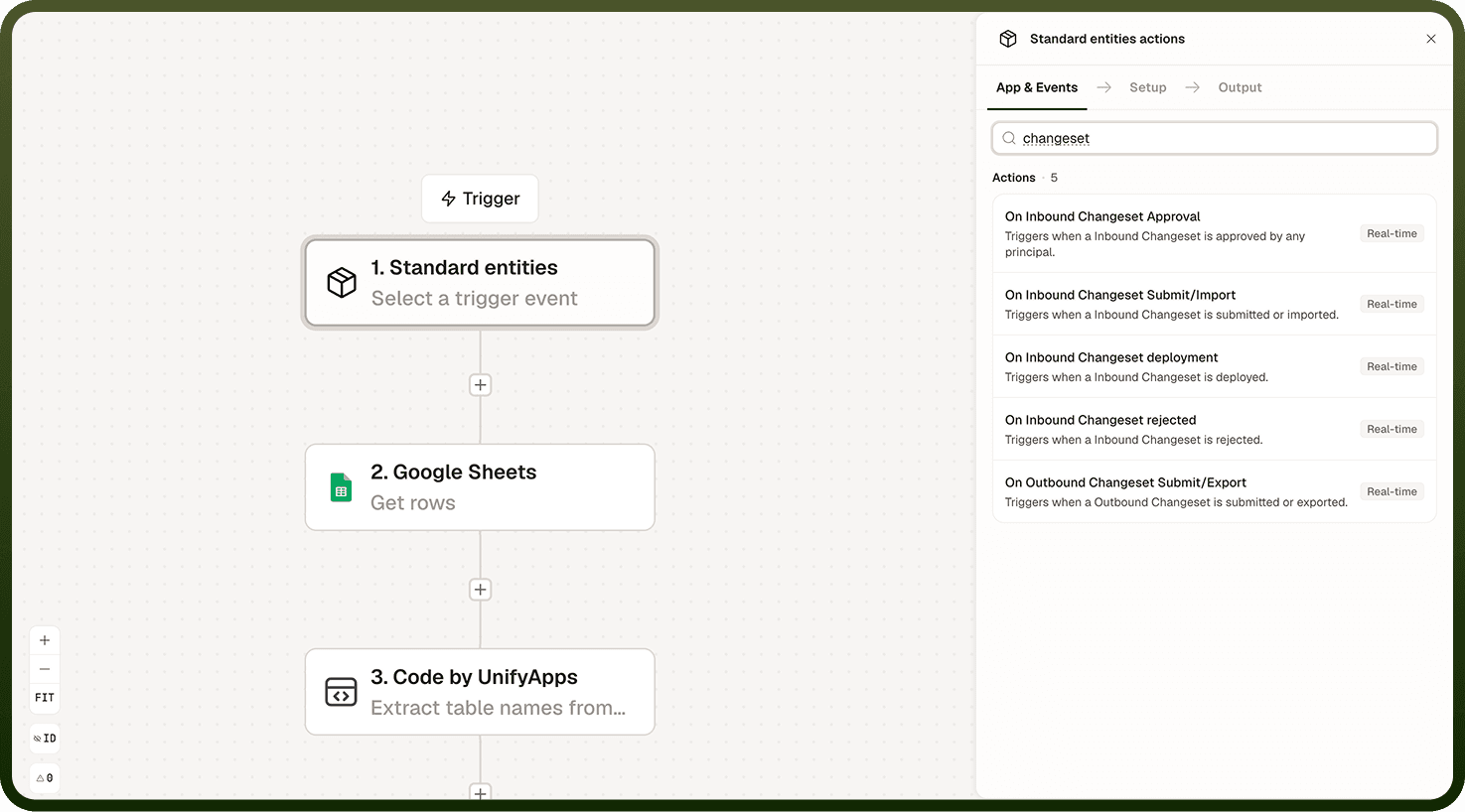
Available Events
Four change set lifecycle events are available as triggers:
Change set submitted — fires when a change set is submitted for review. Use it to notify assigned reviewers, create a review task in a project tracker, or log the submission for audit purposes.
Change set approved — fires when a reviewer approves the change set. Use it to notify the submitter, trigger pre-deployment checks, or automatically queue the change set for deployment.
Change set rejected — fires when a reviewer rejects the change set. Use it to notify the submitter with feedback, reopen associated work items, or log the rejection for compliance records.
Change set deployed — fires when the change set is deployed to an environment. Use it to trigger post-deploy tasks such as smoke tests, cache invalidation, or stakeholder notifications.
Delivery and Filtering
Change Set Events fire in real time at each lifecycle transition. The payload carries the change set's details — name, contents summary, submitter, reviewer, target environment, and status — available as data fields in the automation's context.
Most Change Set Event triggers accept a filter condition. Use filters to scope the automation to specific change sets — for example, only react to change sets targeting a production environment, or only to those submitted by a specific team.
Common Use Cases
Review notification — when a change set is submitted, send a notification to the assigned reviewers with a link to the review queue.
Approval gate — when a change set is approved, automatically trigger a pre-deployment validation pipeline before queueing the deployment.
Rejection feedback loop — when a change set is rejected, send the submitter a notification that includes the reviewer's comments and re-opens the related work item.
Post-deploy automation — when a change set is deployed, run smoke tests, invalidate relevant caches, and notify stakeholders that the deployment succeeded.
Notes
Keep the following in mind when working with Change Set Events triggers.
All Change Set Events are delivered in real time — there is no polling delay between the lifecycle transition and the automation starting.
Apply a filter condition when your automation should only react to specific change sets, such as those targeting a particular environment or from a specific team.
The change set deployed event fires when deployment is initiated, not when it completes. If your post-deploy tasks depend on the deployment being fully applied, add a check or wait step before taking action.
The change set rejected event fires regardless of the reason for rejection. Read the payload to retrieve reviewer comments if your automation should surface them to the submitter.
Each automation gets its own event subscription. Multiple automations can independently react to the same change set lifecycle event.
Test each lifecycle stage end-to-end in a non-production environment before wiring change set events to actions that touch production systems or send external notifications.