


The Excel node's security operations let you apply password protection to workbooks before storing or distributing them, and remove that protection when a file needs to be read or modified further in an automation. Use these operations to meet data-handling requirements for sensitive spreadsheets passed between systems.
Overview
Encrypt Excel file applies workbook-level password protection to an Excel file. The returned file cannot be opened without the correct password. Decrypt Excel file removes that password protection using the current password, returning a standard unprotected Excel file object that subsequent nodes can read or modify without restriction. Both operations work on XLSX, XLSM, and XLS files.


Operations
Operation | Description | Key inputs |
|---|---|---|
Encrypt Excel file | Applies password protection at the workbook level. The encrypted file is returned as a file object; the password must be supplied to open it in Excel or to decrypt it in a subsequent automation step. | File, File Type, Password |
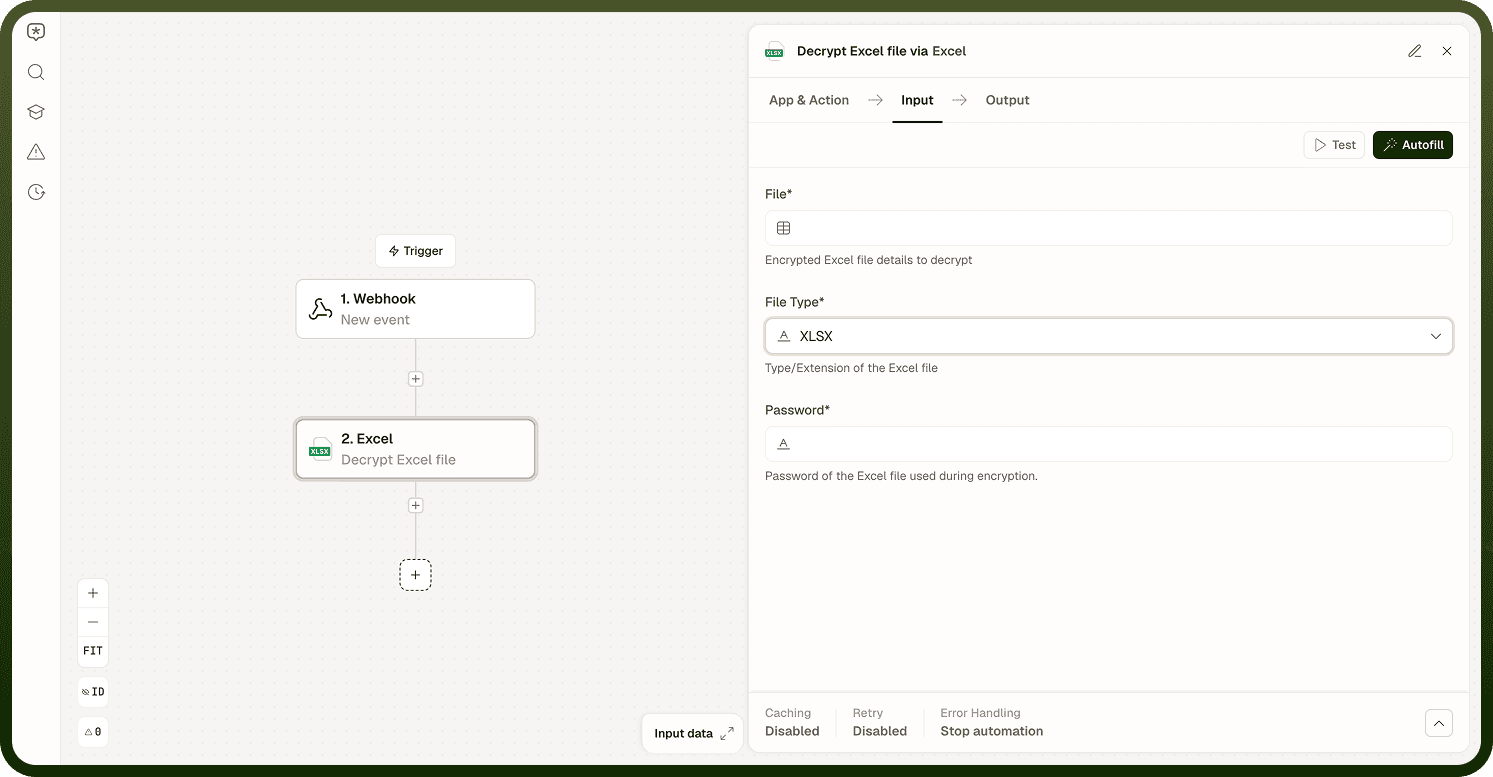
Decrypt Excel file | Removes workbook-level password protection from an encrypted Excel file. The correct password must be provided. On success, the operation returns a standard, unprotected Excel file object. | File, File Type, Password |
Input
Field | Type | Required | Description |
|---|---|---|---|
File | File reference | Yes | The Excel workbook to encrypt or decrypt. Supports XLSX, XLSM, and XLS formats. For Decrypt, the file must already be password-protected at the workbook level. |
File Type | Enum | Yes | Type/extension of the Excel file being encrypted or decrypted: XLSX, XLSM, or XLS. Defaults to XLSX. |
Password | String (sensitive) | Yes | The password to apply (Encrypt) or the existing password to remove (Decrypt). Use a credential or secret reference rather than a hardcoded string to avoid exposing the password in the automation definition. |
Output
Encrypt Excel file — returns the password-protected workbook as a file object. Pass this to a storage or send operation. The file cannot be read by other Excel node operations until it is decrypted.
Decrypt Excel file — returns the unprotected workbook as a standard Excel file object. This can be passed directly to any other Excel operation — read, write, convert, and so on.
Notes
Encryption is applied at the workbook level. Individual sheet-level protections (which restrict editing but not opening) are separate from workbook-level encryption and are not managed by these operations.
An incorrect password supplied to the Decrypt operation will cause the operation to fail with an error. Ensure the password value is correct and sourced from a reliable credential store.
A successfully decrypted file is returned as a plain Excel file object with no password protection. Treat it accordingly — if the file needs to remain protected after processing, re-encrypt it before storing or sending.
Store passwords using the platform's secrets or credentials management, not as literal values in the automation definition. This prevents the password from being visible in automation logs or exports.
Supported file formats: XLSX, XLSM, XLS — set via the File Type field.