


The Webhook Trigger gives an automation a unique HTTP endpoint. When an external system calls that URL, the automation starts immediately — with the request body, headers, and query parameters all available to downstream steps. Use it to react to events pushed from outside: form submissions, payment notifications, messages from other platforms — without polling for changes.
Overview
The Webhook Trigger turns an automation into an HTTP listener. You define the expected data shape, and the parsed payload is passed into the automation's data context. The calling system drives timing — your automation reacts the moment the request arrives.
Webhook Trigger node configuration
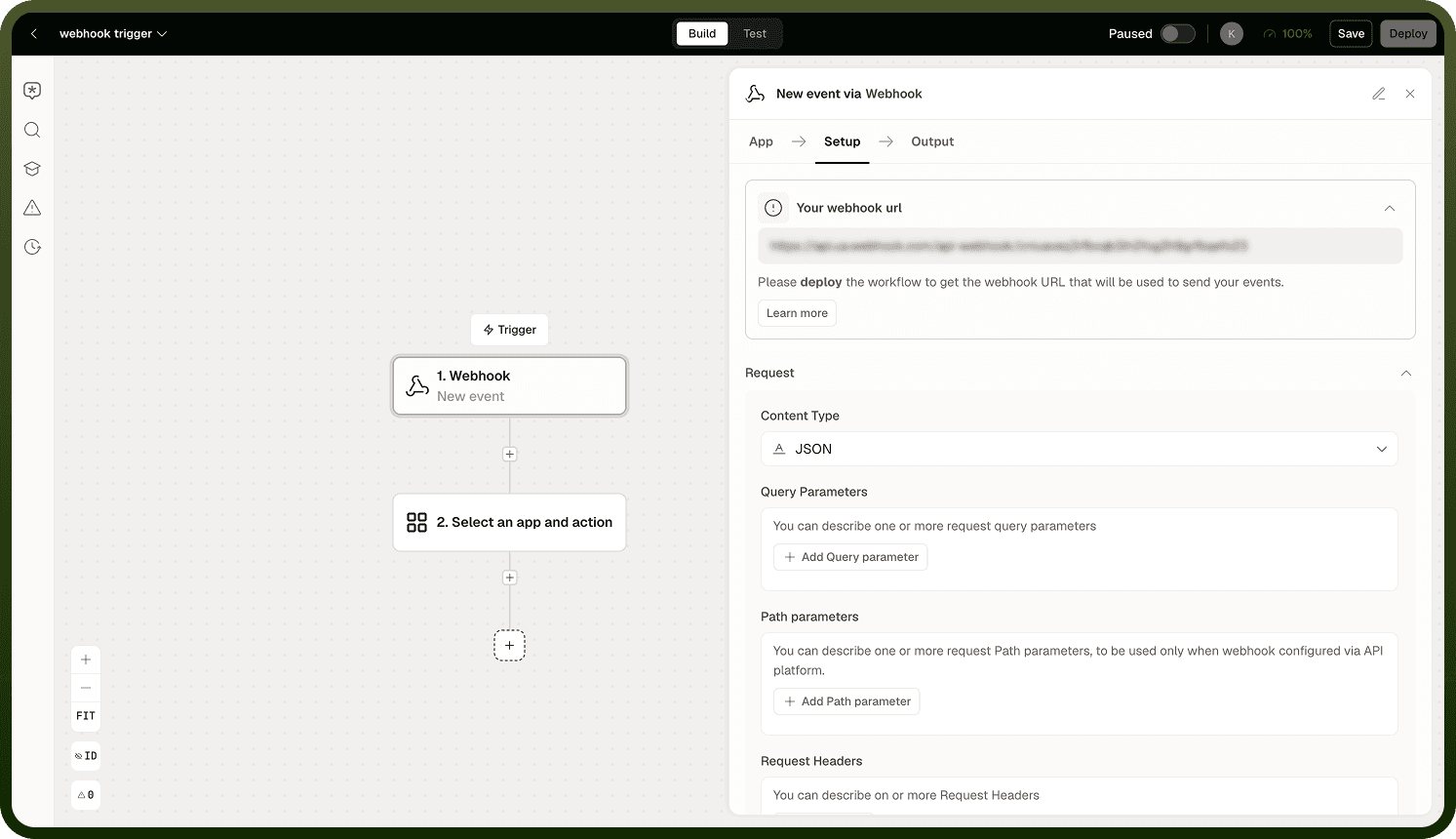
The webhook URL
Each automation with a Webhook Trigger receives a unique URL generated by the platform. Share that URL with the external system that will call it. Any HTTP request to the URL starts a new automation run.
The request body, headers, and query parameters of each incoming request are all captured and made available as named data fields within the automation, so downstream steps can reference them directly.
Request data
The Webhook Trigger surfaces three data sources from each incoming request:
Request body — the payload sent by the caller, typically JSON. You define the shape of the incoming data so the automation can map fields from it cleanly.
Headers — HTTP headers sent with the request, available for reading authentication tokens, content-type hints, or caller-specific metadata.
Query parameters — key-value pairs appended to the URL (for example, ?source=crm&event=lead), useful when callers encode lightweight context in the URL rather than the body.
Defining the data shape up front lets downstream steps map fields without guesswork.
Responding to the caller
A Webhook automation cannot send a workflow-defined response back to its HTTP caller. Do not add a Respond to API request node to a Webhook flow. If the sender needs the result later, write it to Storage or another system and return an identifier through a separate lookup process. If the sender needs the result in the same HTTP response, use Callable with Trigger via API and add Respond to API request on each response path.
Data shape validation
You define the shape of the incoming data so the automation can map fields from it cleanly.
Security considerations
The webhook URL is publicly accessible — it is designed to be called by external systems outside of UnifyApps. Anyone with the URL can send a request to it and invoke the automation. Two built-in measures help you control what gets through:
Data shape validation — you define the shape of the incoming data so the automation can map fields from it cleanly.
Authentication via headers — headers from the incoming request are available to the steps that follow.
Treat the webhook URL like a secret. Share it only with the systems that need to call it.
Notes
Keep the following in mind when configuring a Webhook Trigger.
The webhook URL is unique per automation. Do not share one URL across multiple automations — each should have its own endpoint.
Define the expected data shape in the trigger configuration so downstream steps can reference body fields by name.
A raw Webhook cannot send a response at all. If the caller needs a result in the same HTTP call, use Callable with Trigger via API and add a Respond to API request node on each response path instead.
All three data sources — body, headers, and query parameters — are available in the automation's data context. Use headers for auth tokens and query parameters for lightweight caller context.
If the external system requires a response in the same HTTP call, use Callable with Trigger via API instead of a raw Webhook, and add a Respond to API request node on each response path.