

The PDF node's Read Text operation extracts the embedded text layer of a PDF document. It does not perform optical character recognition (OCR) — scanned or image-only PDFs have no text layer and will return empty or partial output.
Overview
Read Text from PDF retrieves the text stored directly in a PDF file's content streams. Digital PDFs — those exported from a word processor, a browser, or a PDF-generation tool — carry a text layer that this operation reads accurately. Scanned documents and photos saved as PDFs are images: they contain no text layer, so the operation returns nothing useful. If your source PDFs may be scanned, add a separate OCR step before passing the file to this node. Read Text is a loop action — it runs once per page of the source PDF, using a zero-based page index. This is different from Extract / Remove Pages, which uses 1-based page numbers.
Note: Read Text is a loop. You must add at least one step inside the loop body before the automation can be deployed — it cannot be saved with an empty loop.
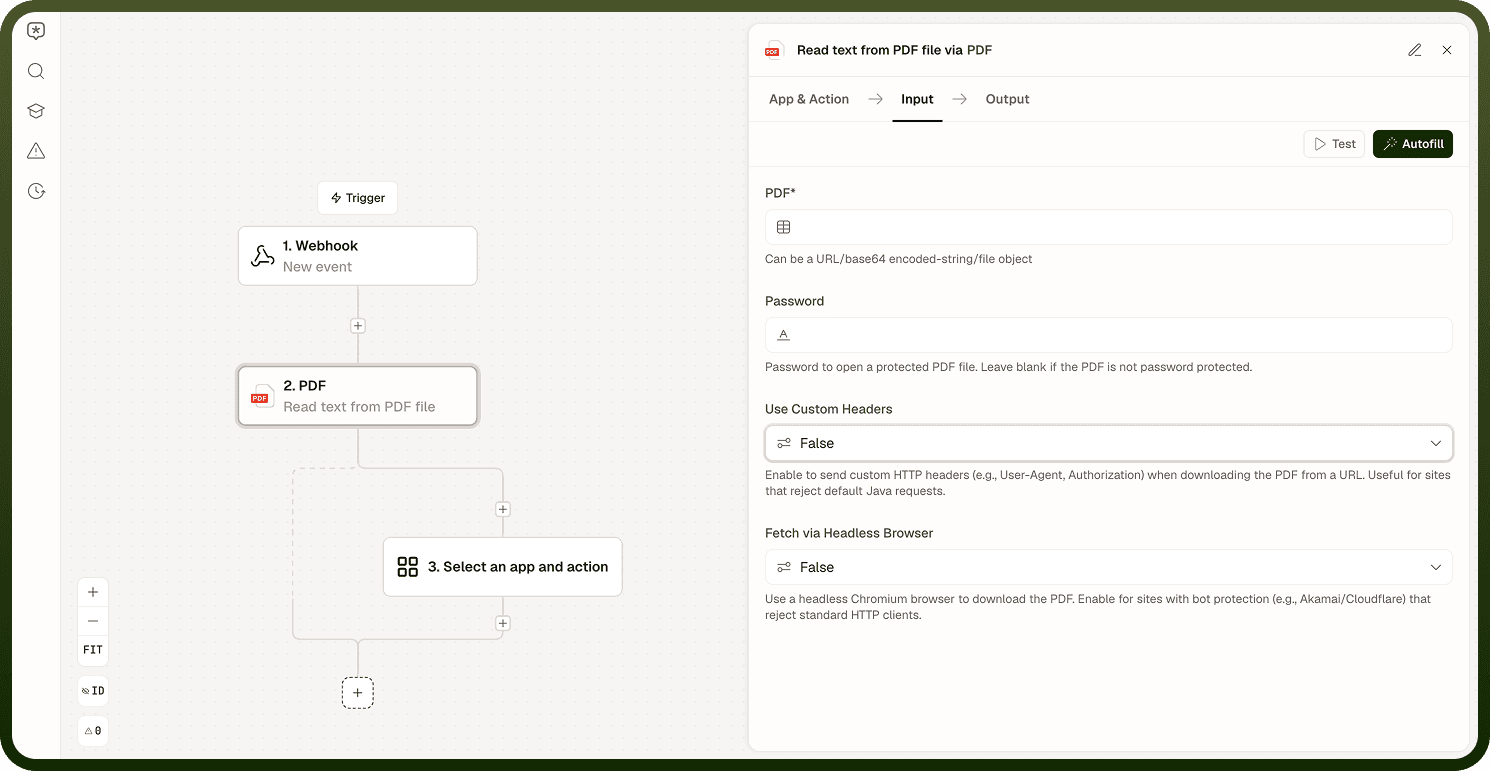
Input
Parameter | Required | Description |
|---|---|---|
file | Yes | The PDF file to extract text from. Must contain an embedded text layer; image-only PDFs return empty or partial results. |
password | No | Password to open a password-protected PDF file. Leave blank if the PDF is not password protected. |
useCustomHeaders | No | Enable to send custom HTTP headers (for example, User-Agent or Authorization) when downloading the PDF from a URL. Useful for sites that reject default requests. |
customHeaders | No | Key-value pairs of HTTP headers to send when fetching the PDF URL. Shown only when useCustomHeaders is enabled. |
usePlaywright | No | Use a headless Chromium browser to download the PDF. Enable for sites with bot protection (for example, Akamai or Cloudflare) that reject standard HTTP clients. |
Output
Read Text is a loop action — each iteration produces the following outputs for the current page:
Field | Description |
|---|---|
item | The text extracted from the current page. |
index | The zero-based index of the current page (0 for the first page, 1 for the second, and so on). |
isFirst | true when the current iteration is on the first page. |
isLast | true when the current iteration is on the last page. |
The result reflects the text layer as stored in the file — formatting, paragraph breaks, and layout fidelity depend on how the PDF was originally produced. Pass the extracted string to downstream steps for processing, storage, or analysis.
Scanned PDFs
If Read Text returns empty or partial text, the file is likely an image-only PDF with no text layer. To confirm: open the PDF in a viewer and try to select text with your cursor. If you cannot select any text, the document is image-only.
Fix: Add a separate OCR or text-recognition step upstream to convert the scanned page image into a text layer before passing the file to the Read Text operation. The PDF node's Read Text cannot process images on its own.
Read Text is not OCR. It reads what the PDF already contains as text. A scanned page has no text — only pixels — so there is nothing for the node to read.
Notes
Keep the following in mind when using Read Text from PDF.
The operation extracts the embedded text layer — it does not perform OCR.
Scanned PDFs and photos saved as PDFs have no text layer; this operation returns empty or partial text for them.
To confirm whether a PDF has selectable text: open it in a viewer and try to select text. If you cannot, the file is image-only and requires a prior OCR step.
Read Text is a loop — it runs once per page, and the automation requires at least one step inside the loop body before it can be deployed.
The index output is zero-based (page 1 of the document is index 0). This differs from Extract / Remove Pages, which uses 1-based page numbers.
Text fidelity depends on how the PDF was originally produced — complex layouts or embedded fonts may affect the extracted output.
Validate the extracted text on a representative sample of your actual input files before relying on it in production, especially when PDFs come from varied sources.