


Hooks in UnifyApps enable triggering child automations directly from existing nodes without requiring a separate node for this purpose.
Overview
Hooks in UnifyApps enable triggering child automations directly from existing nodes without requiring a separate node for this purpose. This feature simplifies workflow design by reducing redundancy while enhancing automation flexibility. Hooks can trigger any automation with a Callable via automation trigger type. Hooks are configured at the step level: open the step, expand the settings bar at the bottom of the Input tab (it shows Caching, Retry and Error Handling), and turn on Hooks.
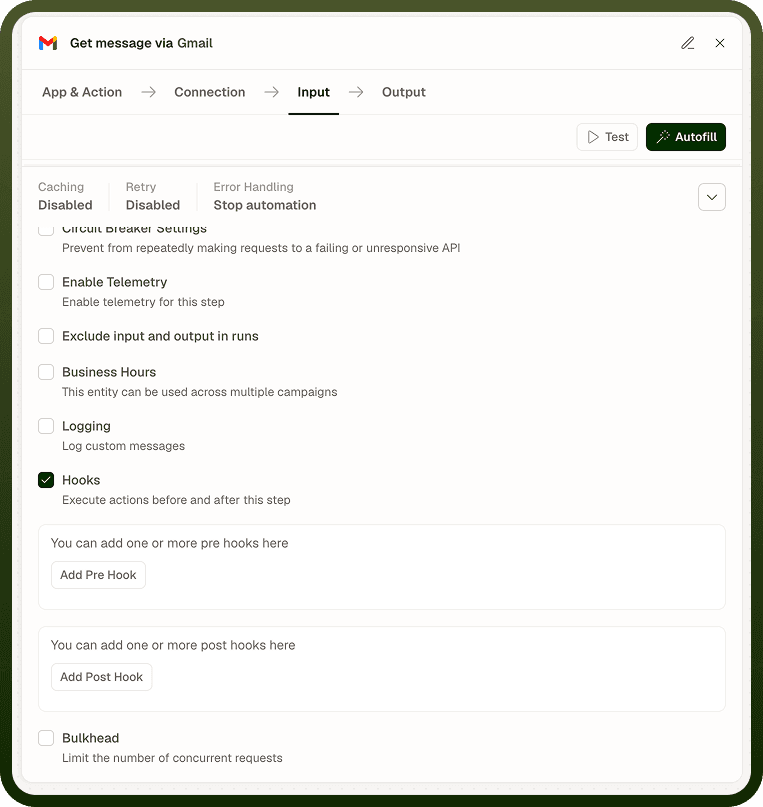
Understanding Hooks in Nodes
The platform supports two hook types at specific execution stages:
Pre-Hook — Triggers the specified automation before the node's execution begins.
Post-Hook — Triggers the specified automation after the node's execution completes.
Both hooks operate synchronously, meaning subsequent workflow events proceed only after the referenced automation finishes execution.
Failure Handling
Referenced automations triggered by hooks can be configured to allow node execution regardless of automation failure. This behavior is controlled via a checkbox in the hook configuration modal for both pre-hooks and post-hooks.
Setup Process
Open the step, expand the settings bar at the bottom of the Input tab, and turn on Hooks.
Click Add Pre Hook or Add Post Hook.
Select the target automation from the dropdown.
Input fields from the selected automation appear below for data mapping. Post-hooks can also map the current step's output.
Use the Continue on Failure checkbox to decide whether the step continues if the referenced automation fails.
You can add one or more hooks per stage. They run one after another, in order.
This approach ensures robust workflow execution with seamless automation integration.
Notes
Keep the following in mind when using Hooks:
Continue on Failure is on by default for both pre- and post-hooks. Clear it if a failed hook should stop the step.
Pre-hooks run synchronously before the node executes; if the pre-hook automation fails and Continue on Failure is not enabled, the parent node will not run.
Post-hooks run only after the step succeeds; they don't run if the step fails or is waiting. Use post-hooks for notification or audit actions on success, and use the step's error handling to notify on failures.
The referenced automation must have a Callable via automation trigger and must be deployed before the hook can invoke it.
Test hooks in isolation by triggering the parent automation with controlled input before integrating hooks into a complex multi-step flow.