


Signals by UnifyApps coordinate work across two or more automations — a child automation emits a signal when its portion is complete, and the parent's Wait Signal action resumes only after all expected signals have arrived.
Overview
Signal actions are capabilities within UnifyApps designed to manage intricate asynchronous operations, particularly when handling parallel processing and parent-child automation relationships.
Signals by UnifyApps has six actions. The Emit signal action is used in child automations; the wait actions are used in parent automations. Together they let a parent automation launch many child automations in parallel and then wait until all of them report back before proceeding.
Action | What it does | When to use it |
|---|---|---|
Emit signal | Emits a signal to all the nodes listening for a signal. | In a child automation, to report back to the parent's wait node. |
Wait for signal | Waits for a signal to be sent. | When the parent waits for one signal. |
Wait for signals | Waits for a defined set of signals to be emitted. | When the parent waits for several signals, for example one per child automation. |
Long wait for signal | Waits for a signal for a long duration (days or weeks). The waiting state is stored durably, so it does not consume memory while waiting. | When a single signal may take days or weeks to arrive. |
Long wait for signals | Waits for specified signals over days or weeks. Resumes when all signals arrive or a timeout occurs. | When several signals may take days or weeks to arrive. |
Wait for signals In Loop | Listens for signals until a stop signal is received or a timeout occurs. | When the parent should keep receiving signals until a child marks the work Completed. |
The sections below cover Wait for signals and Emit signal, the pair used for parallel fan-out.
Wait for Signals action
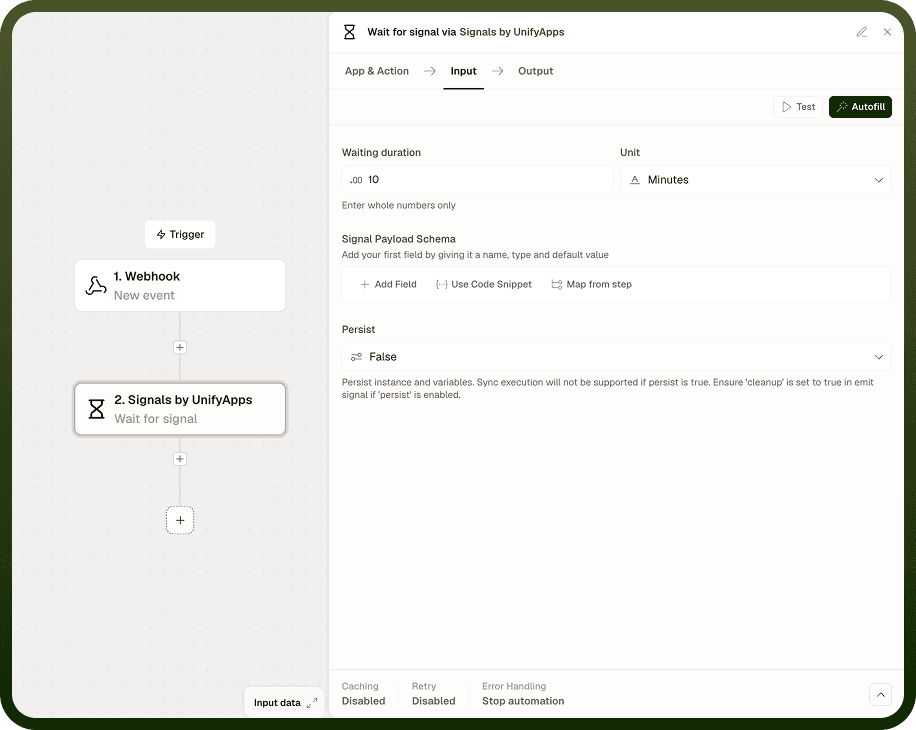
A control node in a parent automation that pauses execution until it receives all specified signals from child automations. Think of it as a collection point that waits to hear back from all child processes before moving forward.
Signal IDs
A list specifying which signals the Wait Signal action should wait for. For example, if processing multiple orders:
Create an empty list called signalList before the loop.
Inside the loop, add identifiers (such as the loop index) to signalList.
Map this signalList to the Wait Signal action's Signal IDs field.
The node knows exactly which signals to wait for and tracks which child automations have responded before proceeding.
Signal Payload Schema
Defines the structure of the response you expect from child automations — for example, a status field and an error field. You can define the schema by adding fields manually, using a code snippet, or mapping from a previous step.
Waiting duration
How long to wait, as a whole number, with a unit (Seconds, Minutes, Hours, Days or Weeks; the default unit is Minutes). If not all signals arrive within this time, the action resumes and its Signal time out output is true.
Persist
Turn this on to persist the waiting instance and its variables. If you turn it on, also turn on Cleanup in the Emit signal action.
Output: Signal time out (true when the wait ended before all signals arrived) and the list of signals received.
Emit Signal action
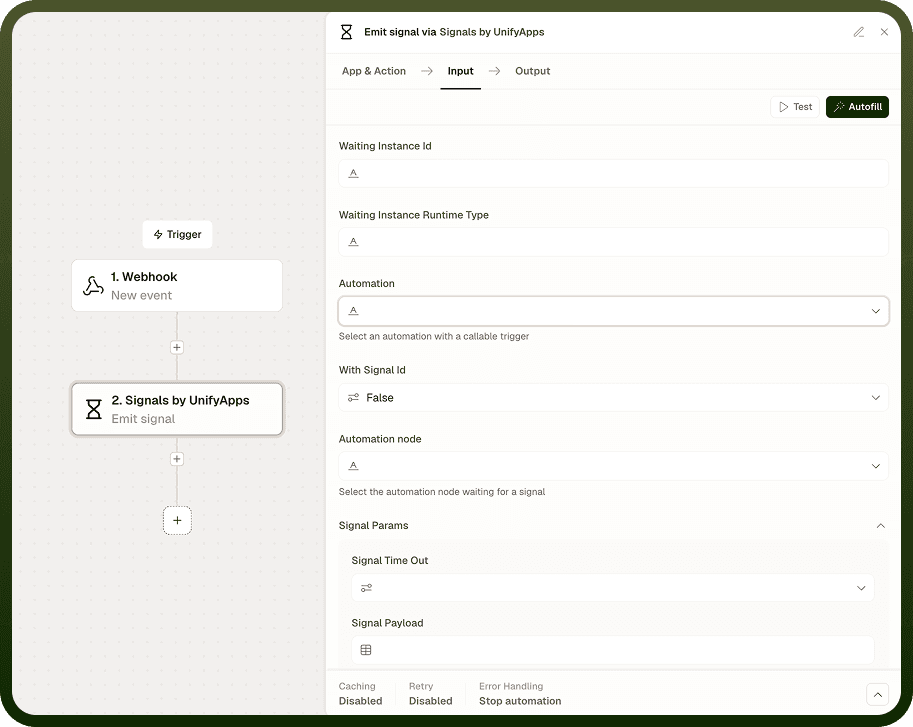
Used in child automations to send processing results back to the parent automation's Wait Signal action. When a child automation completes its processing, the Emit Signal action sends both the signal (matched against the parent's Signal IDs list) and the processing results (matching the parent's defined payload schema).
Waiting Instance ID and Runtime Type
These are the parent automation's identifiers and must be passed to the child automation through the callable trigger:
Waiting Instance ID — the parent automation's execution ID
Waiting Instance Runtime Type — the parent workflow's runtime type
Map both values from the callable input to maintain the connection between parent and child.
Automation Selection and Node
First select the parent automation, then choose the specific Wait Signal node that should receive this response. This ensures signals are delivered to the correct waiting point in the parent automation.
With Signal ID
Enable this option to match signals with their corresponding Signal IDs in the parent's wait node, ensuring each child's response is properly tracked.
Signal Parameters
Map your actual data from the child automation to the fields defined in the parent's Signal Payload Schema. For example, if the parent expects status and result, provide those values here.
Cleanup
Turn this on when Persist is turned on in the parent's wait action, so the stored waiting state is cleaned up once the signal is emitted.
Example: Parallel Order Processing
Suppose you receive 1,000 orders that need to be processed. To handle this efficiently:
In the Parent Automation
Fetch the list of 1,000 orders.
Create an empty list orderSignals.
Loop over the orders:
For each order, add the loop index to orderSignals.
Start the child automation for that order using a Callable trigger.
Add a Wait Signal node, map orderSignals to its Signal IDs, and define the expected response schema (status, processing time).
After all signals are received, continue to the next step.
In the Child Automation
Each child processes one order.
After processing, the Emit Signal action:
Maps Waiting Instance ID and Runtime Type from the callable input.
Sends the signal back to the parent with the success/failure status and processing details.
Instead of processing 1,000 orders sequentially (1,000 minutes), all orders are processed in parallel — potentially completing the entire batch in a few minutes.
Notes
Signals work best when you plan the parent-child flow before building it. Keep the following in mind:
Build the signal list before the loop that starts child automations — the Wait Signal action needs the complete list when it begins waiting.
Each child automation must emit its signal with the correct Signal ID (typically the loop index) so the parent can match each response to the right entry.
Always pass Waiting Instance ID and Waiting Instance Runtime Type from the callable trigger input into the child — do not hardcode these values.
If a child automation might complete before the parent reaches the Wait Signal node, use Long wait for signals for durability against timing gaps.
Check the Signal time out output in the step after the Wait Signal node to handle cases where not all children responded within the configured window.
Signals turn sequential batch processing into parallel fan-out — the setup cost pays off as soon as the number of parallel tasks grows large.