


The Excel node's merge and combine operations consolidate data from multiple spreadsheet files into a single output — either flattening all rows into one sheet or collecting each file's sheets into one combined workbook. Use these operations to aggregate exports from multiple sources, build monthly rollups from weekly files, or assemble a master workbook from departmental submissions.
Overview
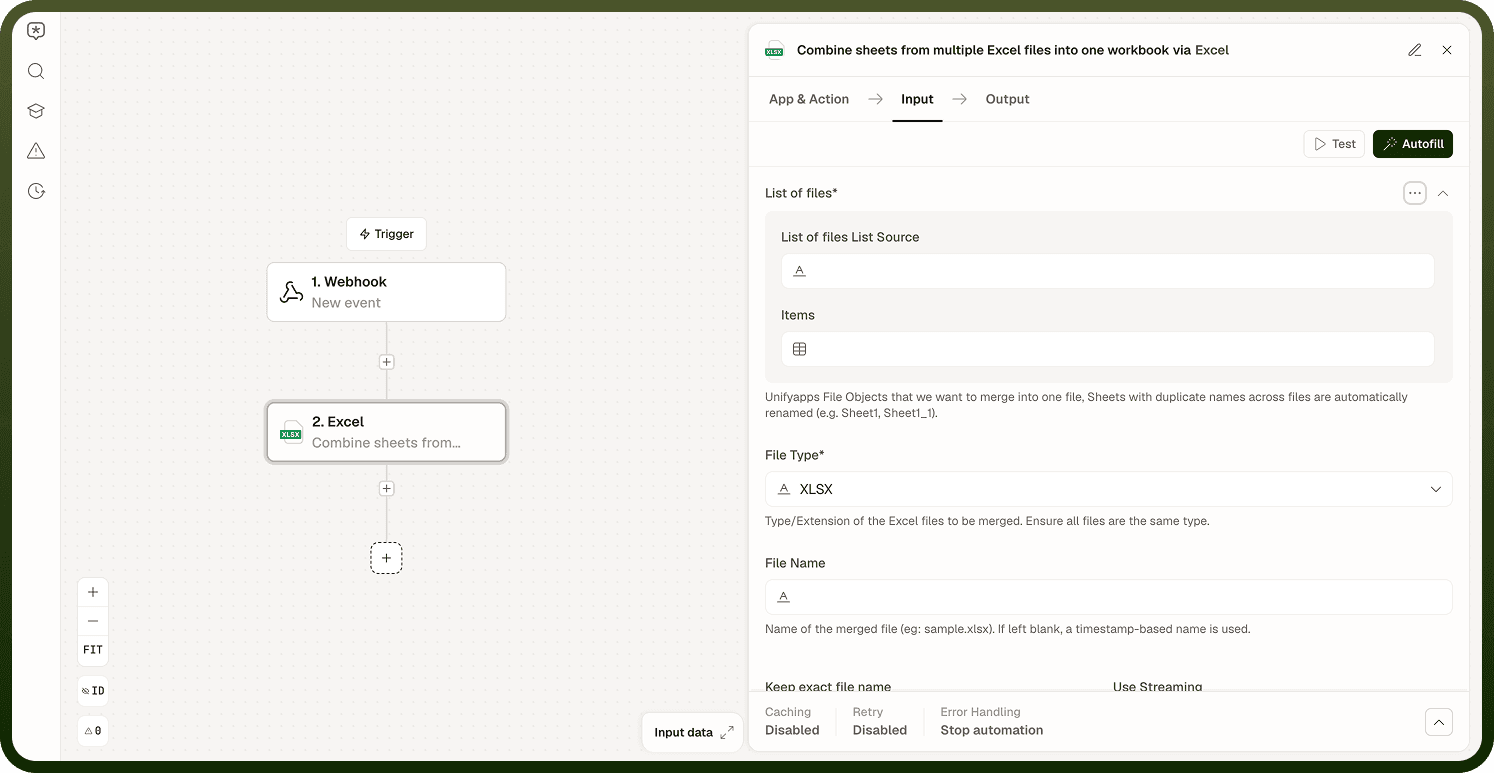
Append multiple excel files into one sheet takes a list of Excel files (currently XLSX only) and writes the first sheet of each file's rows into a single sheet of one output file. Combine sheets from multiple Excel files into one workbook takes every sheet from each input file (XLSX or XLSB) and places it into a single output workbook; sheet names that collide across files are automatically renamed. Both operations produce an XLSX output.
Operations
Operation | Description | Key inputs |
|---|---|---|
Append multiple excel files into one sheet | Reads the first sheet of each input file and appends all rows sequentially into a single sheet of an output workbook. | List of files, File Type, Output Sheet Name, Include headers, Skip first file header |
Combine sheets from multiple Excel files into one workbook | Takes every sheet from each input workbook and places them all into one output workbook. Sheets with duplicate names across files are automatically renamed (for example, Sheet1, Sheet1_1). | List of files, File Type, Use Streaming |
Input
Field | Type | Required | Description |
|---|---|---|---|
List of files | Array of file references | Yes | Unifyapps File Objects to append or combine. For Append, only the first sheet of each file is used. |
File Type | Enum | Yes | Type/extension of the input files. Append currently supports XLSX only. Combine supports XLSX or XLSB (ensure all files are the same type); defaults to XLSX. |
File Name | String | No | Name of the output file. If left blank, a timestamp-based name is used. Keep exact file name (boolean, default off) controls whether the exact name is used as-is or a timestamp is appended. |
Output Sheet Name | String | No — Append | Name of the combined sheet in the output file. Defaults to Combined. |
Include headers | Boolean | No — Append | When enabled (default), the header row from the first file is included in the output and headers from subsequent files are skipped. When disabled, all rows — including headers — from every file are appended. |
Skip first file header | Boolean | No — Append | When enabled, the header row from the first file is skipped too (useful when the first file has data rows only). Only relevant when Include headers is enabled. Defaults to false. |
Use Streaming | Boolean | No — Combine | Enables SAX-based streaming processing when combining sheets, instead of loading each workbook fully into memory. Recommended for input files over 50MB. Applies to both XLSX and XLSB source files. Defaults to false (disabled). Not available for Append. |
Output
Both operations return a fileDetails object for the output workbook, with Name, Source, Source Type, and File Type fields.
Notes
Append currently supports XLSX input files only. Combine accepts XLSX or XLSB, as long as all input files share the same type. The output workbook is always produced as XLSX.
For the Append operation, only the first sheet of each input file is read — there is no field to select a different sheet.
When appending, column alignment relies on the files sharing the same column structure. If input files have different column orders or extra columns, cells will be placed according to their position, not their header name. Standardise column structure upstream before appending.
The Combine operation preserves each sheet exactly as it exists in the source file, including data, formatting, and formulas. Sheet content is not merged — each sheet retains its independent rows and columns. Sheets with duplicate names across files are automatically renamed rather than overwritten.
Files are processed in the order they appear in the input list. For the Append operation, rows appear in the output in the same order as the input files.
For the Combine operation, enable Use Streaming when working with large input files (recommended above 50MB). It processes each workbook with a SAX-based streaming reader instead of loading the whole file into memory, reducing memory pressure during the merge. It is disabled by default and is available for both XLSX and XLSB source files. The Append operation does not have a streaming option.