


The Standard Entities node lets automations manage platform connections programmatically — create, update, authorize, disable, and delete connections without manual admin UI work. Use these operations to build automated provisioning flows, self-service connector setup, and governance automations that keep connections current.
Overview
A connection is the credentials and configuration that let the platform communicate with an external application or data source. The Connection Management operations in the Standard Entities node cover the full lifecycle: provisioning new connections, updating their configuration, managing their authorization state, and retiring them. Managing connections programmatically lets you standardize how they are created, maintained, and decommissioned across your organization.
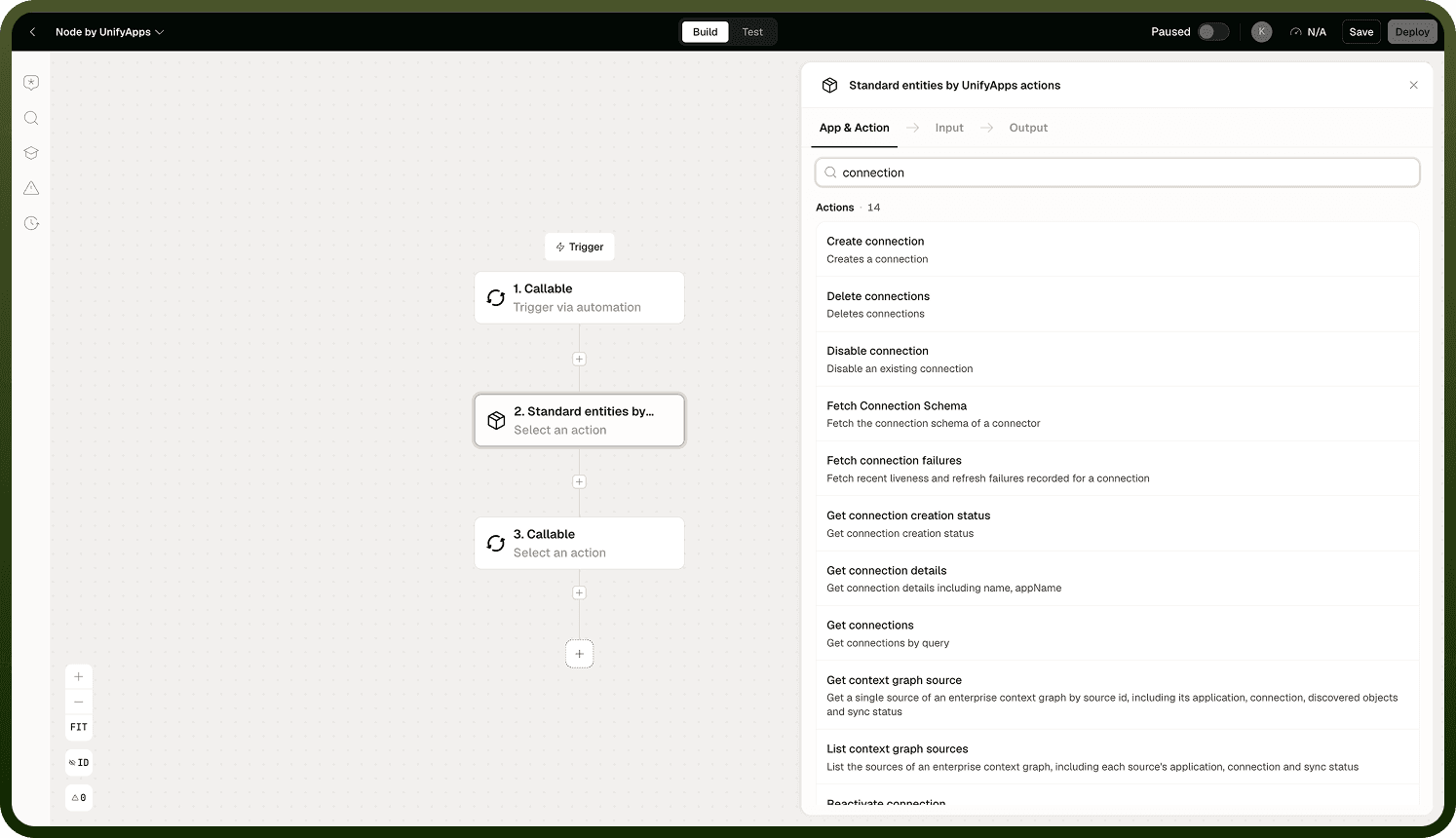
Connection Operations
The node supports the full set of connection actions and triggers found on the connection lifecycle:
Create Connection — provisions a new connection with a static or dynamic input schema.
Save & Authorize Connection — completes the credential handshake for a connection, either via an OAuth redirect or by saving credential inputs directly.
Get Connection Creation Status — checks the authorization status of a connection created through the OAuth redirect flow.
Update Connection — modifies the name, authentication type, parent connection, or input schema of an existing connection.
Disable Connection — suspends a connection without deleting it, preventing automations that rely on it from executing successfully.
Delete Connections — permanently removes one or more connections from the platform in a single call.
Get Connection Details — retrieves details for one or more connections.
Get Connections — retrieves connections with flexible filtering (by app name, active status, tag, owner, and more).
Each operation requires the running identity to hold the appropriate permission on the connection. If the permission check fails, the operation throws an error and stops the automation — there is no soft failure to catch and branch on.
Pre-flight permission checks: Use the check permissions operation before any connection operation that may require elevated access. It returns whether the running identity holds a specified permission (view, edit, delete, or share) on the target asset. Branch on the result before proceeding.
The Authorization Flow
Save & Authorize Connection behaves differently depending on the connector's authentication style:
For OAuth-based connectors, the action returns a Redirect URL. The user (or an interactive step outside the automation) must complete authorization at that URL before the connection is usable.
For credential-based connectors, the action accepts User Inputs (the credential values) and a Save Inputs flag, and completes authorization directly — no redirect is involved.
After an OAuth flow returns a Redirect URL, use Get Connection Creation Status with the state ID from that step to check whether the authorization has completed. It returns a Status and, once authorization succeeds, the new Connection ID.
Security-sensitive field — Allow Custom Redirection: Save & Authorize Connection exposes an Allow Custom Redirection input (customRedirectionAllowed). When enabled, the OAuth redirect can go to any domain without validation; when disabled (the default), the redirect domain must already exist in the platform's domain mapping. Leave this off unless you have a specific reason to redirect to an unregistered domain.
Action Details
Create Connection — Input: App Name; Input Type (Static or Dynamic); for Static — Connection Name, Authentication Type, Parent Connection ID, Input Schema; for Dynamic — Inputs. Output: Connection ID; Success (boolean).
Save & Authorize Connection — Input: App Name; Connection; User Inputs; Save Inputs (boolean); Allow Custom Redirection (boolean, security-sensitive — see above); Return Query Parameters in Return URL (boolean). Output: Redirect URL, present only for connectors that require an OAuth-style handshake.
Get Connection Creation Status — Input: State ID. Output: Status; Connection ID.
Update Connection — Input: Connection; Input Type (Static or Dynamic); Connection Name; Authentication Type; Parent Connection ID; Input Schema or Inputs. Output: Connection ID; Updated (boolean).
Disable Connection — Input: Application Name; Connection. Output: Success (boolean).
Delete Connections — Input: Connection (multiple selection — the action accepts and deletes several connections in one call). Output: Deleted IDs, the list of connection IDs that were actually deleted, so you can confirm which ones succeeded.
Get Connection Details — Input: Select Connections (multiple selection). Output: connection details for each selected connection.
Get Connections — Input: Filter (Active, App Name, Created Time, Tag, ID, Last Modified By, Owner User, Modified Time, Projects). Output: App Name, Name, Active Status, ID for each matching connection.
Triggers
Standard Entities exposes three connection triggers:
On Connection Create — fires when a connection is created.
On Connection Update — fires when a connection is updated.
On Connection Delete — fires when a connection is deleted.
Each fires in real time and returns the connection's ID, name, app name, active status, and owner user ID, so a downstream step can act on the change without a separate lookup.
Notes
Connection operations affect live platform integrations. Exercise care with disable and delete operations in particular.
Disabling a connection stops automations that rely on it from executing successfully — audit all automation dependencies on a connection before disabling it in production.
Deleting a connection is permanent within the node; it cannot be undone via an automation operation.
The running identity must hold sufficient permissions for each connection operation; a missing permission throws an error that stops the automation, not a soft failure.
Use the check permissions operation before connection operations that may fail due to access rights, and branch on the result.
Save & Authorize Connection completes the programmatic portion of a credential handshake — for OAuth connectors, any interactive authorization at the returned Redirect URL happens outside the automation, and Get Connection Creation Status is how the automation finds out when it's done.
Leave Allow Custom Redirection off unless you specifically need to redirect to a domain outside the platform's domain mapping.
Build connection-management automations with audit logging enabled so that connection changes are traceable to a specific automation run.