


Connection Events triggers start an automation when a platform connection is created, updated, or deleted. Use them to react to integration changes in real time — kick off a downstream sync when a new connection is added, alert when credentials are rotated, or clean up associated resources when a connection is removed.
Overview
Connection Events are real-time, webhook-style subscriptions. The platform fires them the instant a connection changes — no polling delay. Each automation gets its own subscription and can apply a filter condition to react only to changes affecting a specific app or connection type.
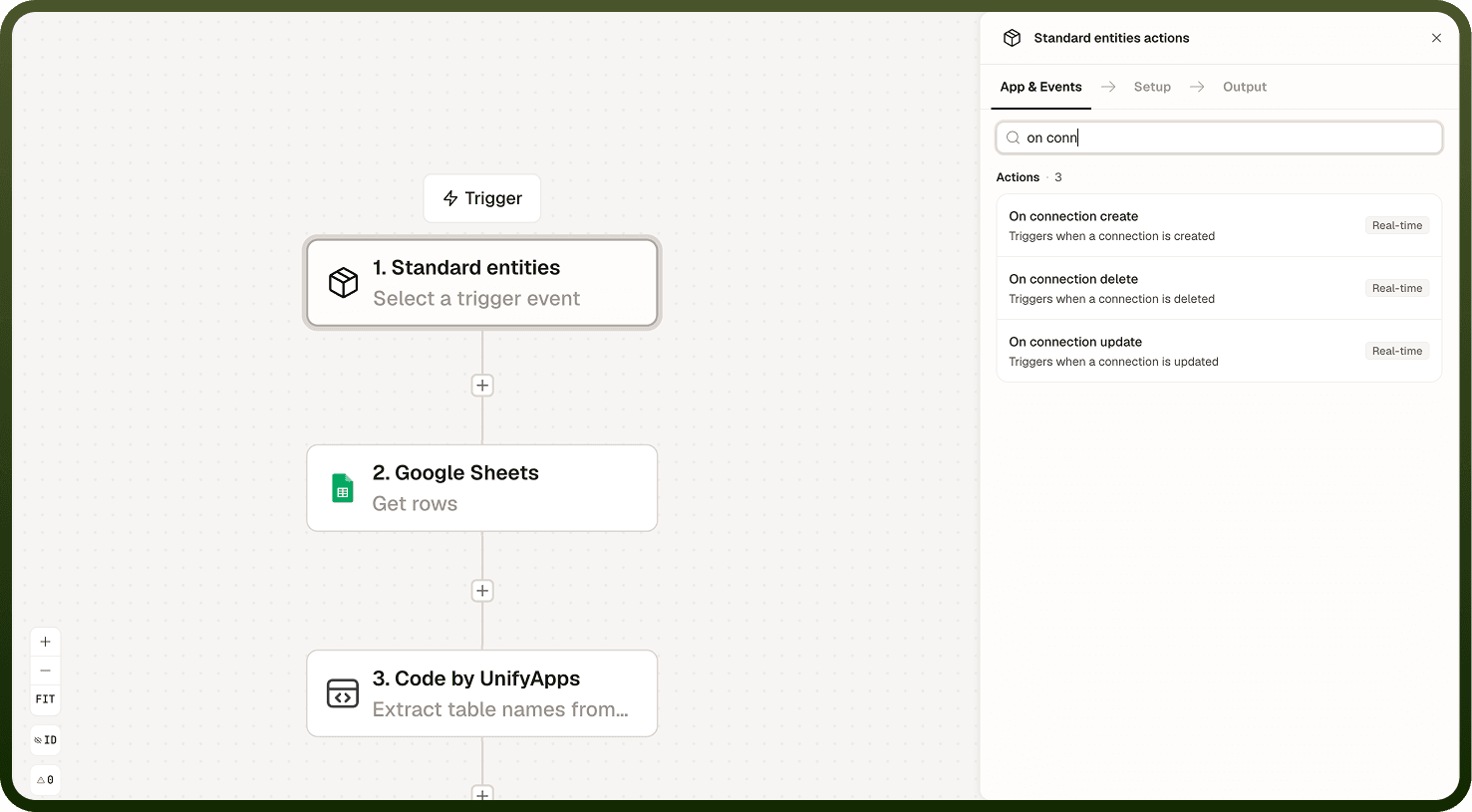
Available Events
Three connection lifecycle events are available as triggers:
Connection created — fires when a new connection to an external system is added. Use it to register the connection in an external catalog, run a connectivity test, or trigger a first-time data sync.
Connection updated — fires when a connection's configuration changes — for example, when credentials are rotated or settings are modified. Use it to propagate the updated configuration to downstream systems or log the change for audit purposes.
Connection deleted — fires when a connection is removed from the platform. Use it to revoke associated tokens in the external system, remove catalog entries, or pause automations that depended on that connection.
Delivery and Filtering
Connection Events fire in real time the moment the change is processed. The event payload carries the details of the connection that changed — name, type, and relevant configuration fields — available as data in the automation's context.
Most Connection Event triggers accept a filter condition. Use filters to scope the automation to a specific connection or app type — for example, only react to changes on Salesforce connections, or only on connections belonging to a specific project.
Filter to reduce noise: Without a filter, a Connection Events trigger fires for every connection of that type across the entire platform. Apply a filter when your automation should only respond to a specific subset of connections.
Common Use Cases
Post-creation setup — when a connection is created, automatically run a connectivity test and register it in an external service catalog.
Credential rotation handling — when a connection is updated, propagate the new credentials or configuration to downstream systems that depend on it.
Cleanup on deletion — when a connection is deleted, revoke any associated API tokens in the external system and update dependent automations.
Audit and compliance — log every connection change to a centralized audit trail, capturing who changed what and when.
Notes
Keep the following in mind when working with Connection Events triggers.
All Connection Events are delivered in real time — there is no polling delay.
Apply a filter condition when your automation should only react to a specific connection or app type. Without a filter, the trigger fires for every matching event across the platform.
The connection updated event fires for any configuration change, including minor metadata edits. Use the payload to inspect what specifically changed before taking action.
The connection deleted event fires at deletion time. Any cleanup automation should act quickly, as the connection's credentials may no longer be valid after the event fires.
Each automation gets its own event subscription. Multiple automations subscribed to the same event type fire independently.
Design connection-event automations to be idempotent where possible. If an event is delivered more than once, the automation should produce the same outcome without duplicating side effects such as duplicate catalog entries or redundant token revocations.