


Custom header mappings let you route incoming runs to different execution tiers based on a header value present in the trigger's request. Each mapping is a rule that pairs a header key and value with a tier — when the inbound request carries that header with the matching value, the run is assigned the specified tier instead of the default.
Overview
Header mappings are the dynamic tier mechanism within the Execution Tier setting. They are configured in the Settings tab of the automation builder and apply to the automation as a whole. Use them when a single automation must serve multiple environments, regions, or caller types that have different compute resource requirements — rather than maintaining separate automations for each scenario.
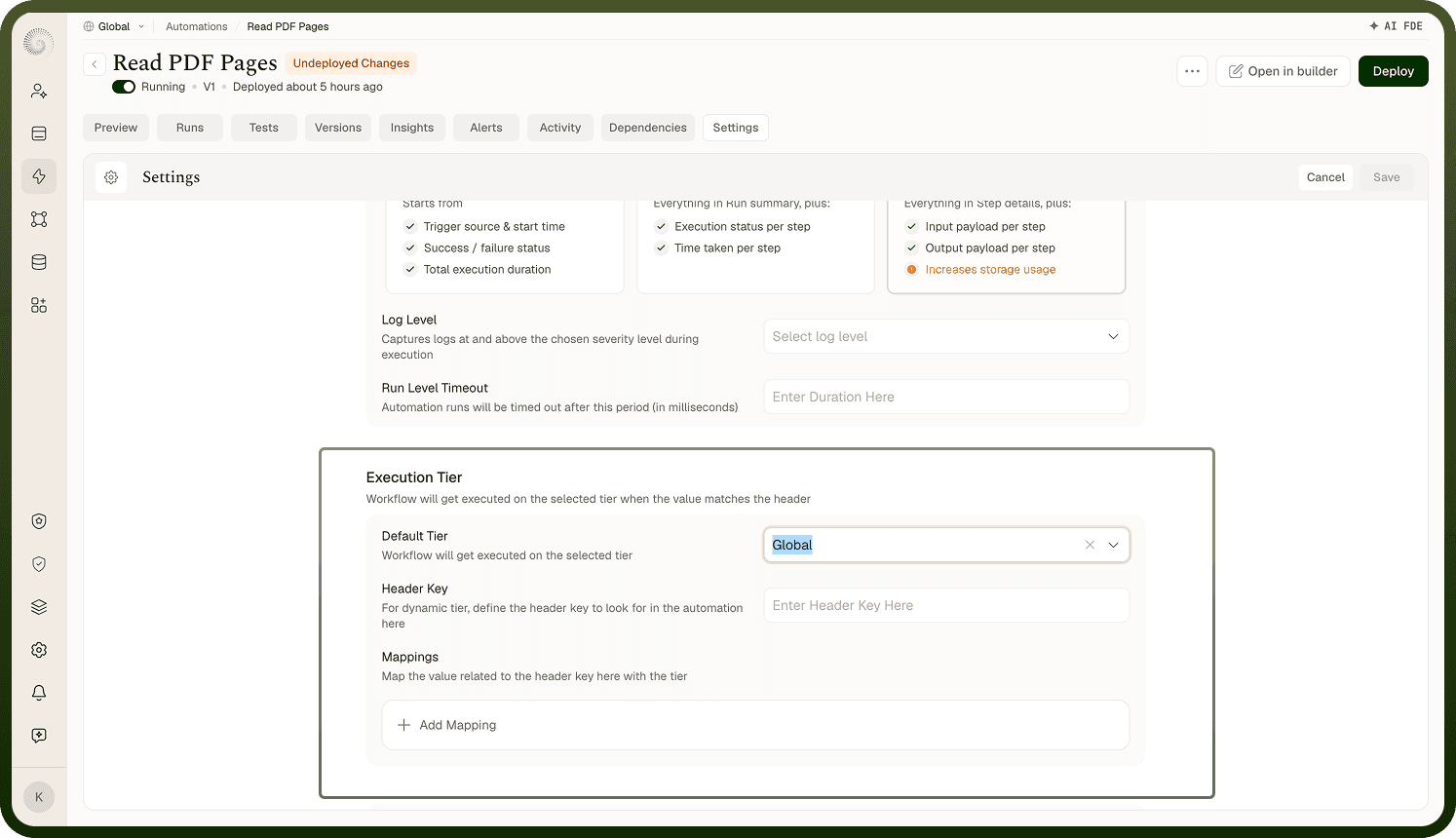
How Header Mappings Work
When a trigger fires with an inbound request, the platform inspects the request headers. Each header mapping rule specifies three things:
Field | Description |
|---|---|
Header key | The name of the request header to inspect (e.g., x-region) |
Header value | The value that triggers this tier assignment (e.g., eu-west) |
Tier | The execution tier to assign when the header key and value match |
Custom Header Mappings configuration panel showing header key, header value, and tier assignment fields
If the inbound request carries the configured header with the matching value, that run is assigned the specified tier. If the header is present but matches no rule, or if no header is present at all, the run falls back to the default execution tier.
When to Use Header Mappings
Header mappings are most appropriate when:
The same automation serves multiple environments (e.g., staging vs. production callers) that need different compute resources.
The automation serves multiple regions with different traffic volumes — a higher tier for requests from high-traffic regions, a lower tier for low-volume ones.
Different types of callers (internal services vs. external partners) have meaningfully different workload profiles that warrant different resource allocation.
Match on what callers already send: Header mappings work only if the caller actually sends the configured header. Coordinate with the teams or systems that trigger the automation to confirm the headers they include in requests.
Notes
Header mappings are an optional extension of the Execution Tier setting. They take effect on the next deployment.
If no header mapping matches an inbound request, the run uses the default tier — no error is raised.
Header mappings are evaluated against the trigger's inbound request headers only; they do not apply to scheduled or manually triggered runs that carry no request headers.
You can add multiple mappings; configure each rule independently with its own key, value, and tier.
Changes to header mappings take effect on the next deployment.
Coordinate with calling systems to ensure they send the expected headers — a misconfigured or missing header causes the run to fall back to the default tier silently.
Test header mappings by triggering the automation with requests that carry each configured header to confirm the correct tier is assigned before deploying to production.