

Connector-wide configuration beyond individual actions and triggers.
Overview
The Settings tab holds configuration that applies to the whole connector rather than one action or trigger. It has two sections:
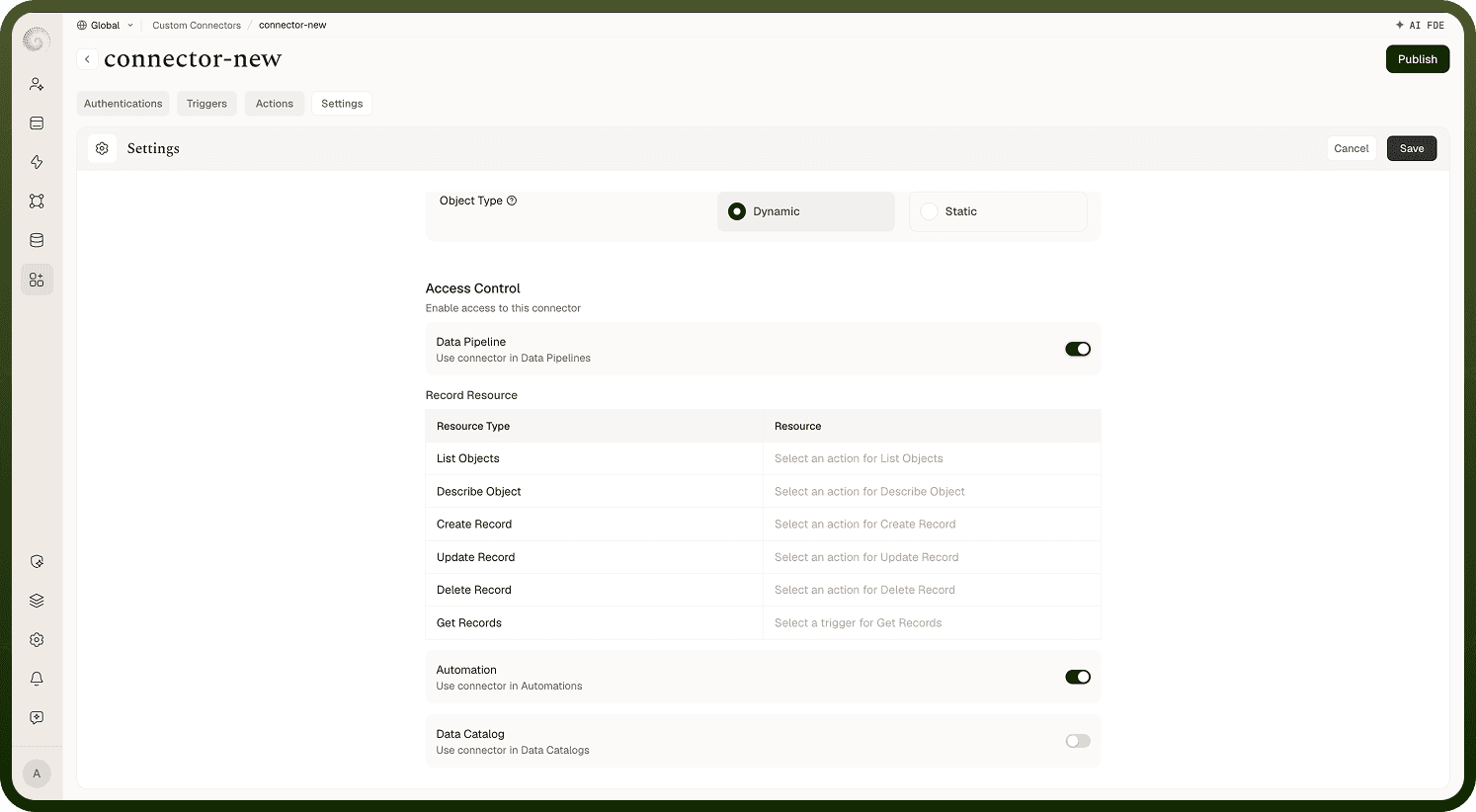
Object Schema — the structure of the objects (resource types) your connector works with, either Dynamic (the default) or Static.
Access Control — which parts of the platform can use this connector: toggles for Automations (on by default), Data Pipelines, and Data Catalog.
These control how the connector presents itself and where it appears, separate from the per-operation request definitions.
Connector objects
A connector can declare the objects it works with — for example "Contacts", "Deals", "Tickets". Under Object Schema you pick the Object Type:
Static — a fixed set of objects you define yourself, each with a name and schema, useful when the API's surface is fixed. The static list shows an "N objects added" count with an inline +, and each row carries edit and delete controls.
Dynamic (default) — "Dynamic fetches objects from the connected app at runtime; static uses the fixed list you define here." — useful when objects vary per account (users create their own objects/tables).
The schema you declare here is "The objects and fields this connector exposes to automations and data pipelines." Defining objects shapes what people can pick when building with your connector and lets object-aware features reference an object's fields.
Making my connector usable in Data Pipelines
Turn on the Data Pipelines toggle under Access Control. Because pipelines move records object by object, you then map object-level resources — you tell the platform which of your connector's actions and triggers implement each standard operation: List Objects, Describe Object, Get Records, Create Record, Update Record, and Delete Record. Once mapped, pipelines can enumerate the connector's objects and read or write their records using your definitions.
Where connectors appear once enabled
The Access Control toggles decide the surfaces: with Automations on (the default), the connector's actions and triggers can be used in workflow automations once they're deployed; Data Pipelines adds it as a pipeline source/destination (with the object mapping above); Data Catalog exposes it to the catalog. A connector must also have a working authentication and at least one deployed action or trigger before it's practically usable anywhere.