


The settings you configure on a field besides its type — name, required, unique, default, and more.
Overview
Every field has, beyond its type, a set of properties:
Key — the field's internal name, used in formulas, APIs, and queries.
Display Label — the friendly name shown in the UI.
Help Text — guidance shown to people filling the field.
Default value — the value a new record starts with if none is given.
Primary Key / Unique Key — uniqueness controls (below).
whether the field is optional or required.
Display Name, Secure, Hashing, and the searchable / sortable / filterable toggles (each covered below).
Nest under — place the field inside an existing Object field instead of at the top level.
Control Visibility — show or hide the field in forms based on conditions on other fields.
The Key is fixed as soon as the field is created; the type is fixed once the object holds records; most other properties can be changed later.
Where: Object › Schema › add or edit a field
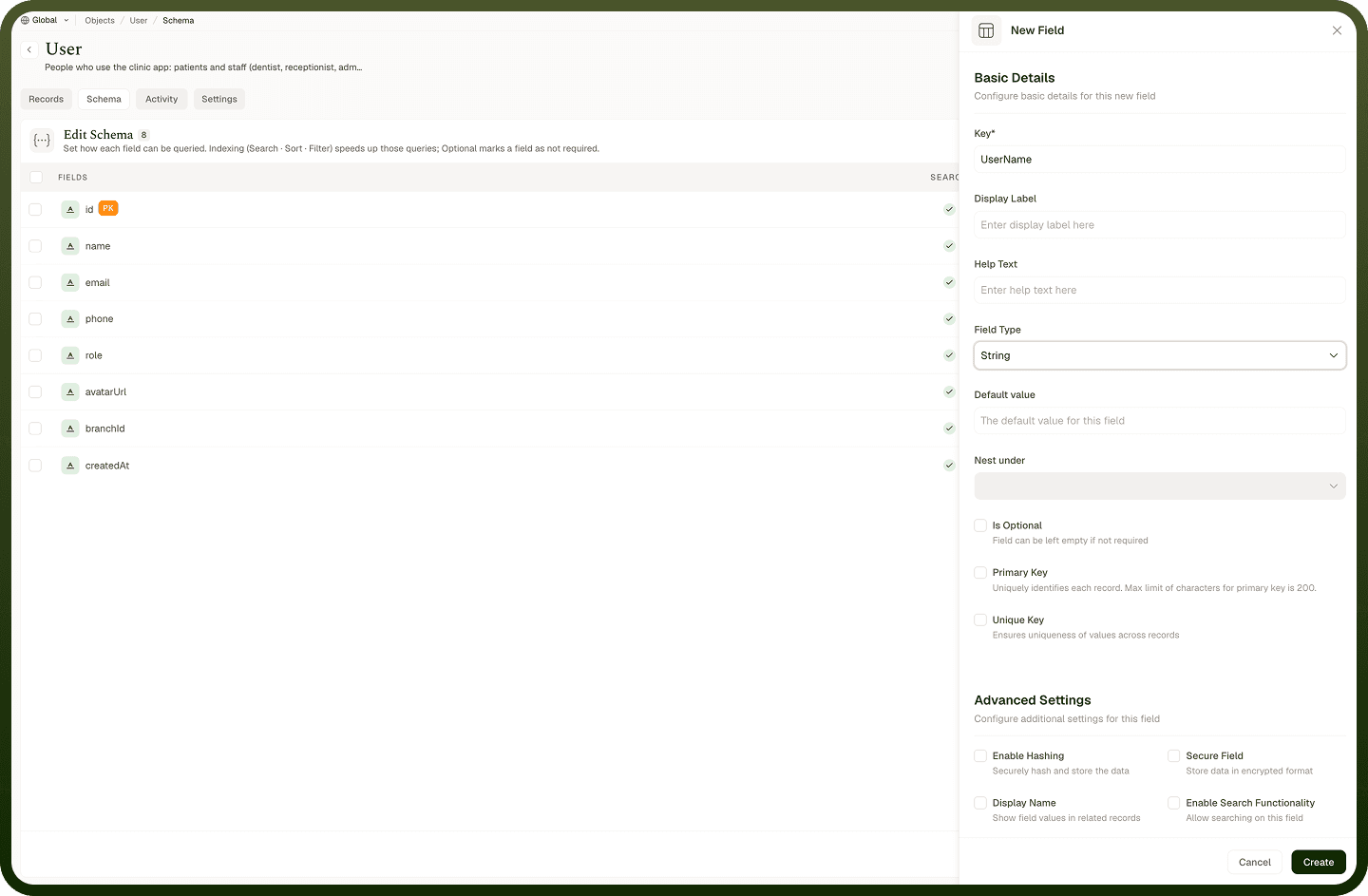
Rules for a field's Key (internal name)
The Key is the field's machine name — what automations, formulas, and the API use to read and write it. It must start with a letter and contain only letters, numbers, and underscores (no spaces or punctuation). It's separate from the Display Label, which is the human-friendly name you see in tables and forms — that one can be anything and can be changed anytime. Once a field is created the Key is read-only, because changing it would break everything referencing it, so choose a clear, stable Key up front and rename the Display Label freely instead.
Where: Object › Schema, field Key vs Display Label
Making a field required or optional
A field is either required or optional. Mark it optional to allow records to be saved without a value; leave it required to force a value on every record. Required fields are enforced when a record is created or edited — a missing value blocks saving and is flagged inline. Two fields can't be optional: the Primary Key and the object's Display Name field, since those must always have a value. Set fields you genuinely need (a name, a status) as required, and make the rest optional so records aren't harder to create than necessary.
Where: Object › Schema, field optional/required
Primary Key
The Primary Key is the field that uniquely identifies each record in the object. Marking a field as Primary Key makes it required — a record can't be saved without a value for it — and its value actually becomes the record's built-in ID, so your business identifier (an order number, an email) is what relationships and the API use to point at the record. Only certain types can be a primary key — String, Number, Integer, or Auto Number — because the value has to be a stable identifier; choosing any other type shows Invalid Field Type for Primary Key, and a nested field (inside an Object or Array) can't be one. Without a Primary Key, records get an automatically generated ID instead.
Where: Object › Schema, Primary Key
Display Name field
One String field can be marked as the object's Display Name — the field whose value stands in for the record wherever the record is referenced. When another object links to this one (through a lookup), or a record is shown in a picker, it's the Display Name value that appears, instead of the raw ID. Only String fields can serve as the Display Name, it can't be optional, and it's automatically made searchable — it's also the field the records screen's search box matches against. Pick the field that best labels a record to a human (a person's name, a company name, a title) so references read clearly everywhere.
Where: Object › Schema, Display Name
Protecting sensitive field data (Secure and Hashing)
Two options protect sensitive values:
Secure Field stores the value encrypted at rest, so it's protected in storage but can still be read back when needed.
Enable Hashing stores a one-way, salted hash of the value — it can be checked against but never read back in its original form (suitable for things you only need to compare, like a secret).
A field can use one or the other, not both — turning one on disables the other. Use Secure for data you must store and later retrieve safely (tokens, account numbers); use Hashing for values you only ever need to verify, never display.
Where: Object › Schema, Secure / Hashing