


The HTTP call an action makes, and how inputs and credentials are filled into it.
Overview
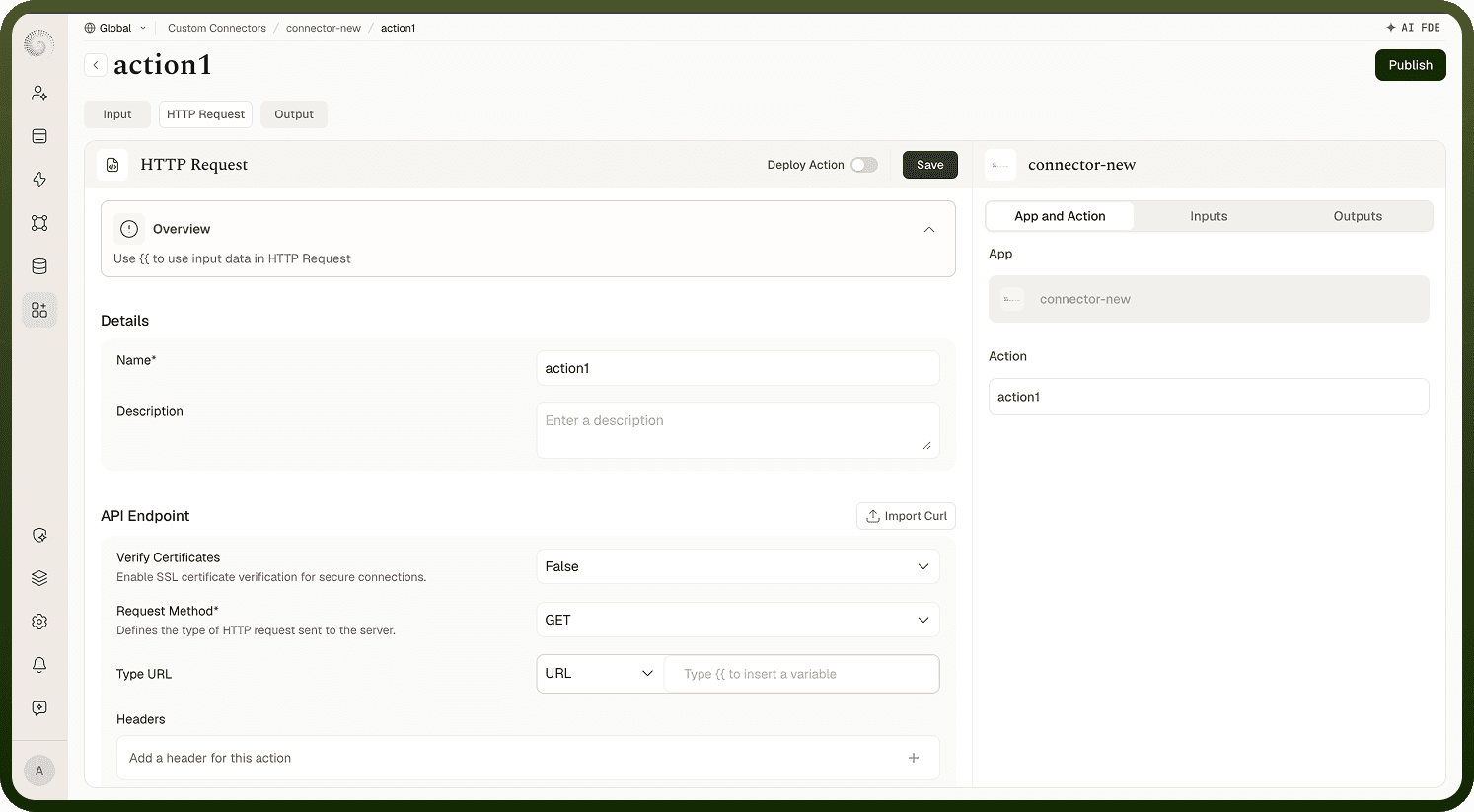
The HTTP Request tab is split into two cards. Details holds the action's name and description. API Endpoint holds the call itself:
Request Method — GET (the default), POST, PUT, DELETE, or PATCH ("Defines the type of HTTP request sent to the server.").
The URL control — a small type dropdown (URL for a full address, or Endpoint for a path beneath the connector's base URL) fused to the URL input.
Headers and Query Parameters — key/value lists, each with an "N fields added" count and an inline + to add rows.
Body — for methods other than GET and DELETE: None, or Raw as a String or JSON payload, with an optional Form Encode toggle for form-encoded APIs.
Each of these can mix fixed text with inserted variables, so one definition produces the right call for any input. When the action runs, the platform fills in the values and sends the request. To skip the manual setup, use Import cURL in the API Endpoint card's header — the method, URL, headers, and body are extracted from a pasted cURL command. One templating note: renaming or deleting input fields cleans up every reference to them in the request, including bulk changes.
Putting input values and credentials into the request
Type {{ anywhere in the request — the URL, a header, a query parameter, or the body — to insert a variable. You can pick from:
Input Schema — the fields you defined on the action's Input tab (what the user filled in).
Authentication Schema — the connection's auth fields and the credentials captured by the authentication (for example a stored token), so you never hard-code secrets.
Environment and user variables — workspace-level values.
When the action runs, the platform resolves each variable against the actual inputs and the connection's credentials and substitutes the real values per connection.
Request safety options
The request runs with built-in safeguards, plus one option you control:
Verify Certificates — "Enable SSL certificate verification for secure connections."; disable it only for services with self-signed certificates.
Outbound safety — the platform blocks requests to disallowed and internal addresses (localhost, private network ranges), including on redirects — an SSRF protection so a connector can't be pointed at internal infrastructure.
Automatic retries — transient failures (rate limits, timeouts, expired credentials) are retried by the platform; see the error-handling screen for exactly how responses are classified and retried.
These exist so a published connector behaves safely against real, external APIs.