


Every expression can use a small set of helpers under the utils namespace — no setup required, available in any binding on any page. They cover the everyday jobs of turning raw data into something a user can read: dates, durations, numbers, JSON, and file downloads. Most helpers degrade quietly instead of throwing, so a formatting mistake doesn't crash your page.
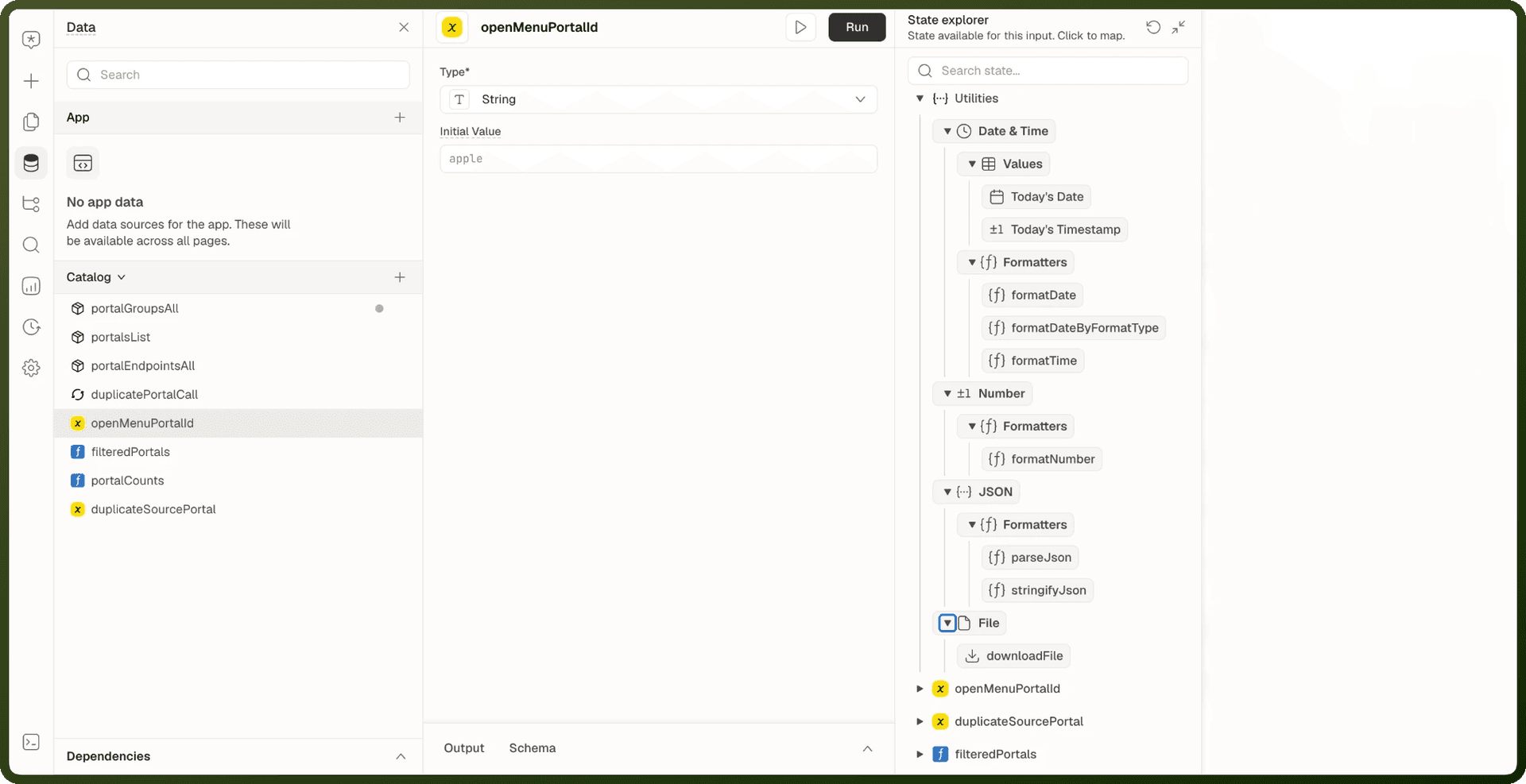
Helpers at a Glance
| Helper | What it does | Quick example |
| utils.formatDate | Format a date with a custom date-fns pattern | {{ utils.formatDate(order.createdAt, 'dd MMM yyyy') }} → 15 Jan 2024 |
| utils.formatDateByFormatType | Format a date with a named preset, including relative forms like "2 hours ago" | {{ utils.formatDateByFormatType(order.createdAt, 'Mdy') }} → January 05, 2024 |
| utils.formatTime | Turn a millisecond duration into readable units like 1d 1h 1m | {{ utils.formatTime(90061000, 'seconds') }} → 1d 1h 1m 1s |
| utils.formatNumber | Format a number — locale grouping, compact notation, units | {{ utils.formatNumber({ value: 1234567, notation: 'compact' }) }} → 1.2M |
| utils.parseJson | Parse a JSON string safely — never throws | {{ utils.parseJson(orders_query.data.objects?.[0]?.payloadJson).total }} → 250 |
| utils.stringifyJson | Serialize a value to JSON safely — never throws | {{ utils.stringifyJson(filters.value) }} → {"status":"open"} |
| utils.downloadFile | Download a file in the current browser tab (side effect — use in actions, not rendered bindings) | {{ utils.downloadFile(invoice.fileUrl, 'invoice.pdf') }} |
| utils.dateTime.values.todayDate | Today's date as dd-MM-yyyy (snapshot, not a live clock) | {{ utils.dateTime.values.todayDate }} → 06-07-2026 |
| utils.dateTime.values.startOfTodayTimestamp | Local midnight timestamp — use for "today only" filters | {{ order.createdAt >= utils.dateTime.values.startOfTodayTimestamp }} |
| utils.getAuthToken | Mobile apps only. Returns the signed-in session's auth token, or empty string. | {{ utils.getAuthToken() }} |
utils.formatDate
Formats a date or timestamp using a date-fns pattern (https://date-fns.org/docs/format).
utils.formatDate(date, formatStr)
| Parameter | Type | Required | Description |
| date | Date | string | number | Required | A Date object, ISO string, or numeric timestamp. A numeric string (e.g. '1704067200000') is treated as an epoch timestamp — see gotchas. |
| formatStr | string | Required | Any date-fns pattern. Common tokens: dd day, MMM short month, yyyy year, H 24-hour, h 12-hour, mm minutes, a AM/PM. |
Examples
{{ utils.formatDate(order.createdAt, 'dd MMM yyyy') }} // → 15 Jan 2024 {{ utils.formatDate(order.createdAt, 'MMM dd, yyyy h:mm a') }} // → Jan 15, 2024 10:30 AM {{ utils.formatDate('not-a-date', 'dd MMM yyyy') }} // → not-a-date (echoes invalid input)
utils.formatDateByFormatType
Formats a date using a named preset instead of a raw pattern — including relative forms like "2 hours ago".
utils.formatDateByFormatType(date, formatType, options)
| Parameter | Type | Required | Default | Description |
| date | Date | string | number | Required | — | The date to format. |
| formatType | string | Optional | mdyhm | A preset name from the table below, or any raw date-fns pattern. Unknown strings are treated as raw patterns. |
| options | object | Optional | — | Only used by relative-time presets. |
Date Format Presets
Preset | Pattern | Output (example: Jan 05, 2024, 09:07:03) |
|---|---|---|
|
| 05 Jan 2024, 9:07:03 |
|
| 05 Jan, 9:07:03 |
|
| 05 Jan 2024, 9:07 AM |
|
| 05 Jan 2024, 9:07 |
|
| 01/05/2024 9:07 |
|
| Jan 05, 2024 9:07 AM |
|
| Jan 05, 9:07AM |
|
| January 05, 2024 |
|
| 5 Jan 2024 |
|
| 2024-01-05 |
|
| 05-01-2024 |
|
| 05-01-2024 9:07 AM |
|
| 05 Jan |
|
| 5 Jan |
|
| Friday, 01-05-2024 |
|
| 09:07 |
|
| 9:07 AM |
|
| 2024-01-05T09:07:03+05:30 |
| Relative with "ago" | 2 hours ago |
| Relative with "about" | about 2 hours |
Presets that combine H (24-hour) with a keep the 24-hour number. For an afternoon time such as Mar 20, 2024, 16:05, dmyhma gives 20 Mar 2024, 16:05 PM, while mdyhma (12-hour h) gives Mar 20, 2024 4:05 PM.
utils.formatTime
Turns a duration in milliseconds into readable units. This is elapsed time, not a clock time.
utils.formatTime(ms, precision, notation, maxSignificantUnits)
| Parameter | Type | Default | Description |
| ms | number | — | Duration in milliseconds. |
| precision | string | 'milliseconds' | Smallest unit to show: 'years', 'months', 'days', 'hours', 'minutes', 'seconds', 'milliseconds'. |
| notation | string | 'compact' | 'compact' → 1d 1h; 'comfortable' → 1 day 1 hour. |
| maxSignificantUnits | number | 7 | Show at most this many units. Values are clamped to 1–6, so the default of 7 shows up to 6 units. |
Examples
{{ utils.formatTime(90061000, 'seconds') }} // → 1d 1h 1m 1s {{ utils.formatTime(90061000, 'seconds', 'comfortable') }} // → 1 day 1 hour 1 minute 1 second {{ utils.formatTime(90061000, 'seconds', 'compact', 2) }} // → 1d 1h
utils.formatNumber
Formats a number with locale grouping, compact notation, or units. Takes a single options object — not a plain number.
utils.formatNumber({ value, locale, notation, compactDisplay, maximumFractionDigits, padDecimalPlaces, unit, unitDisplay })
| Property | Type | Required | Default | Description |
| value | number | Required | — | The number to format. |
| locale | string | Optional | Runtime locale | e.g. 'en-US', 'de-DE' |
| notation | string | Optional | 'standard' | 'standard', 'compact', 'scientific', 'engineering', or 'text' (disables grouping). |
| compactDisplay | string | Optional | — | With compact notation: 'short' (1.2M) or 'long' (1.2 million). |
| maximumFractionDigits | number | Optional | — | Maximum digits after the decimal. |
| padDecimalPlaces | boolean | Optional | — | Pad decimals with zeros to maximumFractionDigits. Has no effect without maximumFractionDigits. |
| unit | string | Optional | — | e.g. 'percent', 'kilometer-per-hour', 'megabyte'. |
| unitDisplay | string | Optional | — | 'short', 'narrow', or 'long'. |
Examples
{{ utils.formatNumber({ value: 1234567.891, maximumFractionDigits: 2 }) }} // → 1,234,567.89 {{ utils.formatNumber({ value: 1234567, notation: 'compact', compactDisplay: 'short', maximumFractionDigits: 1 }) }} // → 1.2M {{ utils.formatNumber({ value: 5, maximumFractionDigits: 2, padDecimalPlaces: true }) }} // → 5.00 {{ utils.formatNumber({ value: 20, unit: 'percent' }) }} // → 20% {{ utils.formatNumber({ value: 20, unit: 'kilometer-per-hour', unitDisplay: 'long' }) }} // → 20 kilometers per hour
Warning: utils.formatNumber does not support currency formatting. To show monetary values, format the number and add the currency symbol yourself in your expression: {{ '$' + utils.formatNumber({ value: total, maximumFractionDigits: 2 }) }}
utils.parseJson
Parses a JSON string safely. Invalid JSON never throws — you get the fallback value instead.
utils.parseJson(str, fallback, retriever)
| Parameter | Type | Default | Description |
| str | string | — | The JSON text to parse. |
| fallback | any | {} | Returned on a parse error and when the parsed value is null. |
| retriever | function | — | A JSON reviver — advanced, usually omitted. |
Examples
{{ utils.parseJson(orders_query.data.objects?.[0]?.payloadJson).total }} // → 250 {{ utils.parseJson('oops', []) }} // → [] (fallback) {{ utils.parseJson('null') }} // → {} (null result → fallback)
utils.stringifyJson
Serializes a value to a JSON string. On failure (e.g. circular reference) returns the fallback instead of throwing.
utils.stringifyJson(obj, fallback, space, replacer)
| Parameter | Type | Default | Description |
| obj | any | — | The value to serialize. |
| fallback | string | — | Returned on failure. If absent, failure returns null. |
| space | number | 0 | Indentation for pretty-printing. |
| replacer | function | — | JSON replacer function — advanced, usually omitted. |
Examples
{{ utils.stringifyJson({ orderId: 'ORD-1042', total: 250 }) }}→{"orderId":"ORD-1042","total":250}{{ utils.stringifyJson({ a: 1 }, undefined, 2) }}→ the same JSON indented by 2 spaces per level. Passundefinedforfallbackto reachspace.{{ utils.stringifyJson(circularObject) }}→null(failed, no fallback given)
utils.downloadFile
Starts a file download in the current browser tab. This is a side effect — put it in an action (button's On Click), not in a text/label binding that recomputes on every render.
utils.downloadFile(fileOrUrl, filename)
| Parameter | Type | Description |
| fileOrUrl | string | Blob | A file URL/path, or in-memory file content. Platform file URLs are resolved automatically. |
| filename | string | The name to save the file as. |
Usage — in a button's On Click action
Run Script takes plain JavaScript, not a {{ }} binding, so write the call without braces:
utils.downloadFile(invoice_query.data.fileUrl, 'invoice-2024.pdf');
Don't put it in a text binding.
Gotchas
Gotcha | Details |
|---|---|
Helpers rarely throw | Most helpers return a safe fallback instead of throwing. A formatting mistake shows as unformatted output, not an error screen. The relative-time presets are the exception: they throw on an invalid date, which leaves the binding empty. |
Numeric string = timestamp in formatDate | A string of digits (e.g. |
formatNumber takes an object, not a number | Write |
downloadFile is a side effect | A binding re-evaluates on every render. Placing |
formatTime = elapsed time, not clock time | Takes a duration in milliseconds, not a time of day. If precision is coarser than the whole span (e.g. hours on a 90-second duration), the result is an empty string — not "0h". |
Relative presets and invalid dates | The |
dateTime values are snapshots |
|
getAuthToken is mobile-only |
|