


Actions at a Glance
Action Type | Builder Label | Use When |
|---|---|---|
navigate | Go to URL | Navigating to an external URL, special scheme (tel:, mailto:), or raw path |
navigateToPage | Go to Page | Navigating to another page in the same app by page ID |
navigateBack | Navigate Back | Going back in browser/app history |
setURLParameters | Set URL Parameters | Updating the current page's query string without navigating |
openShareDialog | Open Share Dialog | Opening the device or browser share sheet for a message and link |
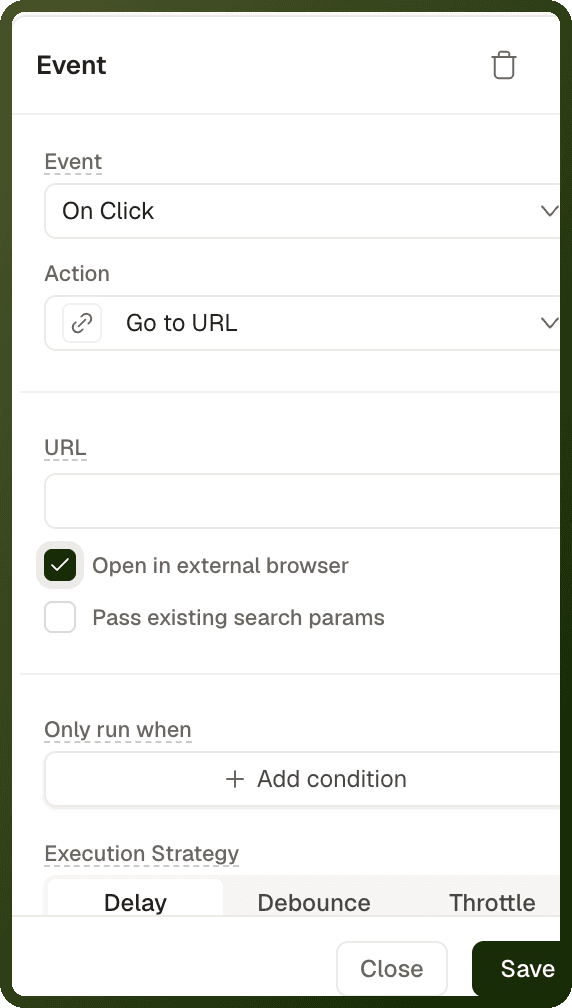
navigate — Go to URL
Sends the user to any URL or path. Use this for external websites, special schemes like tel: or mailto:, and raw router paths. For navigating to another page in the same app by page ID, use navigateToPage instead.
Parameters
Parameter | Builder field | Required | Default | Description |
|---|---|---|---|---|
path | URL | Required | — | The URL or path to navigate to. Supports |
target | Open in new tab (web apps) or Open in external browser (mobile apps) | Optional | _self | Turning the toggle on saves |
history | History (Push or Replace) | Optional | push | Appears only when the new-tab toggle is off. Replace swaps the current history entry (Back won't return here); Push adds a new entry. Ignored when |
preserveSearchParams | Pass existing search params | Optional | false | When on, merges the current page's query string into the destination URL. Params written inside the URL win per-key on conflict. |
Warning: Path resolution rule: A value that starts with http://, https://, //, a special scheme, or a leading slash is used as-is. Anything else gets // prepended (so google.com becomes //google.com). An in-app path with a dot (like pricing.v2) will be treated as an external host — always prefix in-app paths with /.
Note: Put Go to URL last. This action can't fail, so it never stops the actions after it. When it opens the URL in the same tab, place it last on the event — any actions after it still start running as the page changes.
Examples
External URL in a new tab
{ "actionType": "navigate", "payload": { "path": "https://docs.unifyapps.com", "target": "_blank" } }
Same-tab navigation replacing history (e.g. after login)
{ "actionType": "navigate", "payload": { "path": "/dashboard", "history": "replace" } }
Dynamic path with preserved query params
{ "actionType": "navigate", "payload": { "path": "https://example.com/orders/{{ var_orderId['value'] }}", "preserveSearchParams": true } }
Email link
{ "actionType": "navigate", "payload": { "path": "mailto:support@example.com?subject=Help" } }
navigateToPage — Go to Page
Navigates to another page in the same app by page ID. This is the correct action for in-app routing — it performs an SPA route change, preserves app state, and supports passing page parameters and inputs to the destination.
Parameters
| Parameter | Type | Required | Default | Description |
| pageId | string | Required | — | The destination page's ID (e.g. e_68a881264ee5a774c912d4c1 or a template slug like login). If missing or resolving to nothing, the action is a silent no-op. Pick the page from the Page dropdown. |
| target | "_self" | "_blank" | Optional | _self | Open in same tab or new tab. Set by the Open in new tab toggle in the form (web apps). Only the exact string _blank opens a new tab. |
| history | "push" | "replace" | Optional | push | History entry behavior. Set with the History buttons (Push or Replace). Ignored when target is _blank. |
| pageParams | Array of {key, value} | Optional | — | Values for dynamic path segments (e.g. :id in /order/:id). Each entry has key (segment name) and value (string, supports bindings). A missing segment leaves :param in the path — a visible error in builder/preview, a silent no-op in deployment. |
| pageInputs | object | Optional | — | Query-string inputs serialized to the destination URL as ?key=value. Keys should match the destination page's declared query inputs. Supports bindings in values. |
| overridePageAnimation | boolean | Optional | false | Mobile only. When true, applies pageTransitionBehavior. Hidden on web. |
| pageTransitionBehavior | enum | Optional | — | Mobile only. One of: default, none, slide_from_right, fade, fade_from_bottom, modal, adaptive_sheet, full_screen_modal, overlay. Only applied when overridePageAnimation is true. |
Tip: Opening in a new tab: In a web app, turn on the Open in new tab toggle in the action form. The builder saves this as target: "_blank".
To declare the path parameters and query inputs a page accepts, see Page Parameters & Routing. For how actions run in order on an event, see Events & Actions Overview.
Examples
Simple same-tab navigation to a static page
{ "actionType": "navigateToPage", "payload": { "pageId": "e_68a881264ee5a774c912d4c1", "history": "push", "target": "_self" } }
Pass a dynamic path parameter to an order detail page
{ "actionType": "navigateToPage", "payload": { "pageId": "e_orderDetailPage", "pageParams": [ { "key": "id", "value": "{{ currentRow.orderId }}" } ], "target": "_self" } }
Pass query-string inputs to a search results page
{ "actionType": "navigateToPage", "payload": { "pageId": "e_searchPage", "pageInputs": { "query": "{{ textInput_search['value'] }}", "category": "{{ select_category['value'] }}" } } }
Redirect-style navigation after login (no back history entry)
{ "actionType": "navigateToPage", "payload": { "pageId": "e_dashboardPage", "history": "replace" } }
navigateBack — Navigate Back
Goes back in the browser or app navigation history — equivalent to the user pressing the browser Back button.
Parameters
Parameter | Type | Required | Default | Description |
|---|---|---|---|---|
navigateToSpecificPage | boolean | Optional | false | Go back to a specific page. When on, the user is always sent to the page you choose instead of the previous page. Shows the Page, Dynamic Params and Page Inputs fields. |
pageId | string | When navigateToSpecificPage is on | — | The page to go to. |
pageParams / pageInputs | array / object | Optional | — | Dynamic Params and Page Inputs for that page, as in Go to Page. |
resetToDefaultPage | boolean | Optional | false | Open the default page when there is nothing to go back to. Use it for users who land straight on the page from a shared link or a notification. Without it, a web app goes to the app's root URL and a mobile app does nothing when there is no history. |
Note: On mobile apps, navigateBack uses the native navigation stack — it is not just a history pop.
Examples
Simple back button
{ "actionType": "navigateBack", "payload": {} }
Back with fallback page (for deep-linked entry)
{ "actionType": "navigateBack", "payload": { "resetToDefaultPage": true } }
setURLParameters — Set URL Parameters
Updates the current page's query string without triggering a page navigation. The URL changes but the page stays mounted, making this ideal for filter state, active tabs, or any state you want reflected in the URL for sharing or back-button support.
Parameters
Parameter | Type | Required | Default | Description |
|---|---|---|---|---|
pageInputs | object | Required | — | Query Parameters: the key-value pairs to set. Keys map to URL parameter names. Values support bindings. |
mergeWithExistingQueryParams | boolean | Optional | true | Merge with existing query parameters. When on, parameters you don't set are kept. When off, the query parameters are replaced by exactly what you provide. |
history | "push" | "replace" | Optional | push | History: whether to push a new history entry or replace the current one when updating the URL. |
Update filter state in URL without navigating
{ "actionType": "setURLParameters", "payload": { "pageInputs": { "status": "{{ select_status['value'] }}", "page": "1" }, "mergeWithExistingQueryParams": true, "history": "replace" } }
openShareDialog — Open Share Dialog
Opens a share sheet with a message and a link. On mobile it opens the device's native share sheet. On web it uses the browser's share feature; if the browser doesn't support sharing (as on many desktop browsers), the user sees an error message instead. It does not copy the link to the clipboard.
Parameters
Parameter | Type | Required | Default | Description |
|---|---|---|---|---|
message | string | Optional | — | Share Message: the text to share. Supports bindings. |
url | string | Optional | — | URL: the link to share. Supports bindings for dynamic record URLs. |
Share a record link with a message
{ "actionType": "openShareDialog", "payload": { "message": "Check out order #{{ currentRow.orderNumber }}", "url": "https://app.example.com/orders/{{ currentRow.id }}" } }
Choosing the Right Navigation Action
| Scenario | Use |
| Link to an external website | navigate with target: "_blank" |
| Navigate to another page in this app | navigateToPage with the page ID |
| Navigate to a page and pass a record ID in the URL path | navigateToPage with pageParams |
| Navigate to a page and pass filter values as query params | navigateToPage with pageInputs |
| Back button / cancel button | navigateBack |
| Update URL filters without reloading the page | setURLParameters |
| Share a link with the user | openShareDialog |
| Open an email client | navigate with path: "mailto:..." |
| Open a phone dialer | navigate with path: "tel:..." |
| After login, redirect without a Back entry | navigateToPage with history: "replace" |