


What Is a Variable?
A variable is a named piece of in-memory state you define once and bind anywhere in your app — a counter, a selected record, a draft object, a feature flag. Instead of wiring values block-to-block, you write to the variable in one place and every block, expression, or action input that reads it updates automatically.
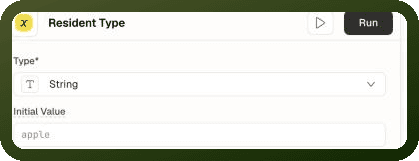
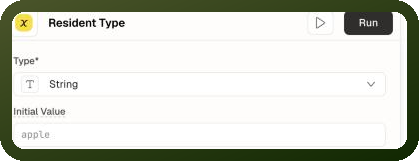
Every variable has three attributes:
Name — a human label shown in the builder.
Type — one of five:
string,number,boolean,object, orarray. The type decides which write operations are available.Initial Value — the value the variable starts with. Can be a fixed literal or a
{{ }}expression evaluated at page load.
Variable Types
Type | Stores | Available Write Operations |
|---|---|---|
string | Text values |
|
number | Numeric values |
|
boolean | True/false flags |
|
object | Key-value maps (JSON objects) |
|
array | Ordered lists |
|
Two Scopes: Page and App
Variables exist at two scopes:
| Scope | Visibility | Resets When | Use For |
| Page variable | Belongs to a single page — invisible to other pages | Navigating away from the page or reloading the app | UI state, selections, form drafts within a page |
| App variable | Available on every page in the app | Full browser reload or opening a new tab | State that must survive in-app navigation: selected workspace, global filter |
Note: App variables are page variables on the global page. Internally, an app variable is just a page variable declared on the app's global page entity. The same types, operations, and reactivity apply — only the scope and lifetime differ.
Creating a Variable
Open the Data panel from the builder's left rail.
Click the + icon and choose Variable.
Click the name in the panel header to rename the variable.
In Type, choose String, Number, Boolean, Object or Array.
Enter an Initial Value if you need one, then click Save & Run. Once the variable is saved, the button reads Run.
See Page Variables for every field and how initial values are converted.
Reading a Variable
Variables are read through {{ }} binding expressions. The binding scope exposes each variable under its ID (not its name), with the current value nested under ['value']:
Reading a variable in a binding
{{ var_abc['value'] }} // read by variable ID {{ var_cartCount['value'] }} // a number variable {{ var_filters['value'] }} // an object variable
Note: In the builder, type the variable's name. The expression editor shows variables by name (for example {{ selected_tab['value'] }}) and stores the variable's ID for you when it saves, so renaming a variable doesn't break your bindings. If you edit app JSON directly or work through the API or AI tooling, use the variable ID (var_abc) — the stored bindings are keyed by ID.
Writing a Variable
You never assign to a variable directly. Writes always go through the Control Variable action (actionType: "setPageVariable"), which applies a typed operation. You can also call setValue directly from a script or function — for example {{ var_abc.setValue('newValue') }}.
Control Variable action — toggle a boolean
{ "actionType": "setPageVariable", "payload": { "variableId": "var_showSidebar", "method": "setPageVariable", "operationDetails": { "operation": "TOGGLE" } } }
The method key is always setPageVariable. The builder fills it in for you, so other examples in these docs leave it out.
Reactivity
Variables are reactive. When a write lands, everything bound to that variable — block properties, visibility conditions, expressions, action inputs — re-computes immediately and the affected blocks re-render. You never refresh a reader manually; binding to the variable is the subscription.
After each write the stored value is frozen, so nothing downstream can quietly mutate it in place. A fresh write is always required to change it. This keeps reactivity honest — readers can trust that a value only changes when a write fires.
Initial Values
A variable's initial value is always stored as a string and evaluated once when the page opens. It can be:
A fixed literal converted to the declared type (
"false"for boolean,"42"for number,"{'status':'new'}"for object).A
{{ }}expression evaluated against the page's load-time context. The result is converted to the declared type.
A value that can't be converted becomes undefined. Boolean is the exception: "true" or "false" (any casing) give that boolean, any other non-empty value gives true, and an empty string gives false. For number, an empty string gives 0.
Warning: Initial value is a starting point, not a live binding. It is computed once at page load. The variable does not keep following the bound value afterwards — later changes come only through explicit writes (the action or setValue).
Persistence and Lifetime
Variable state lives only in memory. When a value must survive beyond the variable's lifetime, pair it with a storage action:
Scenario | Solution |
|---|---|
Value must survive navigating away and back to the same page | Promote to an app variable (app scope) |
Value must survive a full page reload (same browser tab) | Use the Control Session Storage action, then read it with |
Value must survive indefinitely across sessions and reloads | Use the Control Local Storage action, then read it with |
Value must be shareable via URL (bookmarkable) | Use the Set URL Parameters action, then read it with |
Scope and Reachability
The binding context determines which variables you can see:
Page-level bindings (blocks, functions, action inputs on a page) can read both the page's own variables AND app/global variables.
App-level bindings (app-level data sources, global page's own variables) can only read app/global variables — a specific page's variables are not visible there.
Note: If a value must be read from an app-level data source or from a different page, declare it as an app variable (on the global page) — not a page variable.
Variables vs. Functions
| Use a Variable when… | Use a Function when… |
| The value is set by user actions (clicks, form inputs, events) | The value is derived from other state (computed totals, filtered lists, formatted labels) |
| You need to store something that events write and blocks read | You want a value that always stays current with its inputs automatically |
| The value needs type-specific operations (increment, toggle, append) | The computation involves logic too complex for a single binding expression |
Common Gotchas
Page variables don't cross pages
A page variable set on page A doesn't exist on page B — navigating loses it. When two pages need the same value, promote it to an app variable or pass it through URL parameters.
Bindings are stored by ID, not name
Renaming a variable does not change its ID. The builder stores every binding by ID, so bindings survive a rename. If you edit app JSON or use the API, reference the variable by its ID — a name-based reference there won't resolve.
A write to a deleted variable silently does nothing
If a write targets a variable that no longer exists, the write is skipped without any visible error. Renaming or deleting a variable while actions still point at the old ID quietly breaks those actions.
MERGE is shallow
For object variables, the MERGE operation is shallow — a nested object is replaced outright, not deep-merged. To update a deeply nested field, use a full SET with the complete updated value.