


How Conditions Work
The platform never stores show/hide or run/skip logic as a raw JavaScript expression. Instead it stores a condition object — a structured, typed filter evaluated by the runtime's operator engine. This makes conditions predictable, inspectable, and consistent across visibility, editability, and action gating.
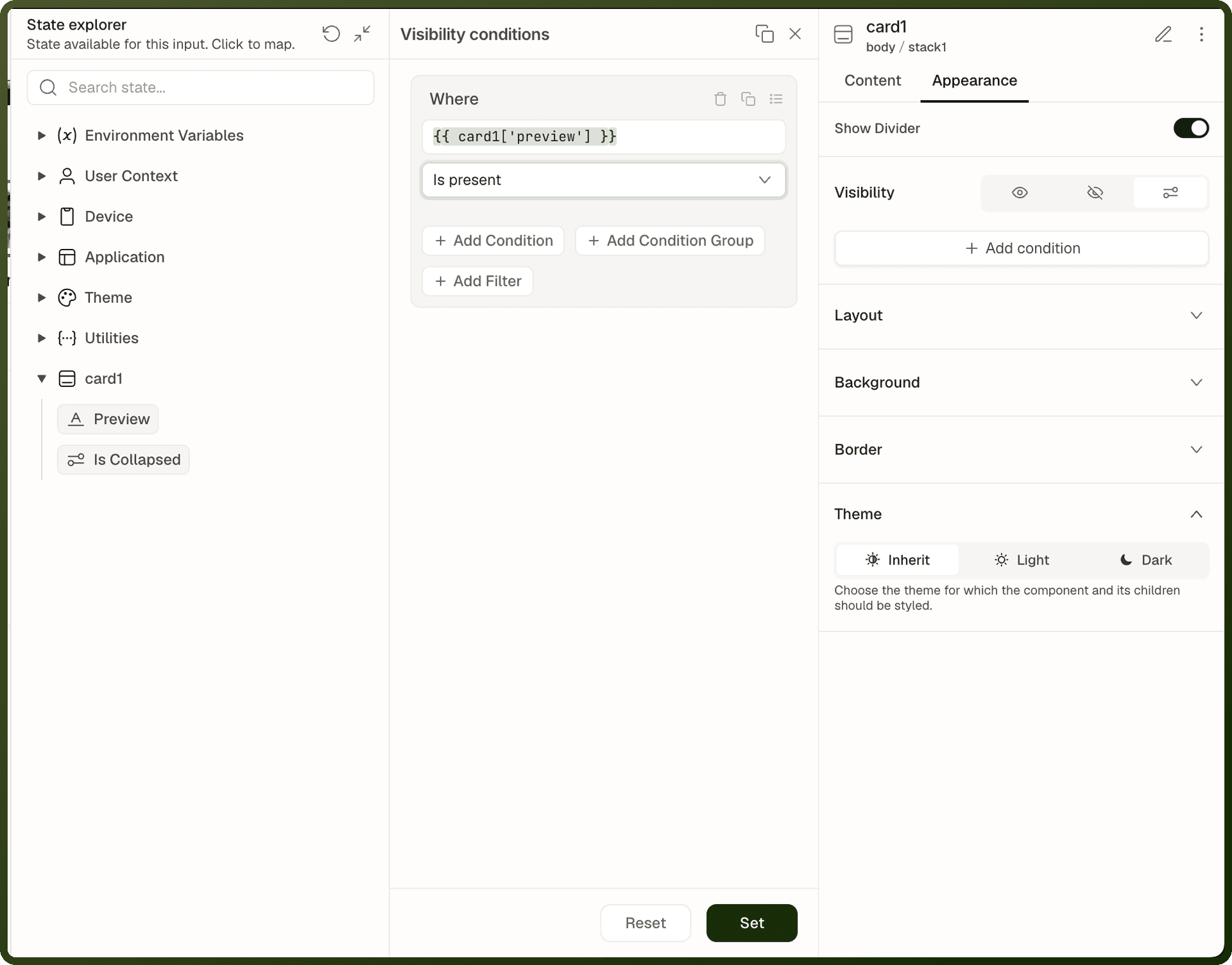
The same condition builder powers three distinct features:
Visibility — show or hide a component based on data, roles, or variables.
Disabled / Read-only — control whether a user can interact with a component.
Only run when (runCondition) — gate an action so it only executes when the condition holds.
Learn the condition builder once and you can drive all three consistently. For how Only run when fits into an event's actions, see Events & Actions Overview. For conditions on form fields, see Form Validation and Visibility.
Build a Condition in the Editor
Select the component and find its Visibility setting. Choose Conditions, the third icon after the eye (Visible) and the crossed-out eye (Hidden).
Click Add visibility conditions. The conditions panel opens.
In the Where row, enter the value to test as a binding, for example
{{ var_showPanel['value'] }}.Choose an operator, for example Equals to or Is present, and enter the value to compare with if the operator needs one. The Operator Reference below lists the operators by their builder label. Operators marked as not available in the condition builder can be used only in JSON or in form-field validation.
Click Add Condition to add another rule, or Add Condition Group to add a nested group of rules.
Click Set to apply the condition, or Reset to clear it. The Visibility setting then shows how many conditions are set.
Only run when on an action works the same way: open the condition from the action's Only run when field.
Condition Object Shape
A condition object is always one of two forms:
Form 1 — boolean literal
{ "type": "boolean", "payload": true } { "type": "boolean", "payload": false }
Form 2 — filter group
{ "type": "filter", "payload": { "operator": "AND", "filters": [ { "property": "{{ ds_currentUser['data']['role'] }}", "filter": { "operator": "EQUAL", "value": "admin" } } ] } }
Warning: Always wrap leaves in a group. Even for a single condition, write {"operator":"AND","filters":[<leaf>]} — this matches the builder's stored shape. A bare leaf at the root is parsed but is non-standard.
Component Visibility
Every component has a Visibility setting on its Appearance tab with three modes:
Mode | Icon | Behavior |
|---|---|---|
Visible | Eye | The component is always visible in the app. |
Hidden | Crossed-out eye | The component is hidden from users but still appears in the builder's hierarchy panel for editing. |
Conditions | Settings (sliders) icon | Visibility is controlled by a condition object. The component only renders when the condition evaluates to true. |
The stored shape for conditional visibility wraps the condition one level deeper:
JSON — block visibility with condition
"visibility": { "value": "conditions", "conditions": { "type": "filter", "payload": { "operator": "AND", "filters": [ { "property": "{{ ds_currentUser['data']['role'] }}", "filter": { "operator": "EQUAL", "value": "admin" } } ] } } }
Note: Per-device visibility: Visibility settings can be different per device breakpoint. You can show a component on desktop and hide it on mobile by configuring the setting separately for each device in the builder.
Disabled and Read-only
Interactive components can also be locked with a condition object. Each setting means what its name says, so the same condition has opposite effects on different settings:
Disabled (
appearance.disabled) — when the condition is true, the component is disabled and can't be used.Read-only on forms and form fields (
readOnly) — when the condition is true, users can see the value but can't change it.Required is a validation rule, not an editability setting: it decides whether a field must be filled before the form submits. See Form Validation and Visibility.
Disabled and read-only can be a fixed true or false (a boolean condition), or driven by a filter condition — useful for role-based access or data-driven form control.
Example — disable the Save button until the form is valid
The condition describes when the button is disabled, so it checks that the form is not valid (isValid Equals to "false"). The button is enabled as soon as the form becomes valid.
"disabled": { "type": "filter", "payload": { "operator": "AND", "filters": [ { "property": "{{ form_create.isValid }}", "filter": { "operator": "EQUAL", "value": "false" } } ] } }
Operator Reference
The condition engine supports a rich set of operators organized by data type. Each operator compares a property (a binding expression) against a value.
Group Operators
| Operator | Behavior |
| AND | All child conditions must be true |
| OR | At least one child condition must be true |
Equality Operators
Operator | Label in the builder | Behavior |
|---|---|---|
EQUAL | Equals to | Strict equality ( |
NOT_EQUAL | Does not equal | Strict inequality |
IN | In | Property value is in the provided list |
NOT_IN | Not in | Property value is not in the provided list |
Presence Operators
Operator | Label in the builder | Behavior | Important Edge Cases |
|---|---|---|---|
EXISTS | Is present | Property is not null/undefined | Empty string, 0, false, [], {} all return true |
MISSING | Is not present | Property is null or undefined | Empty string, 0, false, [] all return false. MISSING does not detect empty arrays. |
Warning: Common trap: MISSING only catches null and undefined. An API returning an empty array [] is NOT missing. Count the rows with ['length'] to detect empty arrays — see the recipe below.
Text Operators
Operator | Label in the builder | Behavior |
|---|---|---|
CONTAINS | Contains | String includes value (case-sensitive). Not for arrays — use IN for array membership. |
NOT_CONTAINS | Does not contain | Negation of CONTAINS |
STARTS_WITH / NOT_STARTS_WITH | Starts with / Does not start with (not available in the condition builder; JSON or form-field validation only) | String starts with value |
ENDS_WITH / NOT_ENDS_WITH | Ends with / Does not end with (not available in the condition builder; JSON or form-field validation only) | String ends with value |
REGEX / NOT_REGEX | Matches regex / Does not match regex | Regular expression match (case-sensitive) |
IREGEX / NOT_IREGEX | Matches regex case insensitive / Does not match regex case insensitive | Regular expression match (case-insensitive). Use these for case-insensitive text matching. |
MIN_LENGTH | Minimum length | String length is at least n. String-only — arrays return false. |
MAX_LENGTH | Maximum length | String length is at most n. String-only — arrays return false. |
Number Operators
Operator | Label in the builder | Behavior |
|---|---|---|
GT | Greater than | Greater than |
GTE | Greater than or equal to | Greater than or equal to |
LT | Less than | Less than |
LTE | Less than or equal to | Less than or equal to |
Date & Time Operators
Operator | Label in the builder | Behavior |
|---|---|---|
DATE_IS_BEFORE | Is before | Date is strictly before value |
DATE_IS_AFTER | Is after | Date is strictly after value |
DATE_IS_ON_OR_BEFORE | Is on or before | Date is on or before value |
DATE_IS_ON_OR_AFTER | Is on or after | Date is on or after value |
TIME_IS_BEFORE / TIME_IS_AFTER | Is before / Is after (time fields; not available in the condition builder; JSON or form-field validation only) | Time comparison |
TIME_IS_EQUAL_TO | Is equal to | Exact time match |
TIME_IS_EQUAL_TO_OR_BEFORE / _AFTER | Is equal to or before / Is equal to or after | Time comparison with equality |
Nesting Condition Groups
Groups can be nested recursively to express complex logic. An OR inside an AND is valid:
JSON — nested AND / OR group
{ "type": "filter", "payload": { "operator": "AND", "filters": [ { "property": "{{ ds_currentUser['data']['isActive'] }}", "filter": { "operator": "EQUAL", "value": "true" } }, { "operator": "OR", "filters": [ { "property": "{{ ds_currentUser['data']['role'] }}", "filter": { "operator": "EQUAL", "value": "admin" } }, { "property": "{{ ds_currentUser['data']['role'] }}", "filter": { "operator": "EQUAL", "value": "manager" } } ] } ] } }
Recipe: Detect an Empty Data Source Result
A data source that returns [] is not MISSING, and a data source that hasn't run yet has no data at all. Use this pattern to detect the "no results" state correctly. It is a complete condition object, wrapped in {"type":"filter","payload":…}:
Recipe — show "No results" when data source returns empty array
{ "type": "filter", "payload": { "operator": "AND", "filters": [ { "property": "{{ ds_orders['isLoading'] }}", "filter": { "operator": "EQUAL", "value": "false" } }, { "property": "{{ ds_orders['error'] }}", "filter": { "operator": "MISSING" } }, { "property": "{{ ds_orders['data'] }}", "filter": { "operator": "EXISTS" } }, { "property": "{{ ds_orders['data']['objects']['length'] }}", "filter": { "operator": "EQUAL", "value": "0" } } ] } }
The rows sit inside the response at a path that depends on the data source — ['data']['objects'] here — so use the same path you bind the rows to, plus ['length']. Don't use data MISSING to mean empty: it is also true before the data source has run, while it loads and when it fails.
Where Conditions Apply
The condition object is used in these places:
| Context | Property Path | Shape |
| Block visibility | block.visibility | {"value": "conditions", "conditions": {type,payload}} |
| Block disabled state | block.appearance.disabled | {"type": "filter"|"boolean", "payload": ...} |
| Block loading state | block.appearance.loading | {"type": "filter"|"boolean", "payload": ...} |
| Form read-only | block.readOnly | {"type": "filter"|"boolean", "payload": ...} |
| Action run condition | action.runCondition | {"type": "filter"|"boolean", "payload": ...} |
| Table cell conditional formatting | column.conditions | {"type": "filter"|"boolean", "payload": ...} |
| Data source disabled (Disable query on the Advanced tab; see Run Behavior & Triggering) | queryDisabled | {"type": "filter"|"boolean", "payload": ...} |
Warning: Do not conflate shapes. The visibility property uses {"value": "conditions", "conditions": {…}}, which is different from disabled and loading, which accept the condition object directly. Using the wrong shape silently does nothing.
Referencing Data in Conditions
The property field in each leaf is a binding expression — any {{ }} expression is valid. This means conditions can reference:
Page variables:
{{ var_abc['value'] }}Current user:
{{ userContext.email }},{{ userContext.id }}Data source output:
{{ ds_orders['data']['length'] }}Component state:
{{ form_create['isValid'] }}URL parameters:
{{ pageInputs['status'] }}
Note: Silent failures: A binding in a condition that fails to resolve is treated as undefined. MISSING will fire; EXISTS will not. A broken binding in a visibility condition makes the block behave as if the condition returned nothing — meaning it may show or hide unexpectedly.
Common Patterns
Role-Based Visibility
Show a component only to admins, using the role returned by a data source that loads the current user's record (here ds_currentUser):
JSON — admin-only visibility
"visibility": { "value": "conditions", "conditions": { "type": "filter", "payload": { "operator": "AND", "filters": [ { "property": "{{ ds_currentUser['data']['role'] }}", "filter": { "operator": "EQUAL", "value": "admin" } } ] } } }
Variable-Driven Visibility
Show a panel only when a toggle variable is true:
JSON — show panel when toggle is on
"visibility": { "value": "conditions", "conditions": { "type": "filter", "payload": { "operator": "AND", "filters": [ { "property": "{{ var_showPanel['value'] }}", "filter": { "operator": "EQUAL", "value": "true" } } ] } } }
Gate an Action with runCondition
Only send an email notification when a checkbox is checked:
JSON — action with runCondition
{ "actionType": "controlDataSource", "payload": { "dataSourceId": "ds_sendEmail", "method": "trigger" }, "id": "act_email", "runCondition": { "type": "filter", "payload": { "operator": "AND", "filters": [ { "property": "{{ checkbox_notify['value'] }}", "filter": { "operator": "EQUAL", "value": "true" } } ] } } }
Edge Cases and Gotchas
EQUAL with empty string
EQUAL coerces numbers via Number(). An empty string converted to a number is NaN, which is never equal to anything — so EQUAL will always fail if the property binding resolves to "".
Comparing booleans
The value box always stores text, so write booleans as "true" or "false", as the examples on this page do. Equals to converts the value to the type of the property before comparing, so "true" matches a boolean true — for example {{ var_showPanel['value'] }} Equals to "true".
MIN_LENGTH / MAX_LENGTH are string-only
These operators check typeof value !== 'string' first. An array returns false regardless of length. Use EQUAL with the ['length'] suffix instead for arrays.
Empty filter groups
An empty AND group (filters: []) evaluates to true (match all). An empty OR group evaluates to false (match none). Never write empty groups intentionally — always include at least one leaf.