


Every data source declares a Run Behaviour — Automatic or Manual — and that single setting decides when it executes. Automatic means the platform runs it for you: when a block that uses it renders on screen, and again whenever an input it depends on changes. It also runs on page load if Run query on page load is on. Manual means it never runs until something explicitly triggers it. Picking the right behavior is the difference between a page that stays in sync by itself and a query that fires exactly once, when you say so.
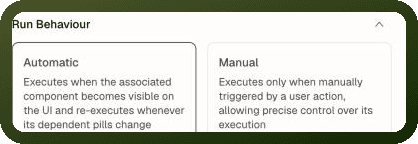
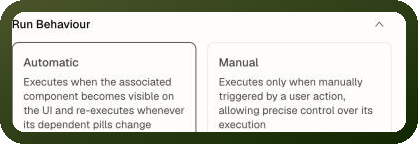
Note: Open the data source's Input tab in the inspector. The Run Behaviour control shows Automatic and Manual. Read operations default to Automatic; write operations (mutations) default to Manual.
Automatic: Runs Itself, Re-runs on Change
An automatic data source is reactive. It runs without any action wiring, and whenever a value its configuration is bound to changes — a page input, another data source's result, a block's state — it re-runs with the fresh values and all bound blocks update.
When an Automatic Data Source Runs
| # | Trigger | When it fires |
| 1 | Page load | Only if Run query on page load is enabled (Advanced tab). |
| 2 | A consumer renders | When a block that references this data source mounts on screen — even if page-load is off. |
| 3 | Its inputs change | Whenever a bound input's value changes (reactive re-run). This is what makes a search-as-you-type query work with no event handler. |
| 4 | Window regains focus | On web, refetch on tab focus is on by default. On mobile, it is opt-in (off by default). |
| 5 | Polling interval fires | If Run query periodically is enabled with a positive interval. |
| 6 | Trigger data source action | An explicit trigger invalidates the cache and re-fetches. For a data source that has already loaded, chained actions after the trigger see the refreshed result. |
Warning: An automatic data source re-runs when its bound inputs change. If the data changes on the backend while the page's inputs stay the same, the data source won't notice. Use polling or an explicit refresh for server-side changes.
Manual: Runs Only When Told To
A manual data source does nothing on its own. It runs when something fires it — most commonly the Trigger Data Source action on a button click or another event. Each trigger is a fresh, one-shot run.
Two Key Consequences of Manual Mode
| Consequence | Details |
| Changed inputs wait for the next trigger | If a manual data source's bound inputs change after a run, the result on screen stays as it was — the new values are only picked up when the source is triggered again. |
| Nothing runs it indirectly | An automatic data source whose inputs reference a manual one does not cause the manual one to run. The reference resolves to an empty value until the manual source has been triggered. |
Tip: Use manual run behavior for anything with side effects or cost — a save, an export, an expensive report — where "runs whenever an input wiggles" would be wrong.
Advanced Options
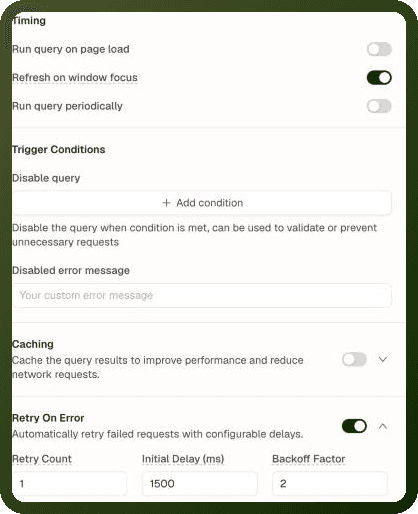
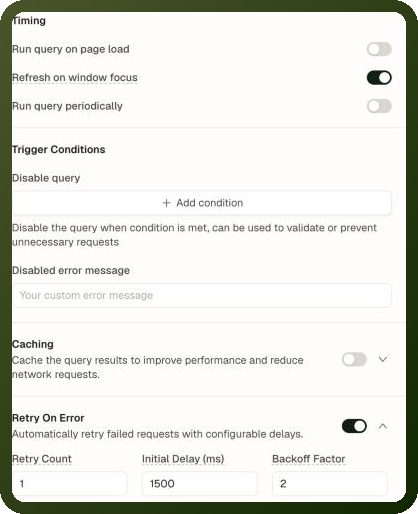
These settings live on the data source's Advanced tab under Timing and Trigger Conditions. Run Behaviour itself is on the Input tab: it defaults to Automatic for read operations and Manual for write operations. The Caching and Retry On Error sections of the Advanced tab are covered in Caching & Refetch.
Setting | Key | Default | Description |
|---|---|---|---|
Run query on page load |
| Off | Run at page load. For automatic + page load on: runs at load AND on reactive changes. For manual + page load on: a single seed run at load, then only on explicit trigger. |
Refresh on window focus (Refetch on page focus in mobile apps) |
| On (web) / Off (mobile) | Refetch an already-loaded source when the tab/screen regains focus. |
Run query periodically |
| Off | Enable polling. Must be combined with a positive Query Interval (ms). |
Query Interval (ms) |
| — | Polling interval in milliseconds. Only used when Run query periodically is on. |
Disable query |
| — | A condition expression. While truthy, the data source does NOT fire for any reason — page load, input changes, or explicit triggers all silently skip. |
Disabled error message |
| — | Snackbar message shown when Disable query blocks a run. Without this, nothing appears and there is no indication the query was skipped. |
Page Load Order & Dependency Sequencing
When a page opens, every data source with Run query on page load enabled is queued. Runs are dependency-ordered, not simultaneous:
If data source B's inputs use data source A's result, B waits until A has finished.
A data source with no dependencies runs straight away.
You define this ordering by binding one data source's output into another's inputs — no manual sequencing required.
Example — Dependency chain
// Data source A: fetch the current user profile user_profile → runs first (no dependencies) // Data source B: fetch orders for that user // Its input binds to A's result: orders_query input: customerId: {{ user_profile.data.id }} // Result: B automatically waits for A to finish before running. // No manual sequencing needed.
On-Success and On-Failure Events
After a run finishes, the data source fires its On Success or On Failure event. These are the reliable completion signals for chaining follow-up actions.
Warning: Actions chained after a Trigger Data Source action wait for the run to finish for Manual sources and for Automatic sources that have already loaded — so a "show success toast" action after the trigger sees the result. If an Automatic source hasn't loaded yet, the trigger only queues it and the next action runs straight away. For logic that must run after fresh data arrives in that case, use the data source's own On Success event.
| Event | Fires when | Typical use |
| On Success | The run completes successfully. | Show a success toast, navigate to a result page, refresh a dependent list. |
| On Failure | The run errors. | Show an error message. Access {{ ds.error.message }} in the event for the error text. |
Legacy Mode
Data sources created before run behavior existed have no mode set. The platform treats them like automatic sources — they run on page load and participate in dependency ordering — but triggering them from an action behaves slightly differently: a legacy source only re-fetches if it has already loaded once.
Tip: Set an explicit run behavior (Automatic or Manual) on any old data source to move it onto the current rules and remove the ambiguity.
Disable Conditions — Gating a Run
The Disable query condition holds off a fetch until inputs are ready — for example, blocking a query until a filter has been chosen. While the condition evaluates truthy, an automatic source is treated as finished without fetching; triggers and page load are also suppressed.
Example — Only run when a filter is selected
// Disable query condition: {{ !status_filter.value }} // Disabled error message: "Please select a status to load orders." // Result: the data source does not run until the user // picks a value in status_filter.
Gotchas
Gotcha | Details |
|---|---|
Manual source shows nothing on load | A block bound to a manual source shows nothing until the source is triggered. Make the source automatic (or manual + Run query on page load) if you need data on the initial render. |
Manual dependency is a dead end for reactivity | Once a manual source sits in a binding chain, everything downstream only updates when it is triggered. Automatic sources around it cannot pull it along. |
Rapid input changes = many runs | An automatic source whose input is bound to unthrottled typing re-fetches on every keystroke. Prefer binding to a settled value (e.g. after a debounce) or use manual mode. |
A silent disable condition | A data source with a disable condition that evaluates truthy silently skips every run — page load, input changes, and explicit triggers. Add a |
Triggering an Automatic source that hasn't loaded | Chained actions after Trigger Data Source wait for the run for Manual sources and already-loaded Automatic sources. An Automatic source that hasn't loaded yet is only queued, so the next action runs before its data arrives — put follow-up logic in its On Success event. |