


Actions at a Glance
Most user and auth operations are unified under the controlUser action. The builder exposes them through a User Action dropdown. The login action is separate and used specifically for the sign-in page.
Action Type | User Action Value | Builder Label | Use When |
|---|---|---|---|
login | — | Login | Sign-in page: SSO redirect or password form submission |
controlUser | logout | Control User → Logout | Sign the current user out |
controlUser | refreshUserContext | Control User → Refresh User Context | Re-fetch user details after a backend change |
controlUser | signInWithSSO | Control User → Sign In with SSO | Mobile only: trigger SSO login in system browser |
controlUser | checkAuth | Control User → Check Auth | Mobile only: re-check the app's sign-in state |
controlUser | setLanguage | Control User → Set Language | Switch the app's language/locale |
controlUser | setTheme | Control User → Set Color Scheme | Switch between light, dark, or system color scheme |
controlUser | setInterfaceTheme | Control User → Set Theme | Switch the active interface theme |
controlUser | setUserPreference | Control User → Set User Preference | Save an arbitrary user preference key-value |
controlUser | startImpersonation | Control User → Start impersonation | Web only: act as another user (needs impersonation switched on) |
controlUser | stopImpersonation | Control User → Stop impersonation | Web only: end impersonation and return to your own session |
login — Login
Signs the current user in against a chosen identity provider. Handles both SAML SSO redirect and password form submission. Used on sign-in pages only — both paths trigger a full-page navigation, so no follow-up action in the chain will run after login starts.
Parameters
Parameter | Type | Required | Default | Description |
|---|---|---|---|---|
method | "sso" or "password" | Required | None |
|
identityProviderId | string | Required | — | The identity provider to authenticate against. If missing, the action silently does nothing — no redirect, no form post, no message. |
Warning: Login is a full-page navigation. SSO and a successful password sign-in trigger a full-page redirect. If password sign-in fails, an error snackbar shows the server's message and the user stays on the page. Any unsaved page state is lost and no later action in the same chain runs after login fires. Web only — mobile uses controlUser → signInWithSSO instead.
Note: Post-login destination: The action reads returnTo from the current URL and passes it through so the user lands back where they started. Use /login?returnTo=/dashboard to redirect after authentication.
Examples
SSO login from a Sign In button
{ "actionType": "login", "payload": { "method": "sso", "identityProviderId": "idp_company_saml" } }
Password login from a form submit
{ "actionType": "login", "payload": { "method": "password", "identityProviderId": "idp_local_password" } }
controlUser → Logout
Ends the current user's session. On web it signs out on the server and navigates to the home path /. On mobile it clears the stored session and returns to the logged-out screen.
Parameters
Parameter | Type | Required | Default | Description |
|---|---|---|---|---|
userControlAction | "logout" | Required | — | Must be the exact string |
softLogout | boolean | Optional | On | Shown as Remember this user after logout, only in mobile apps with a biometric identity provider enabled. On: the app signs the user out but remembers their name and details for the next sign-in (soft logout). Off: full sign-out that clears all stored data (hard logout). |
Note: Mobile biometrics: When softLogout is set, it decides the logout type. When it isn't set, the mobile app infers it: the logout is "soft" if a biometric identity provider is enabled — enough state is kept for biometric re-authentication — and "hard" otherwise, wiping all stored data. On web, logout is always hard.
Sign out button
{ "actionType": "controlUser", "payload": { "userControlAction": "logout" } }
controlUser → Refresh User Context
Re-fetches the signed-in user's details and refreshes all bindings that read {{ userContext.* }}. Use it after a backend operation that changes the user's profile, roles, or preferences — without requiring a re-login.
Refresh user context after updating profile
{ "actionType": "controlUser", "payload": { "userControlAction": "refreshUserContext" } }
controlUser → Sign In with SSO (Mobile)
On native mobile apps, opens a system browser to complete SSO authentication and starts a session. On web this action shows a warning and does nothing.
Parameters
| Parameter | Type | Required | Default | Description |
| userControlAction | "signInWithSSO" | Required | — | Must be "signInWithSSO". Only available when app type is mobile. |
| identityProviderId | string | Required | — | The identity provider to authenticate against. |
Mobile SSO sign-in
{ "actionType": "controlUser", "payload": { "userControlAction": "signInWithSSO", "identityProviderId": "idp_company_saml" } }
controlUser → Check Auth (Mobile)
Re-checks the mobile app's sign-in state against the stored session. If a session exists but the app still shows the user as signed out, it completes the sign-in. If the session is gone but the app still shows the user as signed in, it signs the user out. Use it after a sign-in or sign-out that happened outside the app's normal flow. It takes no other fields. Check Auth appears in the User Action dropdown only in mobile apps; in a web app it does nothing and still reports success.
Re-check the session
{ "actionType": "controlUser", "payload": { "userControlAction": "checkAuth" } }
controlUser → Set Language
Switches the app's language/locale for the signed-in user. On a private interface it saves the choice; on a public interface it holds the choice in page state. Switching to a right-to-left language may reload the app to relayout.
Parameters
| Parameter | Type | Required | Default | Description |
| userControlAction | "setLanguage" | Required | — | Must be "setLanguage". |
| language | string (locale) | Required | "en-US" | The locale to switch to. The builder pre-selects en-US when you add the action, and the field can't be left empty. Must be one of the interface's allowed locales; unsupported locales are silently ignored. |
Language selector button
{ "actionType": "controlUser", "payload": { "userControlAction": "setLanguage", "language": "{{ select_language['value'] }}" } }
controlUser → Set Color Scheme
Switches between light, dark, and system color schemes. Stored as userControlAction: "setTheme" (legacy name for backward compatibility).
Warning: Naming mismatch: "Set Color Scheme" in the builder stores userControlAction: "setTheme", NOT "setColorScheme". "Set Theme" (the interface theme picker) stores "setInterfaceTheme". Do not confuse the two.
Parameters
| Parameter | Type | Required | Default | Description |
| userControlAction | "setTheme" | Required | — | Must be "setTheme" (legacy name for Set Color Scheme). |
| theme | "light" | "dark" | "system" | Required | — | Color scheme to apply. system follows the device/OS setting. The field is named theme (not colorScheme) for backward compatibility. |
Dark mode toggle
{ "actionType": "controlUser", "payload": { "userControlAction": "setTheme", "theme": "dark" } }
controlUser → Set Theme
Switches the app to one of its themes, such as a brand theme. Choose the theme in the Theme dropdown. It is stored as userControlAction: "setInterfaceTheme" with the theme's ID in themeId. For light and dark mode, use Set Color Scheme instead. To create themes, see Theme Builder.
Parameters
Parameter | Type | Required | Default | Description |
|---|---|---|---|---|
userControlAction | "setInterfaceTheme" | Required | — | Must be |
themeId | string | — | — | The theme to apply. Pick it in Theme. |
Switch to a brand theme
{ "actionType": "controlUser", "payload": { "userControlAction": "setInterfaceTheme", "themeId": "e_theme_brand_dark" } }
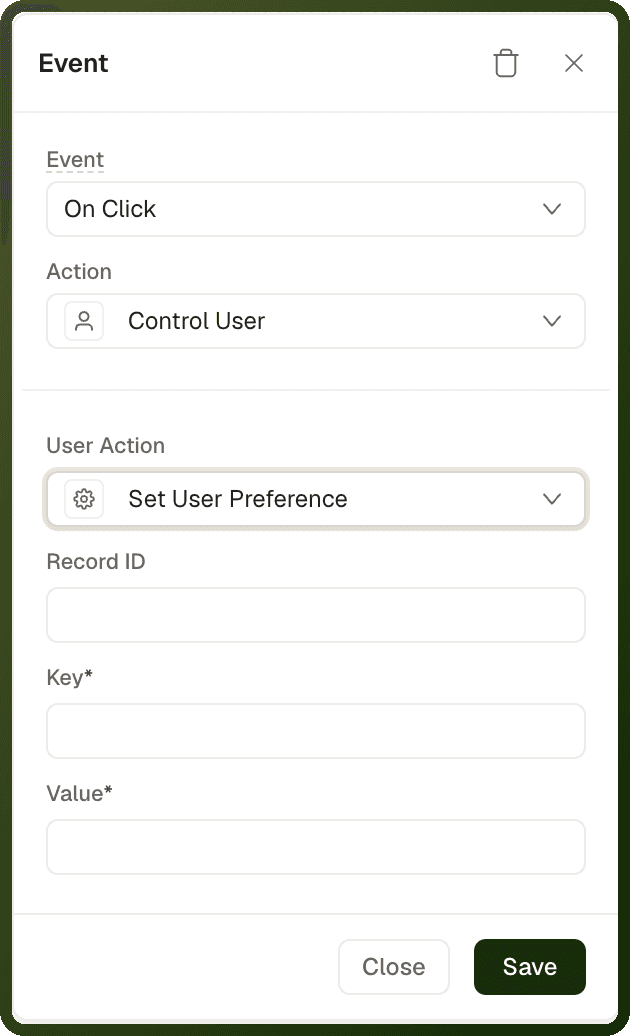
controlUser → Set User Preference
Saves an arbitrary key-value preference for the signed-in user, scoped to this interface. Use it to persist any user choice that doesn't fit the built-in language, theme, or color scheme options.
Parameters
| Parameter | Type | Required | Default | Description |
| userControlAction | "setUserPreference" | Required | — | Must be "setUserPreference". |
| key | string | Required | — | The preference key to write. |
| value | any | Required | — | The value to store. Evaluated before saving. Supports bindings. |
| recordId | string | Optional | — | Optional record ID the preference is scoped to. |
Save a preferred view mode
{ "actionType": "controlUser", "payload": { "userControlAction": "setUserPreference", "key": "orders_view_mode", "value": "{{ toggle_viewMode['value'] }}" } }
controlUser → Start impersonation and Stop impersonation (Web)
Lets a signed-in user act as another user, and then return to their own session. These two options appear in the User Action dropdown only in web apps, and only when impersonation is switched on for the platform and for the app. They work only in the published app. In the builder they show a warning instead.
Parameters
Parameter | Type | Required | Default | Description |
|---|---|---|---|---|
userControlAction | "startImpersonation" or "stopImpersonation" | Required | — | Must be the exact string |
targetUserId | string | Required for Start impersonation | — | The ID of the user to impersonate. Shown as User ID. Stop impersonation takes no other fields. |
Start impersonating a user
{ "actionType": "controlUser", "payload": { "userControlAction": "startImpersonation", "targetUserId": "{{ currentRow['id'] }}" } }
User Action Values Quick Reference
Builder Label | Stored userControlAction | Platform |
|---|---|---|
Set User Preference | setUserPreference | Web + Mobile |
Set Language | setLanguage | Web + Mobile |
Set Color Scheme | setTheme | Web + Mobile |
Set Theme | setInterfaceTheme | Web + Mobile |
Refresh User Context | refreshUserContext | Web + Mobile |
Logout | logout | Web + Mobile |
Check Auth | checkAuth | Mobile only |
Sign In with SSO | signInWithSSO | Mobile only |
Start impersonation | startImpersonation | Web only |
Stop impersonation | stopImpersonation | Web only |