


What Is a Page Variable?
A page variable is a named, typed slot of in-memory state that belongs to a single page. Blocks on the page bind to it, actions change it, and it exists only while the visitor is on that page.
Page variables are the page-scoped tier of the variable system. See Variables Overview for how page scope compares to app scope.
Creating and Configuring a Variable
Create variables from the builder's Data panel, alongside data sources and functions. Open Data from the left rail, click the + icon and choose Variable. Each variable requires:
Give it a name: Click the name in the panel header to rename it. The name is a human label shown in the builder and used in auto-named references. Must be unique, ignoring case, across the page's and app's variables, functions, blocks, data sources and folders. Renaming does NOT change the ID — ID-based bindings survive a rename.
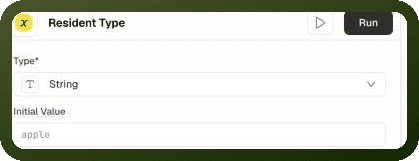
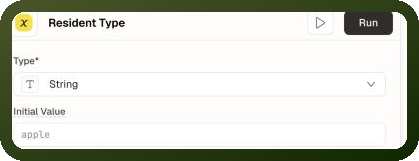
Choose a type: In Type, choose String, Number, Boolean, Object or Array (stored as lowercase
string,number,boolean,object,array). The type is not cosmetic — it determines which operations are available when writing.Set an initial value (optional): In Initial Value, enter the value the variable starts with when the page opens. Always stored as a string — the runtime converts it to the declared type at load time. Click Save & Run to save a new variable and evaluate the value. Once the variable is saved, the button reads Run. The play icon (Preview) evaluates the value without saving.
Stored Configuration Shape
A page variable is stored as an entry in page.properties.pageVariables — an ID-keyed map. Here is the shape of a real entry:
JSON — a boolean page variable
{ "id": "var_DSBrc", "name": "show_pan", "type": "boolean", "createdTime": 1750196246281, "initialValue": "false" }
Field Reference
Field | Required | Description |
|---|---|---|
id | Required | Stable handle, |
name | Required | Human label shown in the builder. Must be unique, ignoring case, across the page's and app's variables, functions, blocks, data sources and folders. Renaming does NOT change the id. |
type | Required | One of the five type strings (lowercase). Decides which |
createdTime | Required | Epoch-ms number. Stamped at creation. Not read by bindings. |
initialValue | Optional | A STRING seed evaluated at page load. Omitted means the variable starts as |
parentId | Optional | Folder ID for organizing variables in the builder's left-panel tree. Organizational only — no effect on runtime or bindings. |
Initial Value Contract
initialValue is always stored as a string — even for number, boolean, object, and array variables. At page load it is evaluated once:
Type | Initial Value String | Result |
|---|---|---|
string |
| The text "false" (used as-is) |
number |
| The number 42. Non-numeric → undefined. An empty string → 0. |
boolean |
| The boolean true or false (case-insensitive). Any other non-empty string → true. An empty string → false. |
object |
| Parsed as JSON (or JS-style). Must yield a plain object or → undefined. |
array |
| Parsed as JSON (or JS-style). Must yield an array or → undefined. |
any |
| Expression evaluated at page load, result converted to the declared type by the same rules. |
Note: An initial value is evaluated before the page's data sources, other variables and functions are available, so it can't read them — it can read page inputs, page parameters, blocks and app-level values. To seed a variable from a data source, add a setPageVariable action to the data source's On Success event handlers.
Reading a Page Variable
Variables are exposed in the binding scope under their ID, with the current value nested under ['value']:
Reading in binding expressions
// Read the variable's value {{ var_DSBrc['value'] }} // Use in a visibility condition // property: {{ var_DSBrc['value'] }} operator: EQUAL value: true // Call setValue directly from a script or function {{ var_DSBrc.setValue(true) }}
Writing a Page Variable
Writes go through the Control Variable action (setPageVariable). The available operations depend on the declared type:
Operations by Type
Type | Operation (builder label) | Effect |
|---|---|---|
string |
| Replace the value |
string |
| Add the given text to the end of the string |
string |
| Add the given text to the beginning of the string |
number |
| Replace the value |
number |
| Add the given number to the current value |
number |
| Subtract the given number from the current value |
boolean |
| Replace with true or false |
boolean |
| Flip to the opposite value. No value needed. |
object |
| Replace the entire object |
object |
| Shallow-merge the given keys into the current object |
object |
| Delete a key (or an array of keys) from the object |
array |
| Replace the entire array |
array |
| Append the items of the given array to the end. The value must be an array — wrap a single item: |
array |
| Add the items of the given array to the beginning. The value must be an array — wrap a single item: |
array |
| Remove the last item. No value needed. |
array |
| Remove the first item. No value needed. |
array |
| Remove the item at the given index (0-based). The value is an index, not an item. |
array |
| Remove all items equal to the given value |
When Variables Reset
Page variables live in memory only. They reset to their initial values when:
The visitor navigates away from the page (including to another page in the same app)
The browser tab is reloaded
They do NOT reset when:
A Modal, Drawer, or Bottom Sheet is opened or closed
Tabs are switched within a Tabs block
These operations keep the visitor on the same page and do not mount a new page, so page variables are untouched.
App Scope vs Page Scope
| Scenario | Use Page Variable | Use App Variable |
| State only needed on one page | Yes | No |
| State must survive navigating to another page | No | Yes |
| State must survive a browser tab reload | No | No — use local/session storage |
| State needed by an app-level data source | No | Yes |
Practical Examples
Selected row variable — open modal with record data
// Variable: var_selectedRow (type: object) // On row click event — two sequential actions: // 1. Set the variable with the selected row { "actionType": "setPageVariable", "payload": { "variableId": "var_selectedRow", "operationDetails": { "operation": "SET", "value": "{{ row }}" } } } // 2. Open the edit modal { "actionType": "controlModal", "payload": { "modalId": "b_editModal", "operation": "show" } } // Inside the modal, bind fields to: {{ var_selectedRow['value']['name'] }} {{ var_selectedRow['value']['email'] }}
Step counter variable for a multi-step form
// Variable: var_currentStep (type: number, initialValue: "1") // Next button: { "actionType": "setPageVariable", "payload": { "variableId": "var_currentStep", "operationDetails": { "operation": "INCREMENT_BY", "value": "{{ 1 }}" } } } // Previous button: { "actionType": "setPageVariable", "payload": { "variableId": "var_currentStep", "operationDetails": { "operation": "DECREMENT_BY", "value": "{{ 1 }}" } } } // Bind each step's visibility: // Step 2 visibility: {{ var_currentStep['value'] }} EQUAL 2
Filter state variable — object type
// Variable: var_filters (type: object, initialValue: "{}") // When status filter changes: { "actionType": "setPageVariable", "payload": { "variableId": "var_filters", "operationDetails": { "operation": "MERGE", "value": "{{ { status: select_status['value'] } }}" } } } // Bind data source parameter: {{ var_filters['value']['status'] }}
Troubleshooting
Variable is empty or back to default when I return to the page
Expected behavior — page variables reset every time the page opens fresh, including navigating away and back. Use an app variable or local storage for state that must survive navigation.
Wrong operations available for my variable
Operations are gated by type. Changing a variable's type changes which operations exist — interactions built on the old type may need reconfiguring. Numeric operations reject non-numeric input silently (value keeps previous state).
Write is not working — variable shows stale value
Check that: (1) the variableId in the action still matches the variable's ID (it may have been deleted and recreated), (2) the operation is valid for the variable's type, (3) the action is actually firing. To check (3), open Dev Tools → Pulse, trigger the event and look for the Control Variable action row (Page variable set). You can also add a Log to debugger action before the write. See Dev Tools & Debugger and Log to Debugger.