


Actions at a Glance
Action Type | Builder Label | Use When |
|---|---|---|
exportData | Export Data | Generate a CSV/XLS/XLSX from records bound to a variable or data source |
controlBlockMethod | Trigger Component Method → Export Block | Download a block as a PNG image (web apps only) |
downloadFile | Download File | Download an existing file from a URL |
importObjects | Import Objects | Open the import wizard so users can import records into an object |
copyToClipboard | Copy to Clipboard | Write a text or value to the clipboard |
Adding One of These Actions
Select the block that starts the action, for example a Button, and open its Interactions section.
Click + (Add Interaction) and choose the Event, for example On Click.
In Action, choose the action and fill in the fields that appear below it.
Action | Fields you fill in |
|---|---|
Export Data | Data, File name, File type, and Sheet name (XLS and XLSX only) |
Trigger Component Method → Export Block | Component (the block to export), Method |
Download File | URL, File Name |
Import Objects | Object, Object Inputs (an Entity field name and a Value per row) |
Copy to Clipboard | Value |
exportData — Export Data
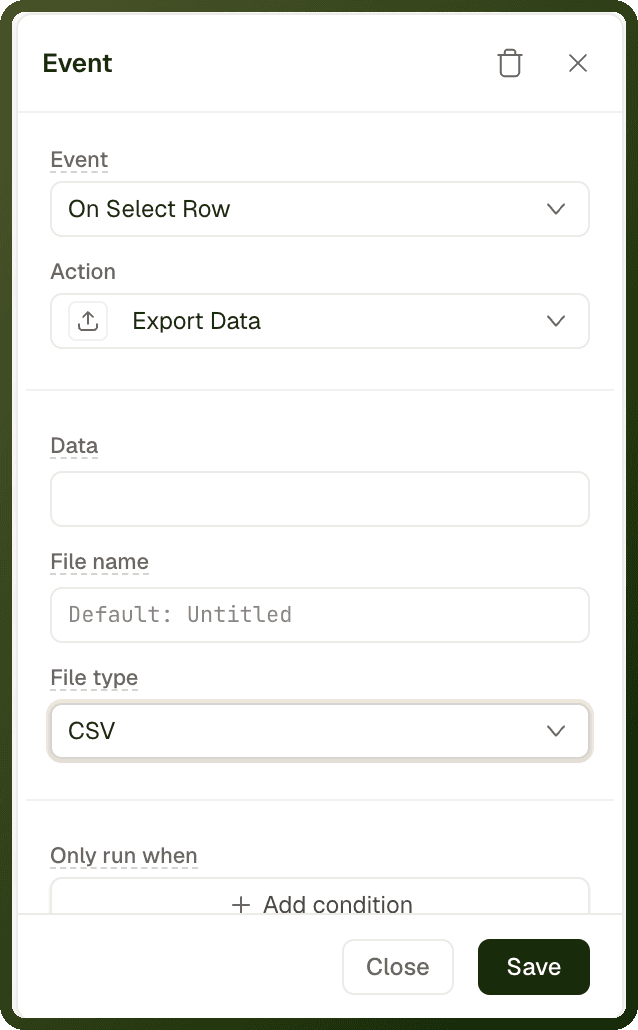
Generates a spreadsheet (CSV, XLS, or XLSX) from an array of records and hands it to the user for download. The data is bound via a binding expression — it is not tied to a specific table block. Use it when the file does not yet exist and must be generated from records already in memory or from a data source.
Parameters
Parameter | Type | Required | Default | Description |
|---|---|---|---|---|
data | string (binding) | Required | — | The records to export, bound to a JSON array of objects. For example: |
fileName | string | Optional | "Untitled" | The filename without extension. The file type extension is appended automatically. Supports bindings. |
fileType | "CSV" | "XLS" | "XLSX" | Optional | "CSV" | The output file format. |
sheetName | string | Optional | "Sheet1" | The name of the worksheet tab. The Sheet name field appears only when File type is XLS or XLSX. |
Examples
Export a data source's rows as CSV
{ "actionType": "exportData", "payload": { "data": "{{ ds_orders['data'] }}", "fileName": "orders-{{ utils.formatDate(new Date(), 'YYYY-MM-DD') }}", "fileType": "CSV" } }
Export as XLSX with a custom sheet name
{ "actionType": "exportData", "payload": { "data": "{{ var_reportData['value'] }}", "fileName": "Monthly Report", "fileType": "XLSX", "sheetName": "Sales Summary" } }
Export Block (component method)
Export Block is not a standalone action. It is a method you run with the Trigger Component Method action. It downloads a PNG image of the block as it currently appears on screen — useful for charts, dashboards and summary cards.
The output is always a PNG named
captured-image.png. There is no file type or file name option, and PDF is not supported.It works in web apps only. In a mobile app it does nothing.
How to set it up
Add Trigger Component Method to a button's On Click event.
In Component, select the block to export, for example a chart.
In Method, choose Export Block.
For the other methods of Trigger Component Method, see UI Control Actions.
downloadFile — Download File
Downloads an existing file from a URL to the user's device. Use this when the file already exists at a URL (e.g. a document stored in a cloud bucket). For generating a new file from records, use exportData instead.
Parameters
| Parameter | Type | Required | Default | Description |
| url | string (URL) | Required | — | The URL of the file to download. Supports bindings for dynamic file URLs. |
| fileName | string | Optional | From URL | The filename to save the download as. If omitted, the filename is inferred from the URL. |
Download a row's attached document
{ "actionType": "downloadFile", "payload": { "url": "{{ currentRow.attachmentUrl }}", "fileName": "{{ currentRow.documentName }}.pdf" } }
importObjects — Import Objects
Opens the standard import-records wizard for an object you choose, so users can bulk-import records. Inside the wizard, users upload their file and map its columns to the object's fields. The action finishes when the wizard closes.
Parameters
Parameter | Type | Required | Default | Description |
|---|---|---|---|---|
objectId | string | Required | — | The Object to import records into. If it is not set, the action does nothing. |
objectInputs | array | Optional | — | Object Inputs: fixed field values applied to every imported record, as a list of |
Import leads with a fixed source
{ "actionType": "importObjects", "payload": { "objectId": "lead", "objectInputs": [ { "key": "source", "value": "bulk-import" } ] } }
copyToClipboard — Copy to Clipboard
Writes a text value to the clipboard so the user can paste it into another application. Common use cases include copying an order number, a link, an API key, or any computed value.
Parameters
Parameter | Type | Required | Default | Description |
|---|---|---|---|---|
value | string | Required | — | The text to copy to the clipboard. Supports bindings. Non-string values are coerced to strings. |
The action shows no confirmation of its own. To confirm the copy, add a Show Snackbar action to its On Success actions.
Note: Clipboard access requires user gesture. Browsers restrict programmatic clipboard writes to user-initiated events (clicks, key presses). Calling this action from an automated trigger (e.g. onPageLoad) will silently fail in most browsers.
Examples
Copy an order number
{ "actionType": "copyToClipboard", "payload": { "value": "{{ currentRow.orderNumber }}" } }
Copy a shareable link
{ "actionType": "copyToClipboard", "payload": { "value": "https://app.example.com/orders/{{ currentRow.id }}" } }
Choosing the Right Action
Scenario | Use |
|---|---|
Export rows from a data source to a spreadsheet |
|
Download a file that already exists at a URL |
|
Save a chart or table as a PNG image | Trigger Component Method → Export Block |
Let users import records into an object |
|
Let users copy a value to their clipboard |
|