


A response transform is an optional JavaScript step on a data source that reshapes the response before any block reads it. The API returns whatever shape it returns; the transform turns that into the shape your page actually wants — flattening nesting, renaming fields, filtering rows, computing derived values — so every consuming block binds to clean data instead of each block untangling the raw payload itself.
How It Works
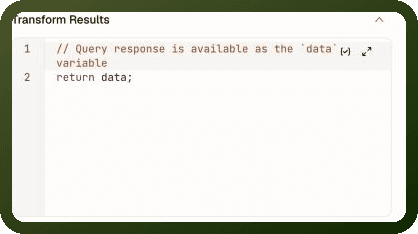
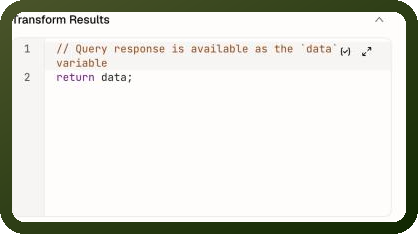
To find the transform editor, open the data source, go to the Input tab, and scroll to the Transform Results section.
The transform is a JavaScript script attached to the data source. The fetched response is handed to your code as a variable named data, and whatever your code returns becomes the data source's data — the value blocks bind to. The editor starts with a pass-through that is treated as "no transform":
// Query response is available as the `data` variable
return data;
Leaving this starter code unchanged means no transform is active. Edit it — even slightly — and the full transform machinery switches on.
Transform Properties
| Property | Description |
Input variable (data) | The raw response from the fetch. Exactly what the API or platform returned, before any reshaping. |
| Return value | Whatever your code returns becomes the data source's data. Blocks bind to this value, not the raw response. |
| Other page bindings | Your transform code can reference other page values through binding expressions ({{ variable.value }}). Their current values are injected as parameters when the transform runs. |
| rawData | The untouched original response is available alongside the transformed result via the data source's rawData key, whether or not a transform runs. Not available on infinite-loading data sources. |
Note: The transform executes as part of every run — including polls, retries, and action-triggered refreshes. Blocks always see the transformed shape; there is no flash of raw data first.
Common Transform Patterns
Pattern 1 — Flatten nested data
Raw response: { items: { records: [ ... ] } }. Return a flat array:
return data.items.records;
Pattern 2 — Rename fields
The API uses snake_case; components expect camelCase:
return data.map(item => ({ id: item.order_id, customerName: item.customer_name, totalAmount: item.total_amount, status: item.order_status }));
Pattern 3 — Compute derived fields
Add a computed field to each record:
return data.map(item => ({ ...item, displayLabel: `${item.firstName} ${item.lastName}`, isOverdue: new Date(item.dueDate) < new Date() }));
Pattern 4 — Filter records using a page variable
Filter by a value from a page variable, injected as a binding:
const minAmount = {{ min_amount_var.value }}; return data.filter(item => item.total >= minAmount);
The filter runs only when the data source runs. Changing min_amount_var does not re-run the data source, so the filtered list stays the same until the next run. To refilter as soon as the variable changes, also bind the variable into one of the request's inputs (see Transforms and Reactivity below), or filter in the consuming block instead.
Pattern 5 — Defensive transform (handle missing fields)
Guard against missing or unexpected shapes:
const records = data?.records ?? []; return records.map(item => ({ id: item.id, name: item.name ?? 'Unnamed', tags: item.tags ?? [] }));
Where the Result Appears
With a transform configured, the run output changes:
| Key | Content | Binding expression |
| data | The value your transform returned. | {{ orders_query.data }} |
| rawData | The untransformed original response. Available even after transforming (not on infinite-loading data sources). | {{ orders_query.rawData }} |
Warning: The data source's output schema — what the binding picker offers when you map fields into blocks — follows the transformed value, not the raw response. If you add a transform after wiring blocks, bindings to paths that no longer exist will show empty values.
When the Transform Fails
The transform is all-or-nothing: if your code throws an error, the entire data source run fails. Blocks see the error state, failure events fire, and the raw response is not exposed. A bug in the transform looks exactly like a failed network fetch to the rest of the page.
Warning: Always write defensive code in transforms. Use optional chaining (data?.field) and nullish coalescing (?? []) to handle missing or unexpected fields — an exception in the transform hides what may be a perfectly good API response.
Transforms and Reactivity
Bindings used only inside the transform code do not make the data source reactive to those values. The data source re-runs when its request inputs change — a page value referenced solely in the transform is not tracked as a dependency.
If you need the data source to re-run when a transform's input changes:
Bind the value into one of the request's inputs (even as an unused parameter), or
Filter in the consuming block instead of in the transform code.
Note: A transform containing exactly the starter code — the comment line plus return data; — is treated as unconfigured, and the platform skips the transform step entirely. Any change, even deleting the comment line, turns the transform on. Either way, blocks read the result at {{ orders_query.data }}: with a transform, that is the value your code returned, and the original response stays at {{ orders_query.rawData }}.
Transforms and Infinite Loading
On an infinite-loading data source, the transform applies to each fetched page separately. The pages' transformed lists are then combined into the single list blocks consume. Return the full page object, including the paging signal the consuming block relies on: a Table, Repeatable or Image Grid reads the total count through its Total Records binding, and a Timeline reads the hasMore flag. A transform that returns only the items array drops the signal, and the list silently stops loading after the first page. See Infinite Loading.
When to Use a Transform
| Use a transform when… | Consider alternatives when… |
| The API response structure doesn't match what your components expect. | The operation lets you choose returned fields or filter server-side — do that instead, no transform needed. |
| You need to flatten, rename, or merge fields across the response. | Only one or two blocks need the reshaped value — transform in the consuming block's expression instead. |
| You need derived computed fields (totals, labels, flags) on every record. | The raw shape is fine and you only need to filter — consider filtering in a consuming expression rather than re-running the source. |