


These actions refresh data and store values. Use Trigger Data Source to re-run a data source, Control Variable to change a page or app variable, Set URL Parameters to update the page's query string, and Control Local Storage or Control Session Storage to keep values in the browser. The storage actions only write; you read the stored values through bindings.
Actions at a Glance
| Action Type | Builder Label | Use When |
| controlDataSource | Trigger Data Source | Re-run or refresh a data source on demand |
| setPageVariable | Control Variable | Change the value of a page or app variable |
| setURLParameters | Set URL Parameters | Update the current page's query string without navigating |
| setLocalStorage | Control Local Storage | Persist a value that survives page reloads and sessions |
| setInterfaceSessionStorage | Control Session Storage | Persist a value for the current browser session only |
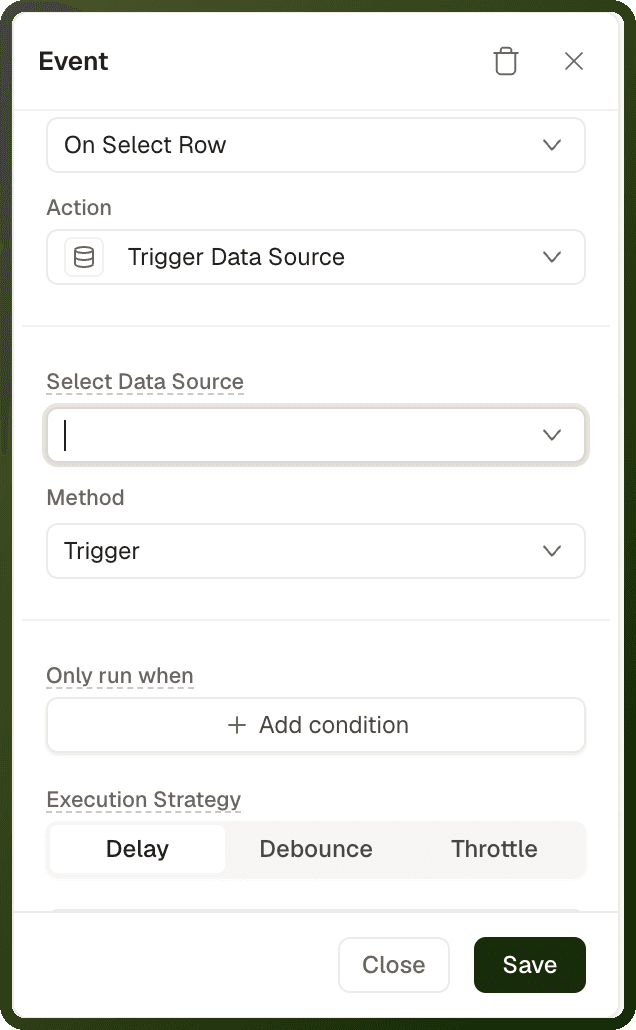
Adding One of These Actions
Select the block that starts the action, for example a Button, and open its Interactions section.
Click + (Add Interaction) and choose the Event, for example On Click.
In Action, choose the action. Its fields appear below it, as listed in the table.
To run more actions after it, expand Callbacks and use Add Action next to On Success or On Failure.
Action | Fields you fill in |
|---|---|
Trigger Data Source | Select Data Source, Method |
Control Variable | Variable, then Operation and the value. The operations depend on the variable's type. |
Set URL Parameters | Query Parameters, Merge with existing query parameters, History |
Control Local Storage | Operation (Set Value, Remove Value or Clear All), Key, Value |
Control Session Storage | The operation (Set In, Remove or Clear), Path, Value |
controlDataSource — Trigger Data Source
Re-runs a data source (a query or API binding on the page) on demand. Use it after a record is created, updated, or deleted to refresh bound blocks with fresh data, or to manually kick off a data source configured with Manual run behavior.
Parameters
Parameter | Type | Required | Default | Description |
|---|---|---|---|---|
dataSourceId | string | Required | — | The ID of the data source to trigger. Pick it from the Select Data Source dropdown. If omitted, the action does nothing. |
method | "trigger" | Optional | "trigger" | Runs or re-runs the data source. Trigger is the only option. |
Tip: Pattern: Wire controlDataSource on the success callback of a mutation action (create, update, delete) to keep the list fresh without a full page reload.
Examples
Refresh a data source after creating a record
{ "actionType": "controlDataSource", "payload": { "dataSourceId": "ds_listOrders", "method": "trigger" } }
setPageVariable — Control Variable
Writes a page variable or app variable. Blocks read the variable through bindings. Variables are reactive in-memory slots — every block or expression bound to the variable re-evaluates immediately when a write lands. The available operations depend on the variable's declared type.
Parameters
Parameter | Type | Required | Default | Description |
|---|---|---|---|---|
variableId | string | Required | — | The variable to write ( |
operationDetails.operation | string enum | Required | — | The write operation. The operations available depend on the variable's declared type — see the table below. |
operationDetails.value | any | Depends on operation | — | The value to apply. Supports bindings. Not used by Toggle Value, Remove Last and Remove First. |
operationDetails.index | number | For Remove at Index | — | The zero-based position to remove. |
Operations by Variable Type
Variable Type | Available Operations (builder label and code) |
|---|---|
string | Set Value ( |
number | Set Value ( |
boolean | Set Value ( |
object | Set Value ( |
array | Set Value ( |
Note: For array variables, Add to End and Add to Beginning take an array and add its items. To add a single item, wrap it in an array, for example {{ [currentRow.productId] }}. A single value that is not an array is rejected and the variable is left unchanged.
Warning: Type gates operations. Using INCREMENT_BY on a string variable will fail silently — the value keeps its previous state. Numeric operations reject non-numeric input. Object MERGE is shallow — a nested object replaces rather than deep-merges.
Examples
Set a string variable
{ "actionType": "setPageVariable", "payload": { "variableId": "var_status", "operationDetails": { "operation": "SET", "value": "active" } } }
Toggle a boolean variable (show/hide a panel)
{ "actionType": "setPageVariable", "payload": { "variableId": "var_showPanel", "operationDetails": { "operation": "TOGGLE" } } }
Increment a counter on each click
{ "actionType": "setPageVariable", "payload": { "variableId": "var_clickCount", "operationDetails": { "operation": "INCREMENT_BY", "value": 1 } } }
Add an item to a cart array
{ "actionType": "setPageVariable", "payload": { "variableId": "var_cartItems", "operationDetails": { "operation": "APPEND", "value": "{{ [currentRow.productId] }}" } } }
Merge new fields into an object variable
{ "actionType": "setPageVariable", "payload": { "variableId": "var_filters", "operationDetails": { "operation": "MERGE", "value": { "status": "{{ select_status['value'] }}", "page": 1 } } } }
setURLParameters — Set URL Parameters
Updates the current page's query string without navigating. For its parameters and an example, see Navigation Actions.
setLocalStorage — Control Local Storage
Writes a value to the browser's localStorage. Local storage persists across browser sessions — it survives page reloads, closing the tab, and reopening the browser. Use it for user preferences or remembered state that should persist indefinitely on the device.
Parameters
Parameter | Type | Required | Default | Description |
|---|---|---|---|---|
operation | "SET", "REMOVE" or "CLEAR" | Required | — | Set Value ( |
key | string | For SET and REMOVE | — | The storage key to write or remove. Use unique keys to avoid collisions between apps or pages. |
value | any | Required for SET | — | The value to store. Objects are serialized to JSON. Supports bindings. |
Remember a user's preferred theme
{ "actionType": "setLocalStorage", "payload": { "key": "app_preferred_theme", "operation": "SET", "value": "{{ select_theme['value'] }}" } }
Read local storage value in a binding
{{ localStorage['app_preferred_theme'] }}
setInterfaceSessionStorage — Control Session Storage
Writes a value to the browser's sessionStorage. Session storage persists for the duration of the browser session — it is cleared when the tab is closed, but survives page reloads within the same session. Use it for temporary state like form drafts or wizard progress that should not persist between sessions.
Parameters
Parameter | Type | Required | Default | Description |
|---|---|---|---|---|
operation | "SET_IN", "REMOVE" or "CLEAR" | Required | "SET_IN" | Set In ( |
path | string | For SET_IN and REMOVE | — | The Path to write or remove. You can use dot notation: |
value | any | Required for SET_IN | — | The value to store. Supports bindings. |
Save wizard step progress in session storage
{ "actionType": "setInterfaceSessionStorage", "payload": { "operation": "SET_IN", "path": "onboarding.step", "value": "{{ stepper_onboarding['currentStep'] }}" } }
Read a session storage value in a binding
{{ sessionStorage['onboarding']['step'] }}
A dotted path is stored as nested objects, so read onboarding.step as sessionStorage['onboarding']['step'], not sessionStorage['onboarding.step'].
Choosing the Right Storage Mechanism
| Mechanism | Scope | Persists | Use For |
| Page Variable | Single page | Until page unmounts (navigation) | UI state, selections, form drafts within a page |
| App Variable | Whole app session | Until browser reload or new tab | State that must survive in-app navigation |
| URL Parameters | Current page URL | Shareable in the URL | Filter state, active tab, pagination — shareable/bookmarkable |
| Session Storage | Browser tab/session | Until tab is closed | Wizard progress, draft data, temporary preferences |
| Local Storage | Browser (device) | Indefinitely (until cleared) | Theme preference, language, long-lived user settings |