


The PGP Tools node performs OpenPGP cryptography on files: encrypt, decrypt, sign, and verify. It is the standard approach for securely exchanging files with partners who use PGP or GPG tooling. Your private key and passphrase are stored in a connection configured for this node, so secret key material stays out of automation definitions,
Overview
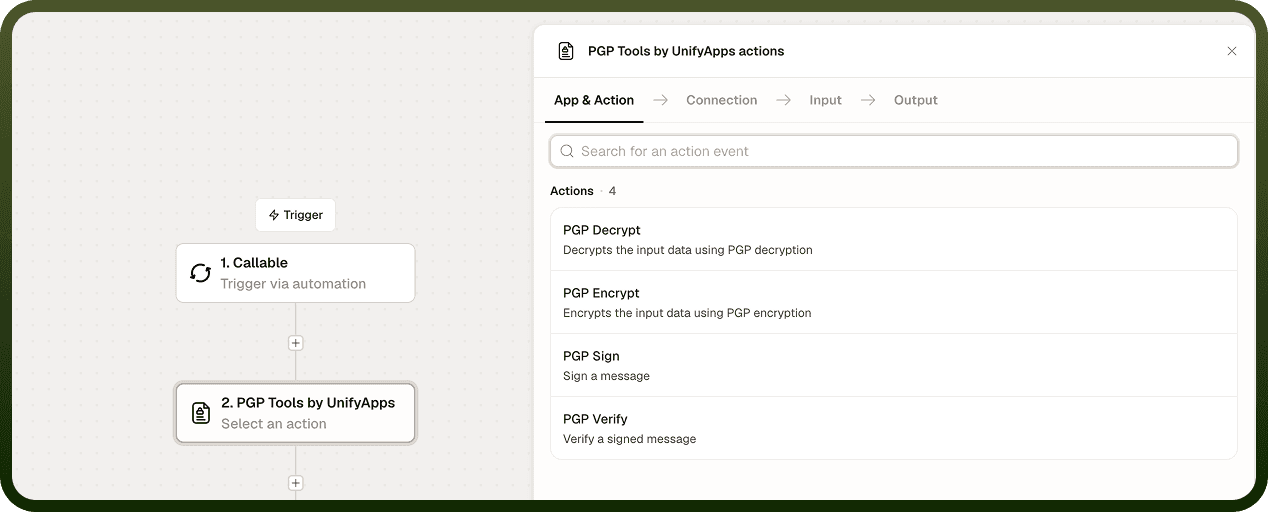
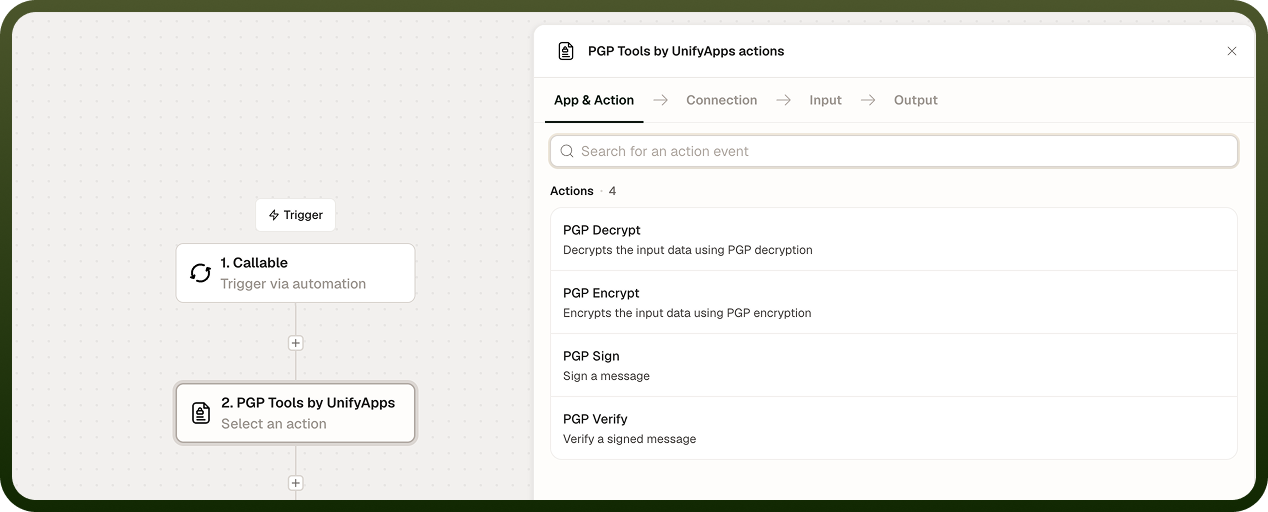
Operation | What it does |
|---|---|
Encrypt | Encrypts a file to a recipient's public key so only the holder of the matching private key can open it. Optionally signs it at the same time. |
Decrypt | Recovers the original file using the private key on your connection. If the file is signed, the signature is checked automatically. |
Sign | Attaches a digital signature to a file using your private key so recipients can confirm authenticity. |
Verify | Checks a signed file against the signer's public key and returns a valid / invalid result. |
Set up the connection
Create a PGP Tools connection and fill in the keys you need:
Field | Description |
|---|---|
Private Key | Your private key. Used to decrypt and sign. |
Passphrase | The passphrase of the keys you have generated. |
Public Key | A public key. Used to check signatures when you decrypt and verify, and to encrypt when you leave the Encrypt node's Public Key field empty. |
Encrypt
Encrypts a file using the recipient's public key. You can sign the output at the same time to prove origin.
Input Field | Description |
|---|---|
Input File Details | The file to encrypt. Required. |
Public Key | Paste the recipient's public key here. If you leave it empty, the Public Key saved on the connection is used. Only the matching private key can decrypt. |
Sign | When on, the file is encrypted and signed using the Private Key and Passphrase from the connection, so the recipient can verify origin. Off by default. |
Armor | When on, the output is ASCII-armored (.asc), a text block safe for email and text channels. When off (default), the output is a binary .pgp file. |
Secure by integrity packet | Adds a tamper-detection check to the encrypted output. Off by default. |
Output: The encrypted (and optionally signed) file or payload in the chosen format.
Decrypt
Recovers the original file from a PGP-encrypted file using the connection's Private Key and Passphrase. The connection's Public Key is required: decryption fails if it is empty. If the data is signed, the signature is always checked against that Public Key.
Input Field | Description |
|---|---|
Input File Details | The PGP-encrypted file to decrypt. Required. |
Output: The decrypted file. If the data is signed and the signature does not match the connection's Public Key, the node returns an error instead of the file.
Sign
Attaches a digital signature to a file using the Private Key and Passphrase from the connection. The signature is combined with the data (not a separate detached file), so the signed output travels as one unit.
Input Field | Description |
|---|---|
Input File Details | The file to sign. Required. |
Armor | When on, the signed output is ASCII-armored text instead of binary. |
Output: The signed file — data and signature combined in a single PGP packet.
Verify
Checks a signed PGP file against the signer's public key. Because the signature is embedded in the signed file (not detached), you pass the full signed output — not the original file separately.
Input Field | Description |
|---|---|
Signed File Details | The PGP-signed file (data and signature combined) to verify. Required. |
Use Public Key from Connection | When on (default), the signature is checked against the Public Key saved on the connection. |
Public Key | The signer's public key. Turn off Use Public Key from Connection to paste a different key here. |
Output: A boolean result — valid (the signature matches and the content is unaltered) or invalid (the key did not match or the content was changed). No detailed failure reason is returned.
Notes
Keep these behaviors in mind when using the PGP Tools node:
Private keys and passphrases are stored in the connection configured for the PGP Tools node, never inline in the automation definition. A recipient's public key can be pasted into the Encrypt node, and a signer's public key into the Verify node.
The Sign operation produces a combined signed packet. There is no detached-signature mode; the entire signed file must be passed to Verify.
Verify returns valid or invalid. It does not return a specific reason for failure. A false result means either the key did not match or the content was modified after signing.
Armor is off by default, so Encrypt produces binary .pgp output. Turn it on for ASCII-armored (.asc) output when sending files through email or API fields.
Encrypting to a recipient's public key ensures confidentiality. Adding a signature (during encrypt or as a separate sign step) adds authenticity. Combining both is the most complete security posture for partner file exchange.
Keeping private keys and passphrases in a connection, never inline, is the baseline for keeping cryptographic secrets out of automation definitions.