


Use the Adyen connector to process online and in-store payments.
Integrating your application with Adyen lets you use these operations in an automation. It exposes 23 triggers, listed below. Add the connector from the Connections area, authenticate, then select its operations in the automation builder. Capabilities: triggers.
Authentication
Before you begin, make sure you have the following information:
Connection Name: Choose a meaningful name for your connection. This name helps you identify the connection within your application or integration settings.
Authentication Type: The authentication method for this connector is defined in the connection setup. Select the connector in the Connections area to see the fields it requires.
Authentication & setup
Adyen provides two authentication methods for API requests. Both require credentials generated through your Customer Area dashboard.
1. API Key Authentication
Send an API key via the HTTP request header:
x-API-key: {your_api_key}
2. Basic Authentication
Include base64-encoded credentials in the Authorization header:
Authorization: Basic {base64_encoded_credentials}
Where credentials follow the format: username:password Example username format: ws_123456@Company.YourCompanyAccount
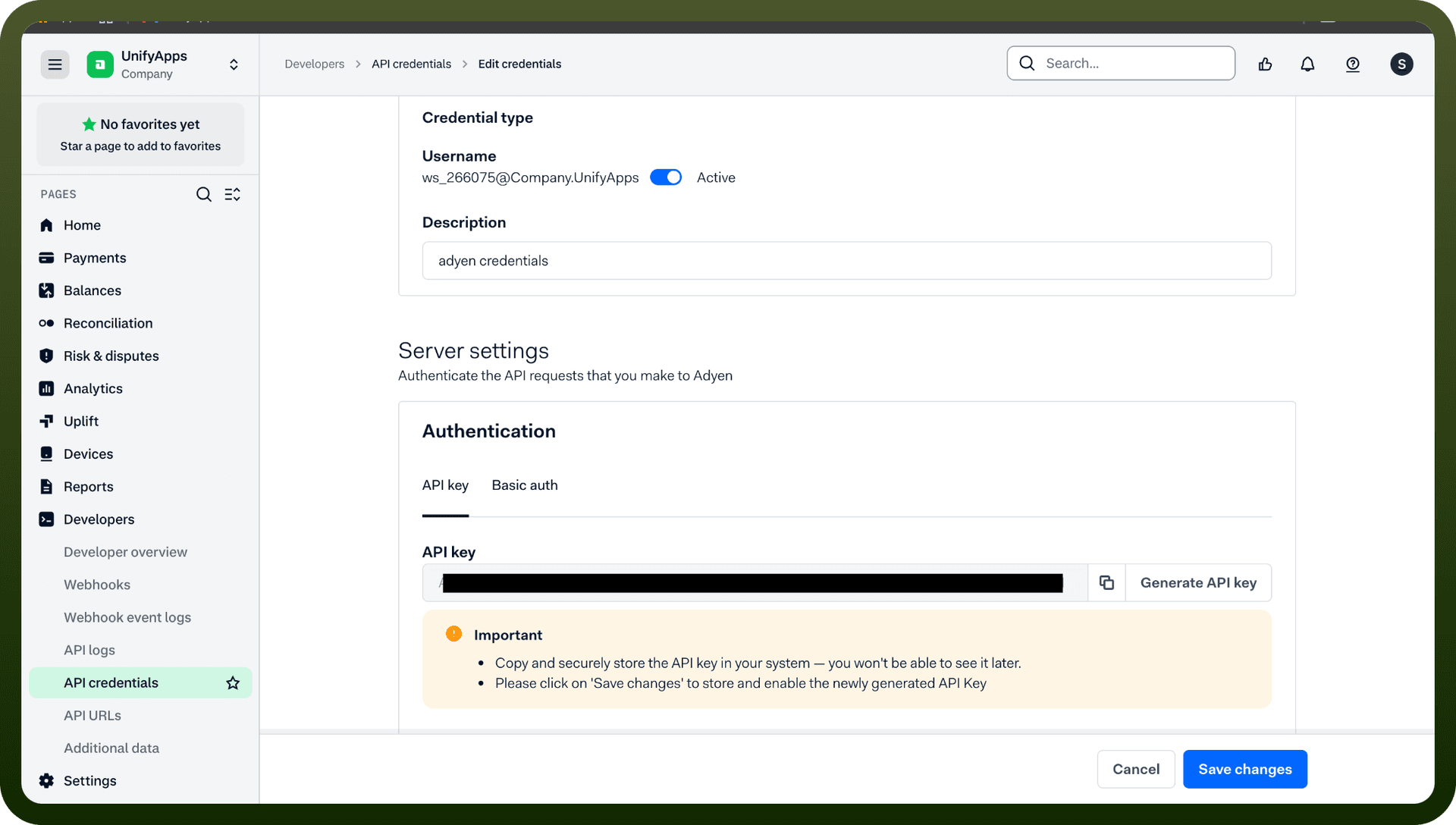
Getting Your Credentials
Log in to your Adyen Customer Area
Navigate to Developers → API credentials
Select the Payments or Platforms tab (depending on your integration type)
Choose Create new credential
Select Web service user as the credential type
Your credentials will include:
Username (format: ws_123456@Company.[YourCompanyAccount])
API key (for API key authentication)
Note: If using Adyen's API libraries, they automatically handle authentication — you only need to provide credentials for your chosen method.
Triggers
Trigger Name | Description |
|---|---|
On account holder created | Triggers when an account holder is created in Adyen |
On account holder onboarded | Triggers when an account holder is successfully onboarded in Adyen |
On account holder updated | Triggers when an account holder is updated in Adyen |
On authorisation request | Triggers when the result of an authorisation request is received in Adyen |
On balance account balance updated | Triggers when a balance account's balance is updated in Adyen |
On balance account created | Triggers when a balance account is created in Adyen |
On balance account sweep updated | Triggers when a balance account sweep is updated in Adyen |
On balance account updated | Triggers when a balance account is updated in Adyen |
On negative balance | Triggers when a balance account in your platform has a negative balance in Adyen |
On new account holder | Triggers when a new account holder is created in Adyen |
On new balance account | Triggers when a new balance account is created in Adyen |
On new balance account sweep | Triggers when a new balance account sweep is created in Adyen |
On new payment instrument | Triggers when a new payment instrument is created in Adyen |
On new payment method | Triggers when a new payment method is created in Adyen |
On new report | Triggers when a new report is created in Adyen |
On new transfer request | Triggers when a new transfer request is created in Adyen |
On payment instrument updated | Triggers when a payment instrument is updated in Adyen |
On payment method request is removed | Triggers when a payment method request is removed in Adyen |
On payment method request scheduled for removal | Triggers when a payment method request is scheduled for removal in Adyen |
On transaction created | Triggers when a transaction is created in Adyen |
On transfer created | Triggers when there are fund movements on your platform |
On transfer request updated | Triggers when a transfer request is updated in Adyen |
On transfer updated | Triggers when the status of a transfer changes in Adyen |
About the API
Adyen's payment platform API enables comprehensive payment processing and financial operations:
Payment Processing: Submit and manage payment transactions across multiple channels
Tokenization & Recurring Payments: Securely store and process repeat payments
3D Secure 2 Authentication: Enhanced security for card payments
Multiple Payment Methods: Support for cards, IBAN, ACH Direct Debit, and more
Batch Processing: Handle bulk transactions via SFTP
Webhook Integrations: Receive real-time event notifications for transaction updates
Payouts & Refunds: Process refunds and payouts to customers
Risk Management: Built-in fraud detection and compliance features
Multiple Business Models: Support for ecommerce, point-of-sale, marketplaces, and platforms
Official documentation
https://docs.adyen.com/development-resources/api-authentication