


Use the Helpwise connector to manage shared inboxes and support.
Integrating your application with Helpwise lets you use these operations in an automation. It exposes 23 actions, listed below. Add the connector from the Connections area, authenticate, then select its operations in the automation builder. Capabilities: actions.
Authentication
Before you begin, make sure you have the following information:
Connection Name: Choose a meaningful name for your connection. This name helps you identify the connection within your application or integration settings.
Authentication Type: The authentication method for this connector is defined in the connection setup. Select the connector in the Connections area to see the fields it requires.
Obtaining Your API Key and Secret
Log in to your Helpwise account.
Go to Settings, then open the API section.
Copy the API Key and the API Secret shown on the page.
Store both values securely and use them for further authentication purposes.
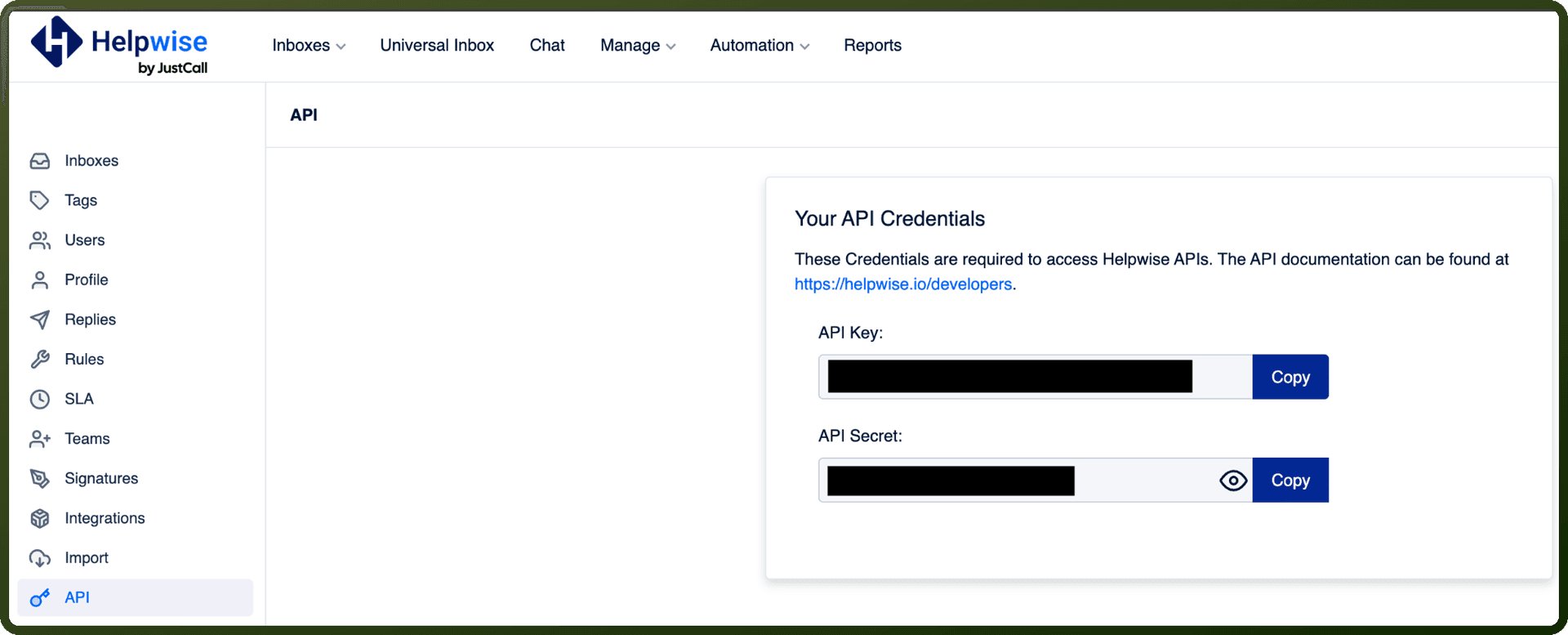
Obtaining Your API Key and Secret
Log in to your Helpwise account.
Go to Settings, then open the API section.
Copy the API Key and the API Secret shown on the page.
Store both values securely — Helpwise requires the API Key and API Secret together to authenticate requests.
Actions
Action Name | Description |
|---|---|
Apply tags to conversations | Apply tags to conversations in Helpwise |
Close conversations | Close conversations by its IDs in Helpwise |
Create contact | Creates a contact in Helpwise |
Create custom field | Create a custom field in Helpwise |
Delete conversations | Delete conversations by its IDs in Helpwise |
Delete custom field | Deletes custom field by its ID in Helpwise |
Get all tags | Lists all tags in Helpwise |
Get contact | Gets a contact by its ID in Helpwise |
Get conversation | Gets conversation details by its ID in Helpwise |
Get custom field | Gets a custom field by its ID in Helpwise |
Get tag | Gets a tag by its ID in Helpwise |
List contacts | Lists contacts in Helpwise |
List conversations | Lists conversations in Helpwise |
List custom fields | Lists custom fields in Helpwise |
Mark spam | Mark conversations as spam by its IDs in Helpwise |
Move to inbox | Move conversations to inbox by its IDs in Helpwise |
Move to trash | Move conversations to trash by its IDs in Helpwise |
Remove tags from conversations | Removes tags from conversations in Helpwise |
Search contacts | Search contacts by term in Helpwise |
Send SMS or WhatsApp | Send SMS or WhatsApp message to a client number in Helpwise |
Update contact | Updates a contact by its ID in Helpwise |
Update custom field | Updates a custom field by its ID in Helpwise |
Update inbox custom field visibility | Updates inbox custom field visibility by inbox ID in Helpwise |