


Use the Mailgun connector to send transactional emails via API.
Integrating your application with Mailgun lets you use these operations in an automation. It exposes 10 actions, listed below. Add the connector from the Connections area, authenticate, then select its operations in the automation builder. Capabilities: actions.
Authentication
Before you begin, make sure you have the following information:
Connection Name: Choose a meaningful name for your connection. This name helps you identify the connection within your application or integration settings.
Authentication Type: The authentication method for this connector is defined in the connection setup. Select the connector in the Connections area to see the fields it requires.
Obtaining Your API Key
Log in to your Mailgun account and open the Mailgun Dashboard.
Click Account Settings.
Select API Keys from the menu.
Click the eye icon next to Private API Key to reveal your primary account API key.
Copy the key and store it securely — you'll use it as the password (with the username "api") for HTTP Basic Auth.
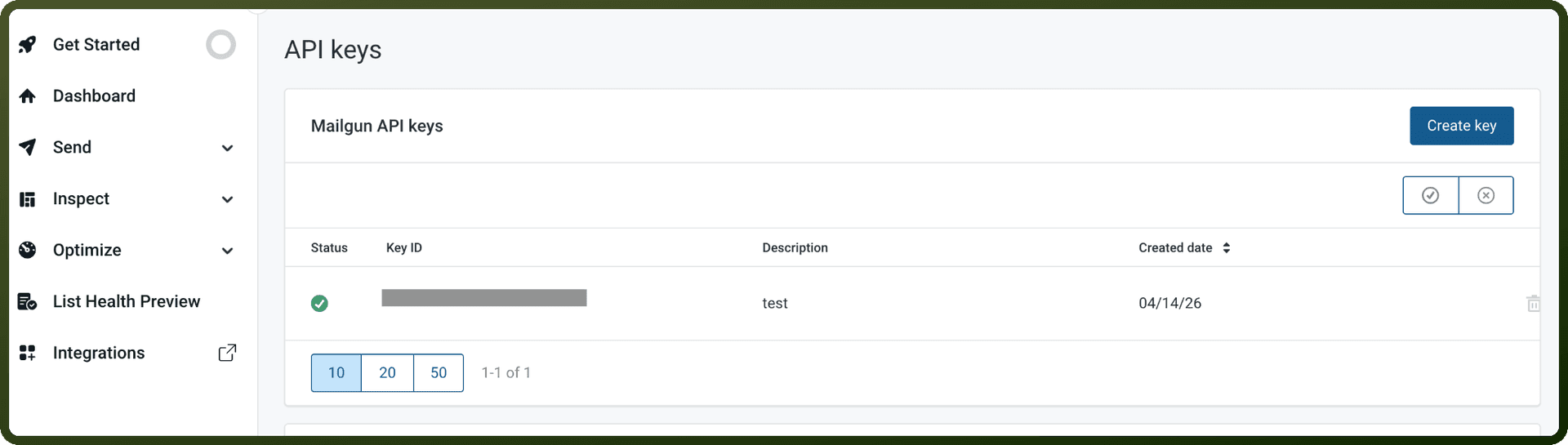
Authentication & setup
Authentication to the Mailgun API is done by providing an Authorization header using HTTP Basic Auth. The username is "api" and the password is your API key. Example: curl --user 'api:YOUR_API_KEY'
Types of API Keys:
Primary Account API Key: When you sign up for Mailgun, a primary account API key is generated. This key allows you to perform all CRUD operations via various API endpoints and for any of your sending domains. Located in Dashboard > Account Settings > API Keys.
Domain Sending Keys: Domain Sending Keys are API keys that only allow sending messages via a POST call on /messages and /messages.mime endpoints for the domain in which they are created for. Created per domain in Dashboard > Sending > Domains > Domain Settings > Sending API keys. One-time display (non-recoverable if lost).
Role-Based Access Control: Role Based Access Control (RBAC) API Keys empower admin users to generate API keys using predefined roles that dictate the access level of each key. This feature allows you to implement the principle of least privilege.
Security Recommendations: API keys should not be exposed in client side code. API keys should only be used in server side applications where they cannot be accessed by end users.
Actions
Action Name | Description |
|---|---|
Create mailing list | Creates a mailing list in Mailgun |
Create mailing list member | Adds a member to a mailing list in Mailgun |
Get domain details | Gets domain details by name in Mailgun |
Get domains | Lists domains with optional filters in Mailgun |
Get mailing list members | Lists members of a mailing list in Mailgun |
Get mailing lists | Lists mailing lists on the account in Mailgun |
Get route | Gets a route by ID in Mailgun |
Get routes | Lists all routes on the account in Mailgun |
Get user details | Gets a user's details by ID in Mailgun |
Get users | Lists users on the account in Mailgun |
About the API
Mailgun offers comprehensive email infrastructure services:
Message sending and core email delivery
Domain management, keys, tracking, and DKIM security
Webhooks for account and domain-level event notifications
Reporting (metrics, logs, bounce classification, tags, events, statistics)
Suppressions management (unsubscribes, complaints, bounces, allowlists)
Email reception with routes and forwards
Account and domain-level email templates
IP management with pools, warmup programs, and allowlisting
Multi-tenant account management via subaccounts
Official documentation
https://documentation.mailgun.com/docs/mailgun/api-reference/mg-auth