


Use the HrFlow.ai connector to parse resumes and automate recruiting workflows.
Integrating your application with HrFlow.ai lets you use these operations in an automation. It exposes 19 actions, listed below. Add the connector from the Connections area, authenticate, then select its operations in the automation builder. Capabilities: actions.
Authentication
Before you begin, make sure you have the following information:
Connection Name: Choose a meaningful name for your connection. This name helps you identify the connection within your application or integration settings.
Authentication Type: The authentication method for this connector is defined in the connection setup. Select the connector in the Connections area to see the fields it requires.
Obtaining Your API Key
Create an HrFlow.ai account if you don't already have one, then log in.
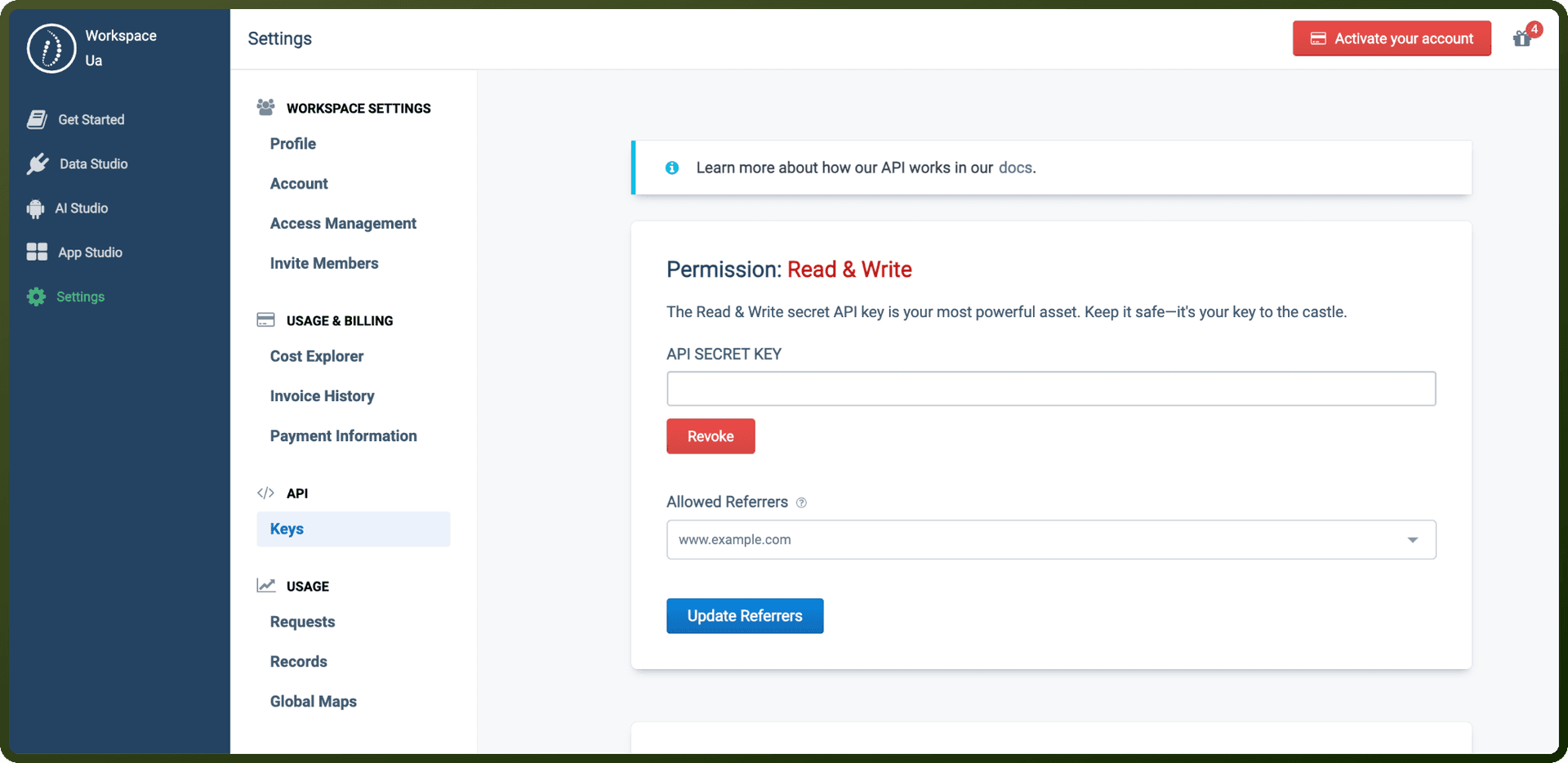
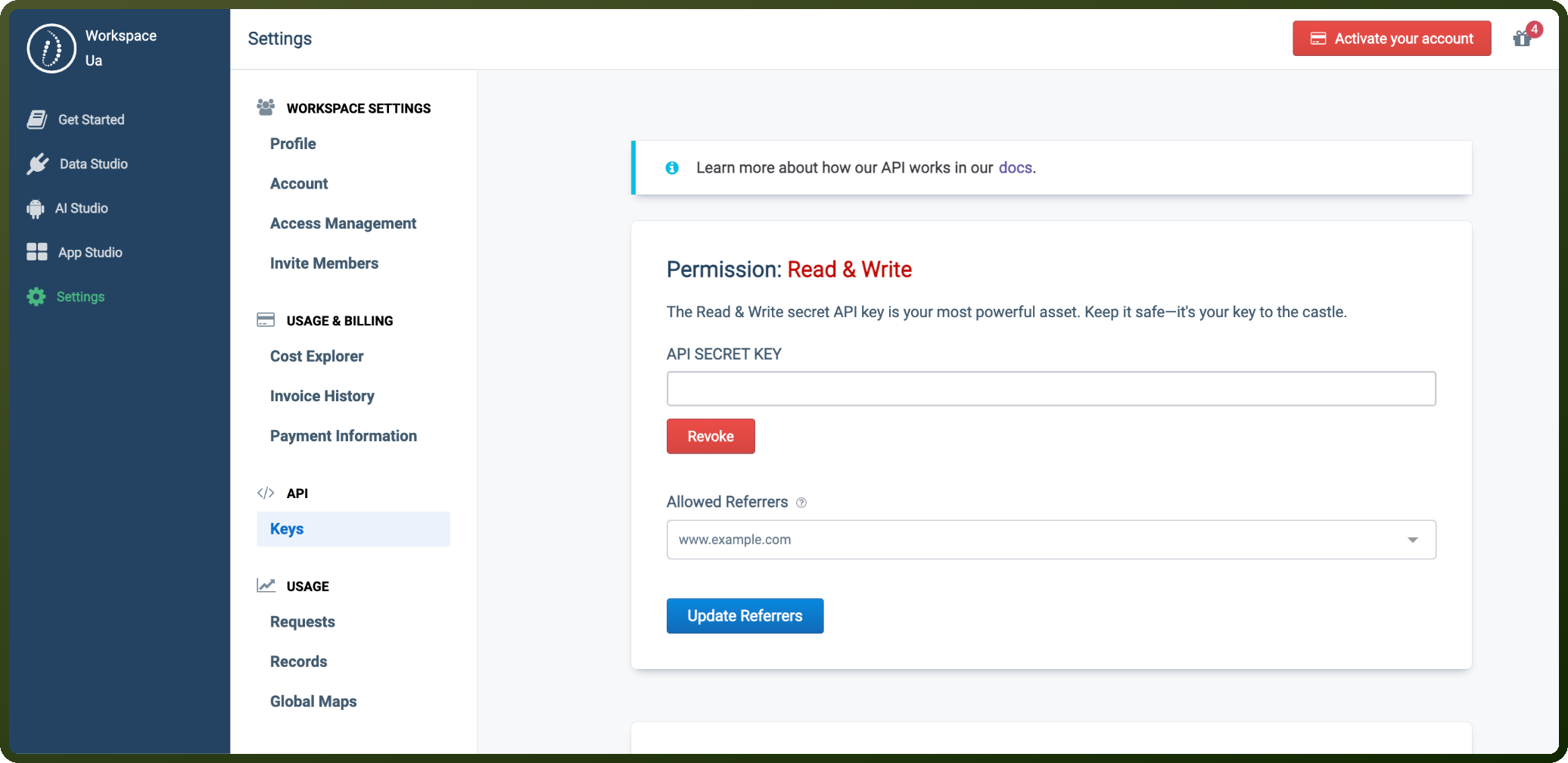
Account creation automatically generates three API key pairs for you, one each for the Write, Read, and Read & Write permission levels, each with its own API ID and API Secret Key.
In the HrFlow.ai portal, go to Settings, then open the API tab and select Keys.
Find the key pair for the permission level you need and copy its API Secret Key.
Store the API Secret Key securely. You'll send it in the X-API-KEY header, along with your account email in the X-USER-EMAIL header, on every API request.
Step 3: Authenticate Your API Requests
All API calls require:
Endpoint URL
HTTP Method (
GET,POST,PATCH,PUT,DELETE)X-API-KEY header: Your API Secret Key
X-USER-EMAIL header: Your account email
Example cURL Request
curl --request METHOD --url ENDPOINT_URL \ -header "X-API-Key: DEMO_KEY" \ -header "X-USER-EMAIL: [email protected]"
Actions
Action Name | Description |
|---|---|
Archive a job in a board | Archive jobs to remove them from active recruitment in a board while preserving their data for historical records in hrflow. |
Archive a profile in a source | Archive profiles to remove them from active candidate search in a source while preserving their data for historical records in hrflow. |
Edit a job in a board | Edit job details in a board such as title, description, skills, or location in hrflow. |
Edit a profile in a source | Edit profile details in a source including contact info, experience, education, and skills in hrflow. |
Find boards in a workspace | List all boards available in the workspace, optionally filtered by name or environment in hrflow. |
Find jobs in boards | List all jobs stored across boards, with optional filtering by name, location, or creation date in hrflow. |
Find profiles in sources | List all profiles stored across sources, with optional filtering by name, location, or creation date in hrflow. |
Find sources in a workspace | List all sources available in the workspace, optionally filtered by name or environment in hrflow. |
Get a board from a workspace | Retrieve board details using its unique key, with optional stats and details in hrflow. |
Get a job in a board | Retrieve job details in a board using its unique key or external reference in hrflow. |
Get a profile in a source | Retrieve profile details in a source using its unique key or external reference in hrflow. |
Get a resume parsing result | Retrieve the structured resume parsing result for a profile including extracted sections and metadata in hrflow. |
Get a source from a workspace | Retrieve source details using its unique key, with optional stats and details in hrflow. |
Index a job in a board | Index new jobs into a board by providing details such as title, description, skills, and location in hrflow. |
Index a profile in a source | Index new candidate profiles into a source by providing personal details, experience, education, and skills in hrflow. |
Parse a resume in a source | Parse resume files to automatically extract structured profile data including contact information, work experience, education, and skills in hrflow. |
Score profiles for a job | Score candidate profiles against a specific job using an algorithm to evaluate fit based on skills, experience, and other criteria in hrflow. |
Search jobs in boards | Search for jobs indexed in boards using criteria such as keywords, location, skills, and date ranges in hrflow. |
Search profiles in sources | Search for candidate profiles indexed in sources using criteria such as name, skills, experience, education, and location in hrflow. |
Overview
HrFlow.ai requires API authentication to secure all API calls. The platform provides different API key types with varying permission levels for different use cases.
Prerequisites
Create an HrFlow.ai account
Step 1: Access Your API Keys
Upon account creation, the system automatically generates three API key pairs:
API ID
API SECRET KEY (must be stored securely)
Permission Levels
Permission Level | Use Case | Key Format |
|---|---|---|
Write | Send data to HrFlow.ai API (Frontend/Backend) | Starts with |
Read | Retrieve data from HrFlow.ai API (Backend only) | Starts with |
Read & Write | Get/send data from/to HrFlow.ai API (Backend) | Starts with |
⚠️ Security Alert: If you expose a Read-permission API key on a website, whitelist the domain to prevent unauthorized access to personal data.
⚠️ Key Compromise: Immediately revoke any API keys suspected of being compromised.
Step 2: Whitelist Your Domains
Domain whitelisting controls external access to your HrFlow.ai account. By default, all external API calls are permitted. Developers can restrict access to specific domains and subdomains through the settings.