


Use the Browserless connector to run browser automation and web scraping at scale.
Integrating your application with Browserless lets you use these operations in an automation. It exposes 10 actions, listed below. Add the connector from the Connections area, authenticate, then select its operations in the automation builder. Capabilities: actions.
Browserless REST APIs provide HTTP endpoints for common browser tasks like screenshots, PDFs, content scraping, file downloads, function execution, and website unblocking.
Authentication
Before you begin, make sure you have the following information:
Connection Name: Choose a meaningful name for your connection. This name helps you identify the connection within your application or integration settings.
Authentication Type: The authentication method for this connector is defined in the connection setup. Select the connector in the Connections area to see the fields it requires.
Obtaining Your API Token
Go to the Browserless sign-up page and create a free account, or log in at the account dashboard if you already have one.
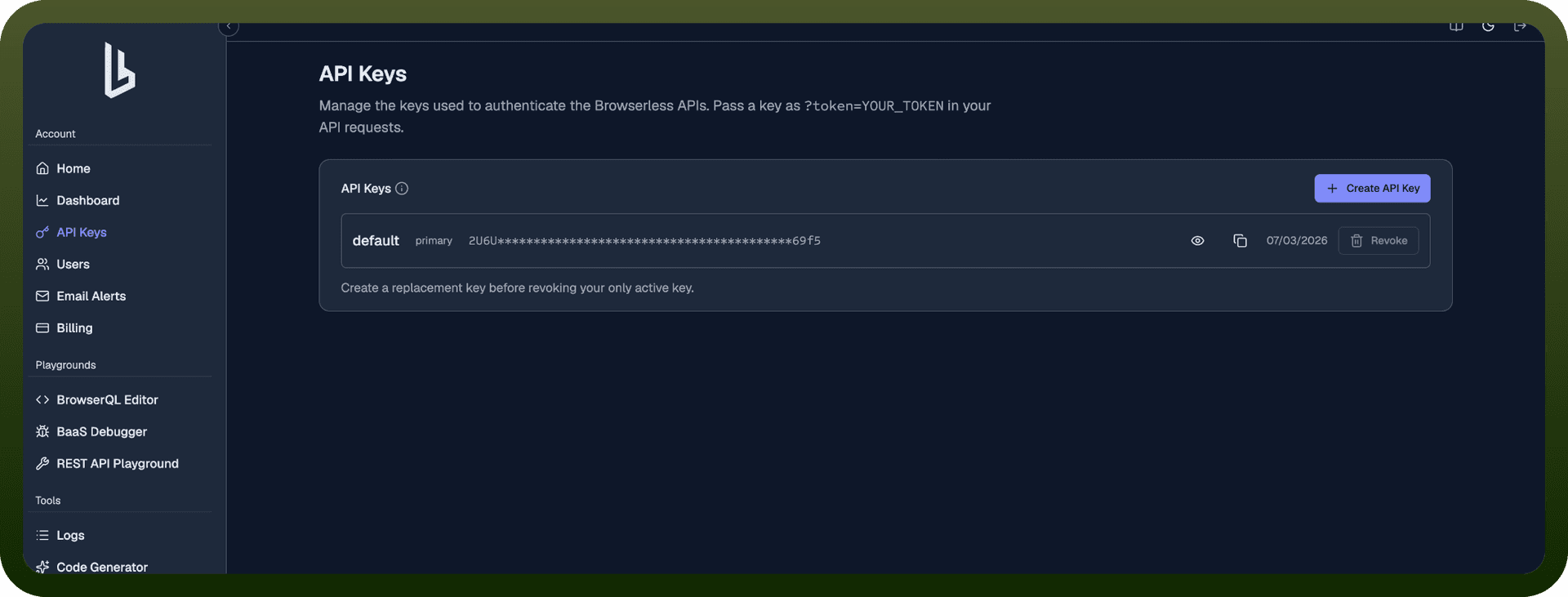
On your account home page, find the API Key section — your default token is already listed there.
Click Copy next to the token to copy it, or click Manage API keys to create an additional one.
To create a new key, click Create API key, enter a name to identify it, and confirm.
Copy the generated token right away and store it securely — Browserless shows it only once, at creation time.
Authentication
All REST API requests require an API token included as a query parameter:
https://production-sfo.browserless.io/scrape?token=YOUR_API_TOKEN_HERE
Get your API token from the Browserless dashboard.
Actions
Action Name | Description |
|---|---|
Download file | Run custom Puppeteer code and return files that Chrome downloads during execution. |
Export URL | Fetch a URL and stream the result in its native content type. Can bundle all resources into a ZIP file. |
Generate PDF | Navigate to a URL or render raw HTML and return a PDF file. |
Get content | Fetch fully rendered HTML from a real browser, including JavaScript-rendered content. Response is raw HTML (text/html). |
Run function | Execute custom Puppeteer code via HTTP. Your function receives a page object and optional context. |
Run performance audit | Run Lighthouse audits and return metrics for accessibility, best practices, performance, PWA, and SEO. |
Scrape with selectors | Extract structured JSON from a fully rendered page using CSS selectors. |
Smart scrape | Intelligently scrape any URL using cascading strategies. Returns HTML, markdown, screenshots, PDFs, or extracted links. |
Take screenshot | Capture PNG, JPEG, or WebP screenshots of a page. |
Unblock site | Bypass CAPTCHAs and bot detection, then return content, cookies, screenshots, or a WebSocket endpoint for custom automation. |
Quick Start
Scrape a website with a single HTTP request:
Sign up for a Browserless account (free plan available)
Get your API token from the account dashboard
cURL:
curl -X POST "https://production-sfo.browserless.io/scrape?token=YOUR_API_TOKEN_HERE" \ -H "Content-Type: application/json" \ -d '{"url":"https://example.com","elements":[{"selector":"h1"}]}'
Node.js:
const response = await fetch( 'https://production-sfo.browserless.io/scrape?token=YOUR_API_TOKEN_HERE', { method: 'POST', headers: { 'Content-Type': 'application/json' }, body: JSON.stringify({ url: 'https://example.com', elements: [{ selector: 'h1' }] }) } ); const data = await response.json(); console.log(data);
Python:
import requests response = requests.post( 'https://production-sfo.browserless.io/scrape?token=YOUR_API_TOKEN_HERE', json={ 'url': 'https://example.com', 'elements': [{'selector': 'h1'}] } ) data = response.json() print(data)
Response:
{ "data": [ { "results": [ { "html": "Example Domain", "text": "Example Domain" } ], "selector": "h1" } ] }
Which API Should I Use?
API | Best For | Input | Output |
|---|---|---|---|
/smart-scrape | Scraping with automatic fallbacks for blocked or JS-heavy sites | URL + optional output formats | application/json |
/content | Getting fully rendered HTML including JS-rendered content | URL or raw HTML | text/html |
/scrape | Extracting structured data with CSS selectors | URL + elements array | application/json |
/screenshot | Capturing full-page or viewport screenshots | URL or raw HTML + Puppeteer options | image/png, image/jpeg, image/webp |
Generating PDF documents from pages | URL or raw HTML + Puppeteer options | application/pdf | |
/search | Searching the web and scraping results | Query + optional sources | application/json |
/map | Discovering URLs on a site or sitemap | Base URL + optional settings | application/json |
/function | Running custom Puppeteer code server-side | JavaScript code + optional context | Any (based on return type) |
/download | Retrieving files Chrome downloads during execution | JavaScript code + optional context | Any (matches downloaded file) |
/export | Fetching a URL and streaming in native content type | URL | Any (native type or zip) |
/unblock | Bypassing CAPTCHAs and bot detection | URL + data flags | application/json |
/performance | Running Lighthouse audits | URL + optional config | application/json |
/crawl | Asynchronously crawling entire sites | URL + depth, filters, scrape options | application/json |
REST API Limitations
No multi-step workflows — Each request launches a browser, performs one task, and closes the session
No session persistence — Cookies and state are discarded after every response
Limited bot-detection bypass — Advanced fingerprinting or interactive CAPTCHAs may still block requests
No real-time interaction — Cannot observe the page, react to changes, or branch logic mid-execution
Frequently Asked Questions
What can I do with Browserless REST APIs?
"Browserless REST APIs let you take screenshots, generate PDFs, extract rendered HTML, scrape structured data, download files, run Lighthouse audits, and unblock protected sites."
Do I need Puppeteer or Playwright?
No. "REST APIs are standalone HTTP endpoints. Send a POST request with your parameters and receive the result directly."
Which REST API should I use for web scraping?
Use /content for full rendered HTML, /scrape for structured JSON extraction via CSS selectors, or /smart-scrape for cascading approach with fallbacks.
Can REST APIs handle bot-protected sites?
Yes. Use the /unblock endpoint or add stealth and proxy parameters to any REST API call.