


Use the Float connector to plan resource allocation and team schedules.
Integrating your application with Float lets you use these operations in an automation. It exposes 73 actions, listed below. Add the connector from the Connections area, authenticate, then select its operations in the automation builder. Capabilities: actions.
Authentication
Before you begin, make sure you have the following information:
Connection Name: Choose a meaningful name for your connection. This name helps you identify the connection within your application or integration settings.
Authentication Type: The authentication method for this connector is defined in the connection setup. Select the connector in the Connections area to see the fields it requires.
Obtaining Your API Key
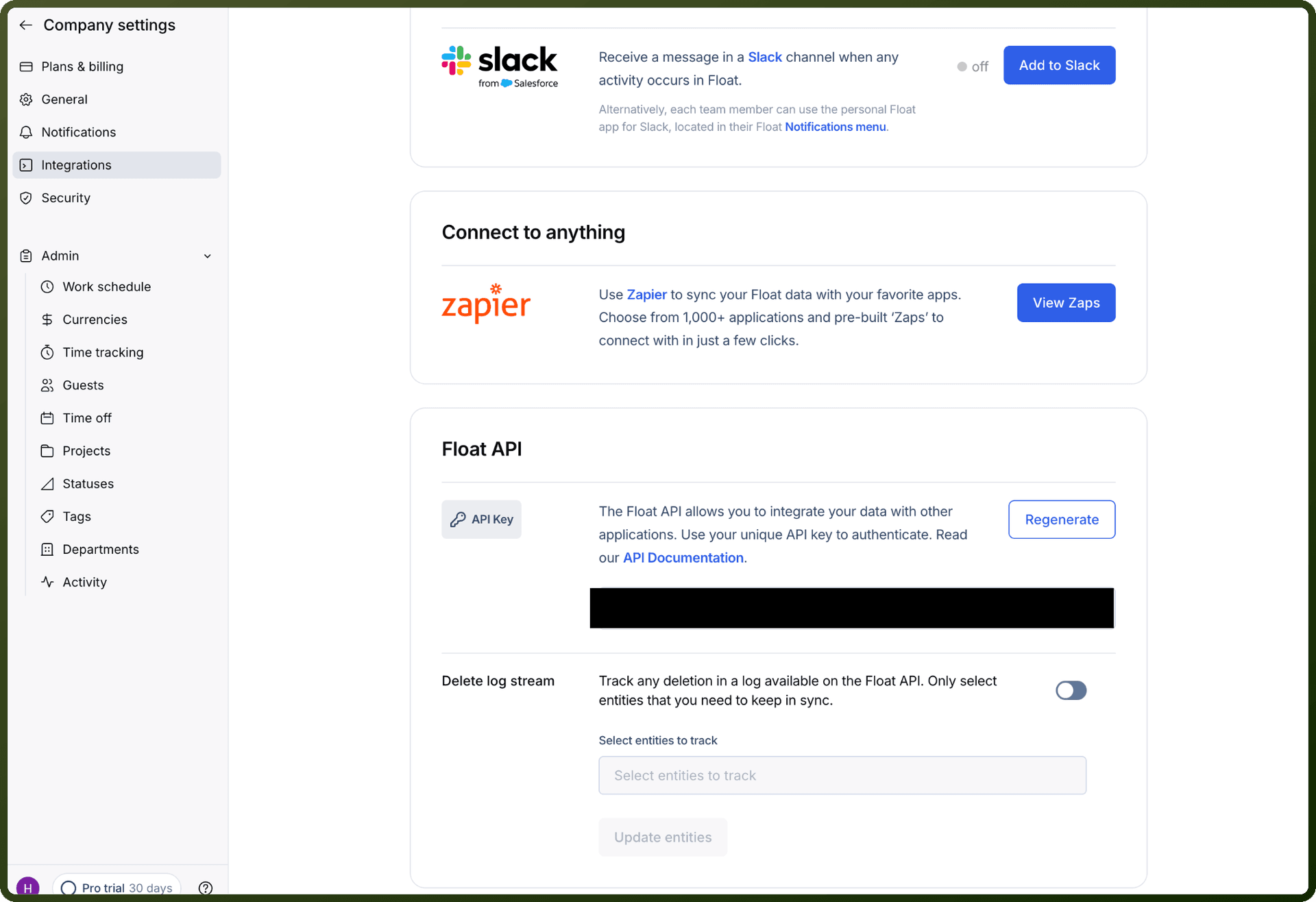
Log in to Float as the Account Owner. Only the Account Owner can access the API key.
Go to Company Settings.
Open Integrations, then select Float API.
Copy the API key shown on the page.
Store the key securely — you'll use it as a Bearer token when authenticating.
Actions
Action Name | Description |
|---|---|
Add allocations | Adds new allocation as a task to the float |
Add clients | Adds new clients in Float |
Add department | Adds new department in Float |
Add logged time | Creates a logged time entry for a person in Float |
Add milestones | Adds new milestones to the Float |
Add person | Adds new person in Float |
Add phases | Adds new phases in Float |
Add project tasks | Adds new project task to the Float |
Add projects | Adds new projects in Float |
Add role | Adds new role in Float |
Add status | Adds new status of an Individual to Float |
Add team holidays | Adds new team holidays in Float |
Add timeoff types | Adds new timeoff type in Float |
Add timeoffs | Adds new timeoff entries for people to Float |
Delete allocations | Deletes allocation as a task in Float |
Delete clients | Deletes client information by client Id in Float |
Delete department | Deletes department by department Id in Float |
Delete logged time | Deletes an existing logged time entry in Float |
Delete milestones | Deletes milestones in the Float |
Delete phases | Deletes phases by phase Id in Float |
Delete project tasks | Deletes project task in the Float |
Delete projects | Deletes project by project Id in Float |
Delete role | Deletes role by role Id in Float |
Delete status | Deletes status by status Id in Float |
Delete team holidays | Deletes team holidays by holiday Id in Float |
Delete timeoffs | Deletes timeoffs by timeoff Id in Float |
Get account | Retrieves account information by account Id from Float |
Get allocations | Retrieves a single allocation as a task in Float |
Get clients | Retrieves client information by client Id from Float |
Get department | Retrieves department by department Id from Float |
Get logged time | Retrieves a single logged time entry in Float |
Get milestones | Retrieves milestones by milestone Id in Float |
Get person | Retrieves person information by people Id from Float |
Get phases | Retrieves phase information by phase Id from Float |
Get project tasks | Retrieves project task by project task Id in Float |
Get projects | Retrieves project information by project Id from Float |
Get public holidays | Retrieves public holiday by public holiday Id from Float |
Get role | Retrieves role by role Id from Float |
Get status | Retrieves status of an individual from Float |
Get team holidays | Retrieves team holidays by holiday Id from Float |
Get timeoff types | Retrieves timeoff type by timeoff type Id from Float |
Get timeoffs | Retrieves people's timeoffs from Float |
List accounts | Retrieves list of accounts from Float |
List allocations | Retrieves list of allocation as tasks from Float |
List clients | Retrieves list of clients information from Float |
List departments | Retrieves list of departments from Float |
List logged time | Retrieves list of logged time for a project or person from Float |
List milestones | Retrieves list of milestones in Float |
List people | Retrieves list of people from Float |
List people reports | Retrieves list of people reports from Float |
List phases | Retrieves list of phases from Float |
List project tasks | Retrieves list of project tasks in Float |
List projects | Retrieves list of projects from Float |
List public holidays | Retrieves list of public holidays from Float |
List roles | Retrieves list of roles from Float |
List status | Retrieves list of status from Float |
List team holidays | Retrieves list of team holidays from Float |
List timeoff types | Retrieves list of timeoff types information from Float |
List timeoffs | Retrieves list of timeoffs of people from Float |
Merge project tasks | Merges multiple project tasks in Float |
Update allocations | Update an allocation details as a task in Float |
Update clients | Updates client information by client Id in Float |
Update department | Updates department information in Float |
Update logged time | Updates an existing logged time entry in Float |
Update milestones | Updates milestones in Float |
Update person | Updates person information in Float |
Update project tasks | Updates project tasks in Float |
Update projects | Updates project information by project Id in Float |
Update role | Updates role information in Float |
Update status | Updates status of an individual in Float |
Update team holidays | Updates team holiday information in Float |
Update timeoff types | Updates timeoff type information in Float |
Update timeoffs | Update timeoffs of people in Float |