


Use the Formstack connector to build forms and automate data collection workflows.
Integrating your application with Formstack lets you use these operations in an automation. It exposes 18 actions, listed below. Add the connector from the Connections area, authenticate, then select its operations in the automation builder. Capabilities: actions.
Authentication
Before you begin, make sure you have the following information:
Connection Name: Choose a meaningful name for your connection. This name helps you identify the connection within your application or integration settings.
Authentication Type: Formstack supports OAuth authentication.
Authentication & setup
OAuth 2.0
Formstack uses OAuth 2.0 for authorization, allowing third-party applications to access Formstack accounts (forms, fields, submissions, etc.) on behalf of users.
Personal Access Tokens (Latest Approach)
The V2025 API uses Personal Access Tokens (PATs) managed within the Formstack Admin environment, providing better security practices and a unified way to manage API credentials across Formstack products.
Getting Credentials
Log into your Formstack account
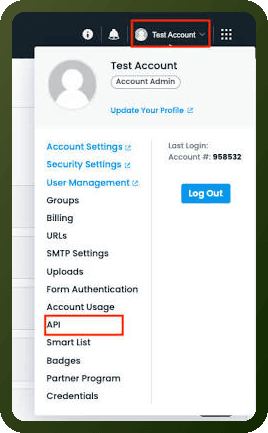
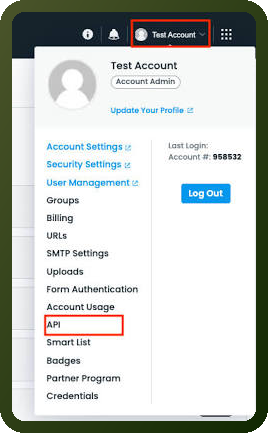
Navigate to the profile menu dropdown → API
Add a new SCIM Token to be used in the "Authorization: Bearer" header
Actions
Action Name | Description |
|---|---|
Create folder | Creates a new folder or subfolder in Formstack |
Create form | Creates a new form in your account in Formstack |
Create webhook | Creates a new webhook to the specified form in Formstack |
Delete field | Deletes the specified field in Formstack |
Delete folder | Deletes the specified folder in Formstack |
Delete form | Deletes the specified form in your account in Formstack |
Delete webhook | Deletes the specified webhook in Formstack |
Fetch field | Fetches details of the specified field in Formstack |
Fetch fields | Fetches details of all fields for the specified form in Formstack |
Fetch folder | Fetches details for the specified folder or subfolder in Formstack |
Fetch folders | Fetches all folders on your account and their subfolders in Formstack |
Fetch form | Fetches details of the specified form in your account in Formstack |
Fetch forms | Fetches details of all forms in your account in Formstack |
Fetch webhook | Fetches details for the specified webhook in Formstack |
Fetch webhooks | Fetches details of all webhooks for the specified form in Formstack |
Update folder | Updates the specified folder in Formstack |
Update form | Updates the details of the specified form in Formstack |
Update webhook | Updates the specified webhook in Formstack |
About the API
The Formstack API allows users and third-party applications to access resources programmatically and conforms to REST principles. The API supports standard HTTP methods (GET, POST, PUT, DELETE) for managing forms, fields, submissions, and related resources.
Base Endpoint: https://api.formstack.com/
Core Capabilities:
Form management (create, retrieve, list, update, delete)
Field management and configuration
Form submission handling and retrieval
User and team management
Webhooks for real-time notifications
Advanced filtering and pagination support