


Use the Shotstack connector to automate video editing and generation.
Integrating your application with Shotstack lets you use these operations in an automation. It exposes 10 actions, listed below. Add the connector from the Connections area, authenticate, then select its operations in the automation builder. Capabilities: actions.
Authentication
Before you begin, make sure you have the following information:
Connection Name: Choose a meaningful name for your connection. This name helps you identify the connection within your application or integration settings.
Authentication Type: The authentication method for this connector is defined in the connection setup. Select the connector in the Connections area to see the fields it requires.
Authentication & setup
Shotstack uses API key authentication with the x-api-key header.
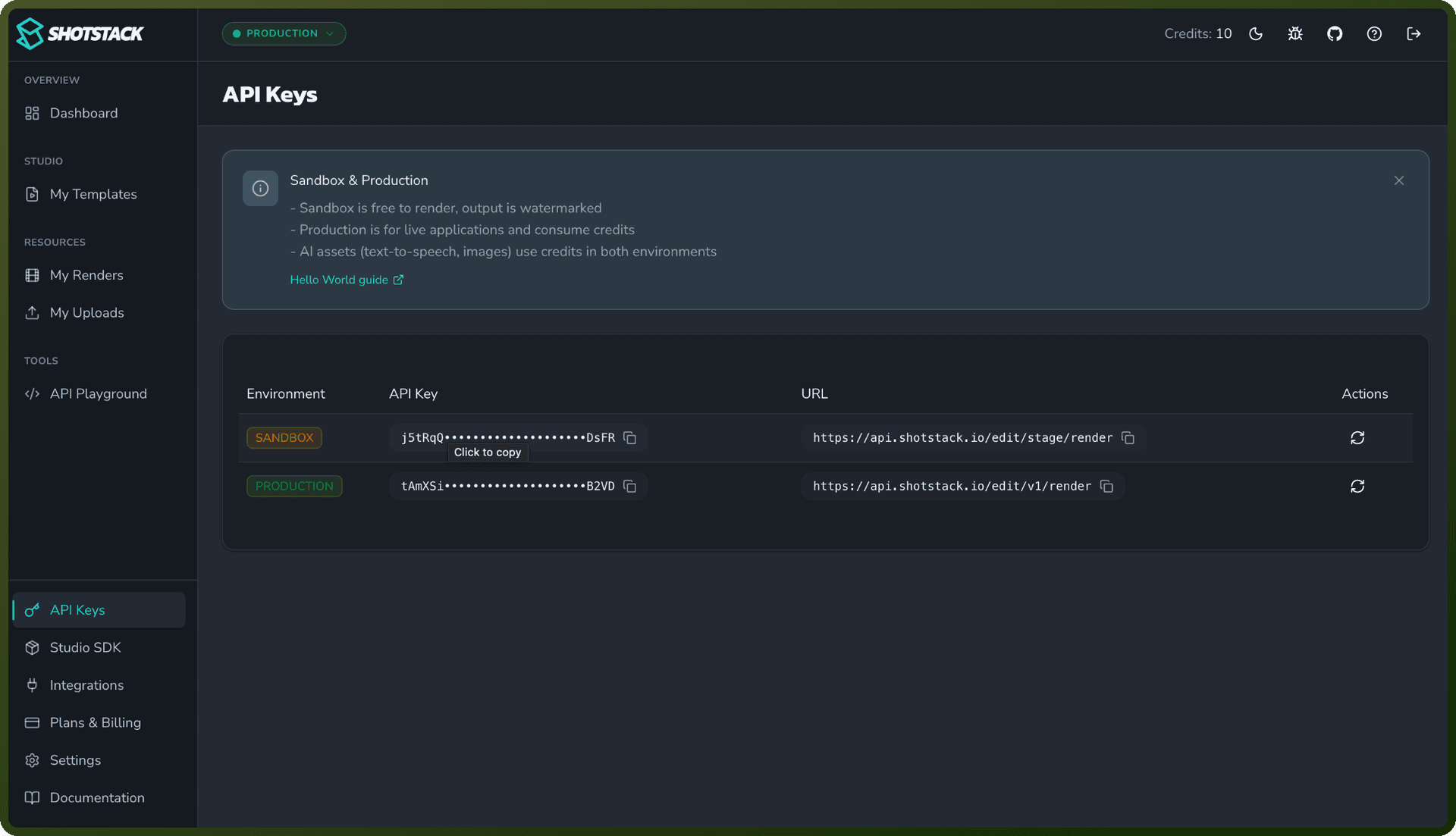
Getting Your API Key
Sign up or log into your Shotstack account
Go to the Shotstack Developer Portal
Create a new organization
Navigate to API Keys tab
Click to create a new key with a descriptive name
Copy the key immediately (only shown once) and store securely
Using Your API Key
Include the API key in the x-api-key header:
x-api-key: YOUR_API_KEY
Also include the Accept header:
Accept: application/json
Sandbox vs Production
Sandbox Key — Use for testing and development; no charges incurred
Production Key — Use for live video generation; requires credits
Actions
Action Name | Description |
|---|---|
Delete source | Deletes an ingested source file by its id in Shotstack |
Fetch source | Queues a source file to be fetched from a URL and stored by Shotstack |
Get asset | Fetches an asset by asset id in Shotstack |
Get asset by render ID | Fetches one or more assets by render id in Shotstack |
Get render status | Gets the rendering status, temporary asset url and details of a render by id in Shotstack |
Get source | Fetches a source file details and status by its id in Shotstack |
List sources | Retrieves a list of ingested source files stored in Shotstack |
List templates | Retrieves a list of templates stored in Shotstack |
Render template | Renders an asset from a template id and optional merge fields in Shotstack |
Retrieve template | Retrieves a template by template id in Shotstack |
About the API
Shotstack is a cloud video editing and media processing API providing three main service APIs:
Edit API
Generate videos, images, and audio via JSON-based compositions
Timeline-based editing with tracks and clips
Asset management (video, image, text, audio, shapes, captions)
Transitions, filters, effects, and transformations
Template creation and rendering with merge fields
Media inspection via FFprobe
Serve API
Host and manage generated assets
Asset lookup by ID or render ID
Multi-destination support (S3, Mux, Google Cloud Storage, Google Drive, Vimeo)
Asset deletion and transfer capabilities
Ingest API
Upload and transform source content
Fetch files from URLs for storage
Output renditions with customizable quality/format
Transcription generation
Audio enhancement (Dolby)
Callback notifications for job completion
Base URLs: https://api.shotstack.io/{api-type}/{version} where version is v1 (production) or stage (sandbox)