

Azure Blob Storage enables teams and applications to store and manage unstructured data such as documents, images, videos, backups, and logs at massive scale within the Microsoft cloud. By integrating your application with Azure Blob Storage, you can securely upload, download, and organize data using containers and blobs, while supporting high availability and durable storage for enterprise workloads.
Authentication :
Integrating your application with Azure Blob Storage enables efficient and scalable storage solutions for unstructured data, such as images, videos, and documents. Ensure you have the following information ready for a seamless integration process:
Connection Name: Choose a meaningful name for your connection. This helps you easily identify it within your application or integration settings.It could be something descriptive like "MyAppAzureBlobIntegration".
Authentication Type: Azure Blob supports Client Credential Based Authentication method.
Client credentials Based:
Login into the Microsoft Azure Portal by clicking here.
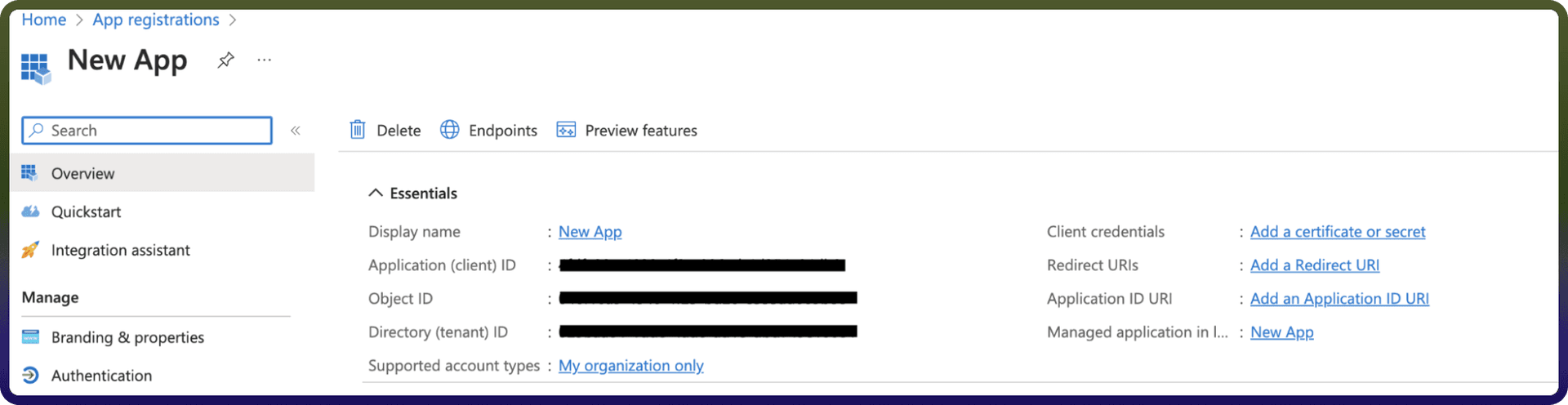
In the search Bar, search for App Registration and then Click on new Registration.
Provide the Name and supported account types and register your app.
The Client ID refers to the Application(client) ID
Click on “Add a credential or scope” to generate the client secret.
Use these credentials for further authentication purposes.
Actions
Action Name | Description |
| Copies a blob in Azure Blob |
| Creates a container to store blobs in Azure Blob |
| Deletes a blob in Azure Blob |
| Downloads the contents of a blob from Azure Blob |
| Retrieves a blob from Azure Blob |
| Retrieves all properties of a blob, including metadata, from Azure Blob |
| Gets container properties in storage account from Azure Blob |
| Lists blobs in a container in Azure Blob |
| Uploads a blob to Azure Blob |
Triggers
Trigger Name | Description |
| Triggers when a new Azure Blob Storage event is received |