


Use the Contentful connector to manage headless website content.
Integrating your application with Contentful lets you use these operations in an automation. It exposes 5 actions and 3 triggers, listed below. Add the connector from the Connections area, authenticate, then select its operations in the automation builder. Capabilities: actions, triggers.
Authentication
Before you begin, make sure you have the following information:
Connection Name: Choose a meaningful name for your connection. This name helps you identify the connection within your application or integration settings.
Authentication Type: The authentication method for this connector is defined in the connection setup. Select the connector in the Connections area to see the fields it requires.
Obtaining Your Personal Access Token
Log into your Contentful account.
Open the space you want to connect, then click Settings in the top navigation.
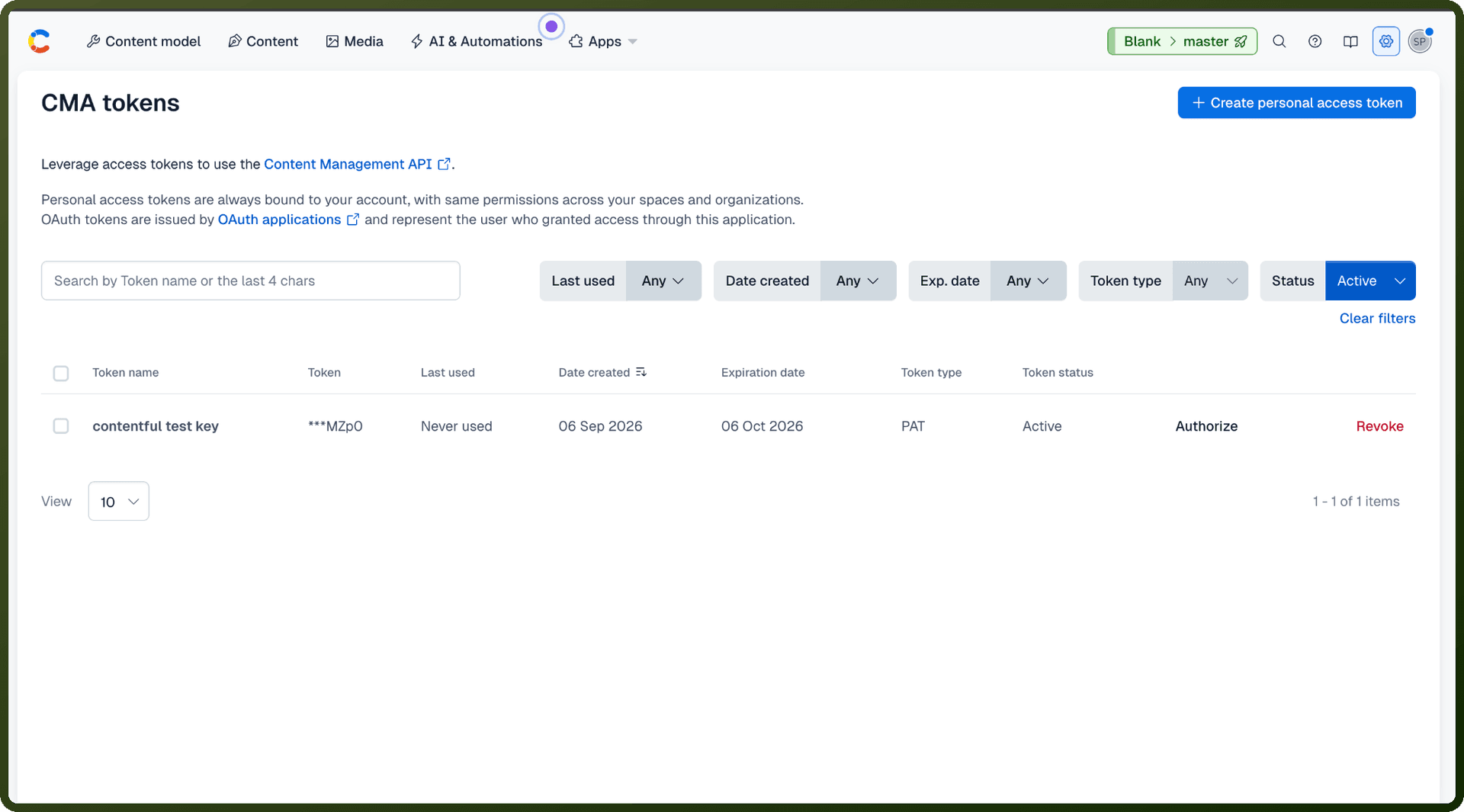
Select CMA tokens from the Settings menu.
Click Create personal access token in the top right corner of the page.
Enter a name for the token, optionally choose an expiration date, and click Generate.
Copy the generated token immediately and store it securely — it will not be shown again.
Authentication & setup
Personal Access Tokens
Log into Contentful web app
Navigate to Settings → CMA tokens
Click Create personal access token and copy immediately
Use for accessing your own Contentful account
OAuth Tokens
Required for building public integrations accessing other users' data
Set up OAuth 2.0 application in Contentful
Follow OAuth 2.0 authorization flow
Recommended for third-party integrations
Token Transmission
Query parameter:
?access_token=$tokenHTTP header (recommended):
Authorization: Bearer $token
Actions
Action Name | Description |
|---|---|
Create asset | Creates an asset in Contentful |
Delete asset | Deletes an existing asset in Contentful |
Get all assets of a space | Gets all assets of a space in Contentful |
Get all published assets of a space | Gets all published assets of a space in Contentful |
Publish asset | Publishes an existing asset in Contentful |
Triggers
Trigger Name | Description |
|---|---|
Asset created | Triggers when an asset is created in Contentful |
Asset deleted | Triggers when an asset is deleted in Contentful |
Asset published | Triggers when an asset is published in Contentful |
About the API
Contentful provides five distinct APIs for different content operations: Content Delivery API (read published content), Content Preview API (access unpublished content for previews), Content Management API (store and manage content), Images API (deliver images without authentication), and specialized APIs for other use cases. Each API requires appropriate token type. Tokens grant read-only access to one or more environments, enabling separate credential management across production, staging, and CI/CD pipelines.
Official documentation
https://www.contentful.com/developers/docs/references/authentication/