


Use the api.video connector to host, process, and stream videos.
Integrating your application with api.video lets you use these operations in an automation. It exposes 10 actions, listed below. Add the connector from the Connections area, authenticate, then select its operations in the automation builder. Capabilities: actions.
Authentication
Before you begin, make sure you have the following information:
Connection Name: Choose a meaningful name for your connection. This name helps you identify the connection within your application or integration settings.
Authentication Type: The authentication method for this connector is defined in the connection setup. Select the connector in the Connections area to see the fields it requires.
Authentication & setup
api.video supports two authentication methods for API requests.
1. Basic Authentication
Simple HTTP authentication using your API key as the username:
Authorization: Basic {base64_encoded_credentials}
Where credentials are: api_key: (with empty password) encoded in base64.
Use case: Quick testing and development with tools like Postman
2. Bearer Token Authentication (Recommended)
Enhanced security method using disposable tokens with short lifespans:
Step 1: Request an access token via the /auth/api-key endpoint using your API key Step 2: Use the returned token (valid for 3600 seconds) in subsequent API calls:
Authorization: Bearer {access_token}
Step 3: Refresh expired tokens using the /auth/refresh endpoint with your refresh token
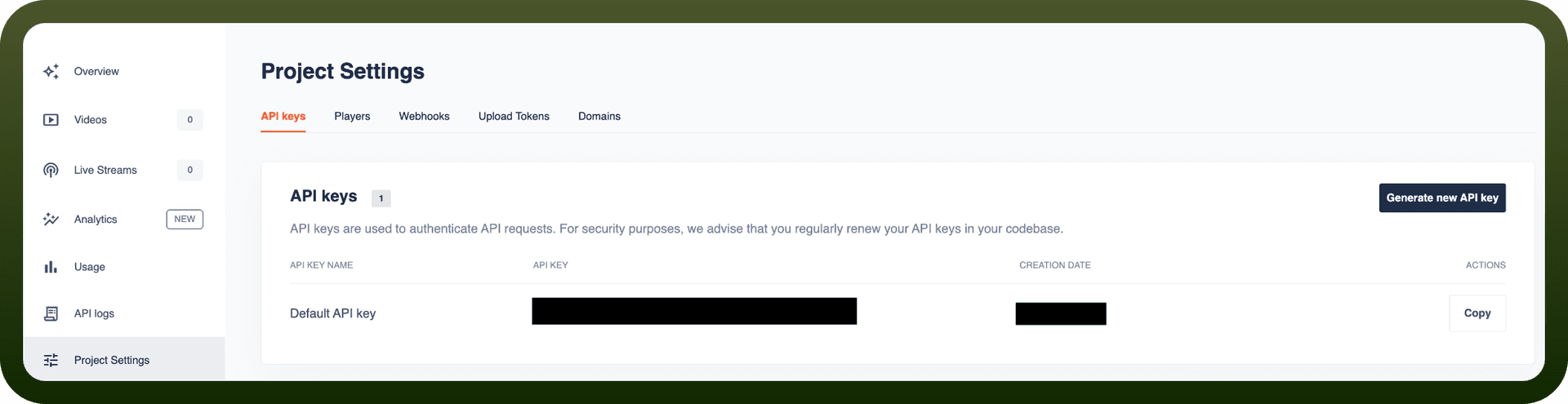
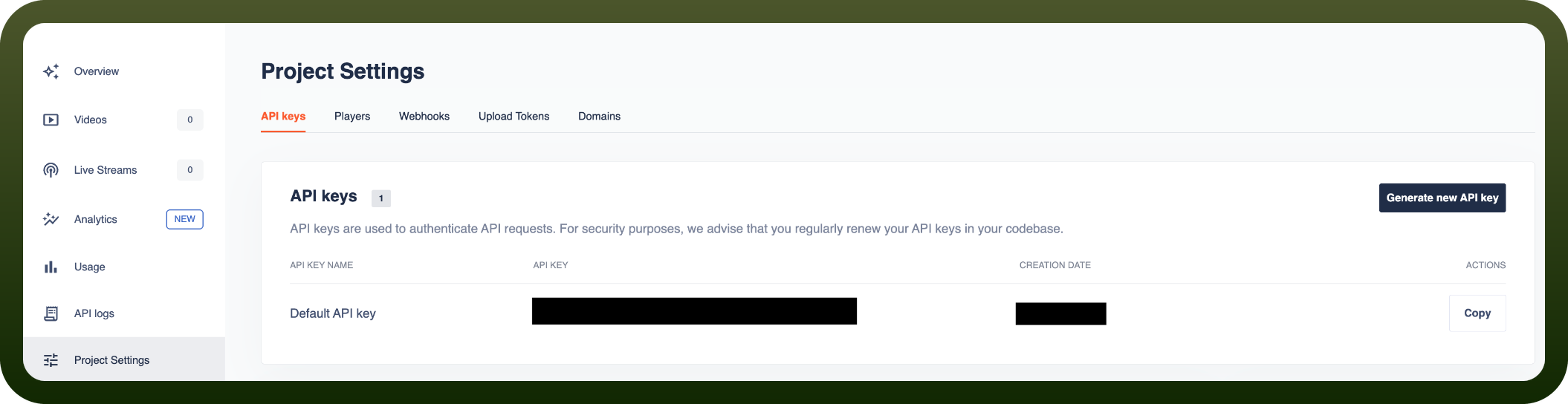
Getting Your API Key
Sign up at the api.video dashboard at https://api.video
Log in to your account
Navigate to API Keys section
Choose between Sandbox (free testing) or Production keys
Copy your API key
Recommendation: Use Bearer Token authentication (Method 2) for production — it's more secure and built into api.video client libraries.
Actions
Action Name | Description |
|---|---|
Create video object | Create a new video object in api.video |
Delete video object | Delete a video object by video ID |
Delete video summary | Delete a video summary |
Generate video summary | Generate a summary for a video |
Get summary details | Get details for a summary |
Get video object | Retrieve a video object by video ID |
List summaries | List summaries for videos |
List video objects | List all video objects in the current workspace |
Update summary details | Update details for a summary |
Upload video | Upload a video to an existing video object |
About the API
api.video provides a comprehensive video platform API for hosting, managing, and delivering video content:
Video on Demand (VOD):
Video management (upload, delete, organize)
Watermarking and caption support
Chapter management and tagging
Player customization
Live Streaming:
Real-time broadcast capabilities
Stream management and monitoring
Live chat and interaction features
Recording of live streams
Delivery & Players:
Custom player themes and branding
Adaptive bitrate streaming
Multi-device support
DRM and content protection (where applicable)
Analytics:
Performance tracking and insights
Viewer engagement metrics
Bandwidth and delivery statistics
Heat maps and interaction data
Webhooks:
Event-driven integrations
Real-time notifications for video lifecycle events
Custom workflow automation
SDK Support: Official client libraries available for simplified authentication and request handling.