


Microsoft Dynamics 365 Business Central is an all-in-one business management solution that helps small and medium-sized businesses manage finance, operations, sales and customer service. The UnifyApps Microsoft Business Central connector uses the Business Central API (v2.0) to create, read, update and list companies, customers, vendors, items, sales and purchase documents, journals and financial statements from workflows and agents.
This guide covers the authentication type available on the connection form, and the actions supported, along with the Business Central permissions they need.
Authentication
Before you begin, you should have the following information:
Connection name: a descriptive name such as MyAppBusinessCentralIntegration, so the connection is easy to identify later.
Authentication type: Microsoft Business Central supports one type of authentication, so the form does not ask you to choose:
OAuth
Environment name: the name of the Business Central environment the connection should use, for example Production. If you open Business Central at
https://businesscentral.dynamics.com/<tenant ID>/Production, the environment name is Production.
1. OAuth
Use this to connect through your organization's own Azure app registration. Actions run as the Business Central user who signs in, with that user's Business Central permissions.
Step 1: App registration in Azure
Log in to the Azure portal, search for App registrations and click New registration.
Enter a name and choose the supported account type as Multitenant or Single tenant.
Under Redirect URI, choose platform Web and paste the Callback URL shown at the top of the connection form (it is copyable and differs per environment).
Click Register.
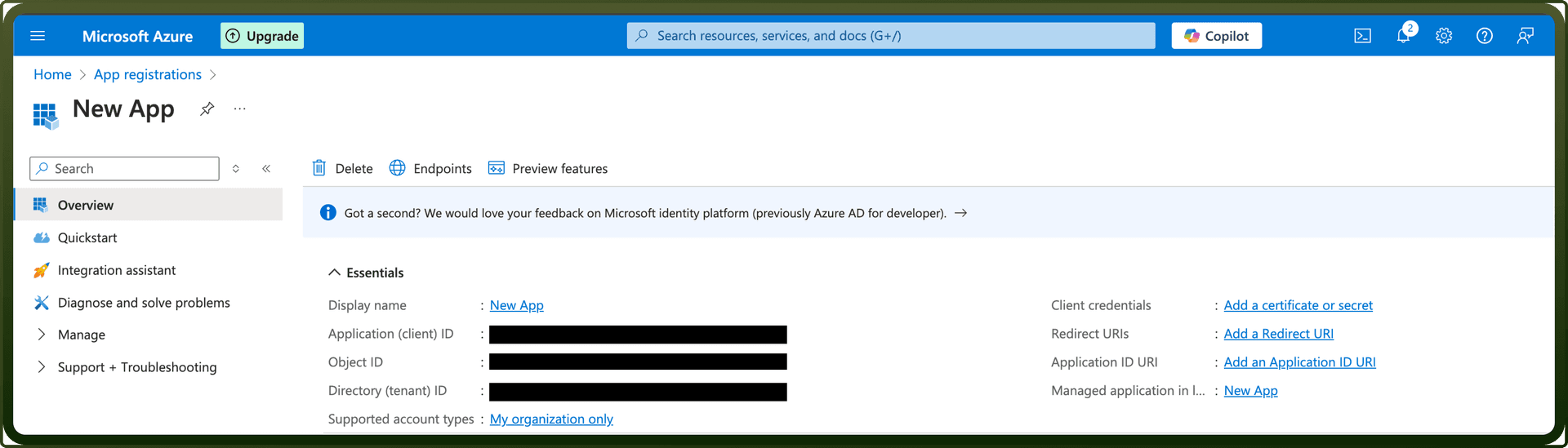
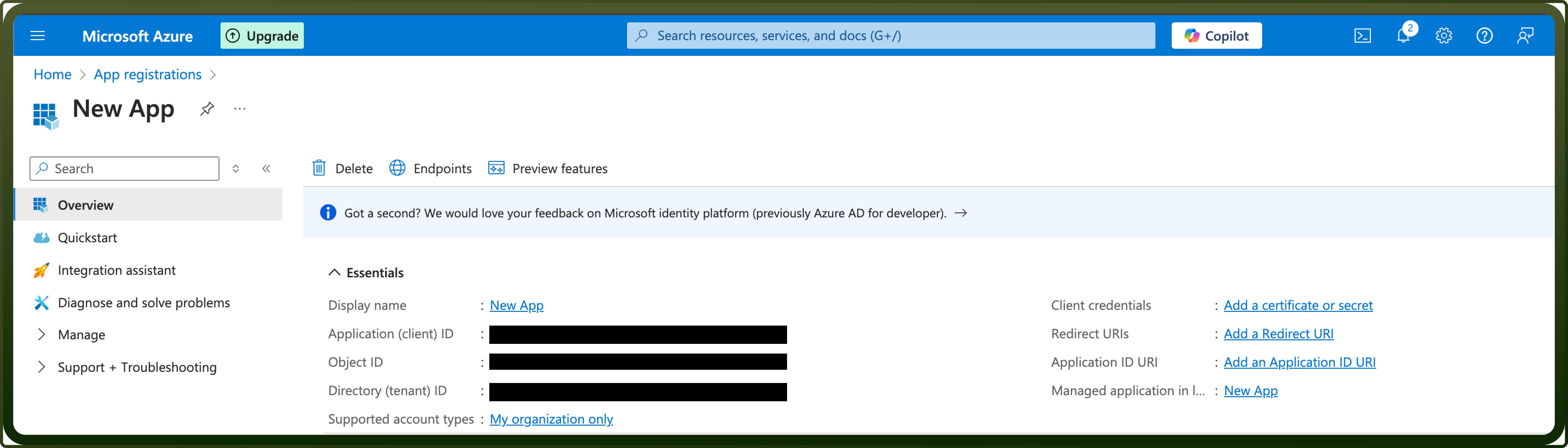
On the Overview tab, copy the Application (client) ID and the Directory (tenant) ID.
Go to API permissions → Add a permission, select Dynamics 365 Business Central on the Microsoft APIs tab, choose Delegated permissions, check Financials.ReadWrite.All and click Add permissions. Click Grant admin consent if your tenant requires it.
Go to Certificates & secrets → New client secret, add a description and expiry, and click Add. Copy the secret Value immediately and store it securely. It is not shown again.
Note: if Dynamics 365 Business Central does not appear in the list of APIs, the Microsoft Entra tenant has no Business Central subscription yet. Microsoft suggests signing up for Business Central (a trial is enough) with a user from the directory to make it visible.
Step 2: Find the environment name
Sign in to Business Central and select Settings → Admin Center in the upper-right corner, or open
https://businesscentral.dynamics.com/<tenant ID>/admin.On the Environments tab, copy the name of the production or sandbox environment the connection should use from the Name column.
Step 3: Connection setup in UnifyApps
Open Connections → New Connection → Microsoft Business Central and enter a Connection name.
Enter the Client ID and Client Secret copied from Azure.
Enter the Tenant ID. It defaults to
common, which works only if the app registration is multitenant; for a single-tenant app, enter your Directory (tenant) ID.Enter the Environment name from Step 2.
Click Authorize. You are redirected to the Microsoft sign-in page.
Sign in with a Microsoft account that is a Business Central user, review the permissions requested on the consent screen and click Accept.
Confirm the success message after the redirect back to UnifyApps.
Actions
Every action calls the Business Central API with the signed-in user's token, so they all need the same access rather than a scope per action: the Financials.ReadWrite.All delegated permission on the Dynamics 365 Business Central API (added in Step 1), plus a Business Central license and permission sets for that user that allow the records the action reads or changes. Most actions need a Company ID; use List companies to find it.
Actions | Description |
|---|---|
| Creates a new bank account in Dynamics 365 Business Central. |
| Creates a new contact in Dynamics 365 Business Central. |
| Creates a new country/region in Dynamics 365 Business Central. |
| Creates a new currency in Dynamics 365 Business Central. |
| Creates a new customer in Dynamics 365 Business Central. |
| Creates a new employee in Dynamics 365 Business Central. |
| Creates a new item in Dynamics 365 Business Central. |
| Creates a new item category in Dynamics 365 Business Central. |
| Creates a new item variant in Dynamics 365 Business Central. |
| Creates a new journal in Dynamics 365 Business Central. |
| Creates a new journal line in Dynamics 365 Business Central. |
| Creates a new location in Dynamics 365 Business Central. |
| Creates a new opportunity in Dynamics 365 Business Central. |
| Creates a new payment method in Dynamics 365 Business Central. |
| Creates a new payment term in Dynamics 365 Business Central. |
| Creates a new project in Dynamics 365 Business Central. |
| Creates a purchase credit memo in Dynamics 365 Business Central. |
| Creates a purchase invoice in Dynamics 365 Business Central. |
| Creates a new purchase order in Dynamics 365 Business Central. |
| Creates a new sales credit memo in Dynamics 365 Business Central. |
| Creates a new sales invoice in Dynamics 365 Business Central. |
| Creates a new sales order in Dynamics 365 Business Central. |
| Creates a new sales quote in Dynamics 365 Business Central. |
| Creates a new shipment method in Dynamics 365 Business Central. |
| Creates a new tax area in Dynamics 365 Business Central. |
| Creates a new tax group in Dynamics 365 Business Central. |
| Creates a new time registration entry of an employee in Dynamics 365 Business Central. |
| Creates a new unit of measure in Dynamics 365 Business Central. |
| Creates a new vendor in Dynamics 365 Business Central. |
| Creates a new vendor payment journal in Dynamics 365 Business Central. |
| Gets object metadata from Microsoft Business Central and shows the output produced by the object extractor. |
| Gets object metadata from Microsoft Business Central and shows the raw XML output. |
| Gets a purchase credit memo in Dynamics 365 Business Central. |
| Gets a purchase invoice in Dynamics 365 Business Central. |
| Gets an account from Dynamics 365 Business Central. |
| Gets an item in Dynamics 365 Business Central. |
| Gets an item variant in Dynamics 365 Business Central. |
| Gets a balance sheet from Dynamics 365 Business Central. |
| Gets a bank account from Dynamics 365 Business Central. |
| Gets a cash flow statement from Dynamics 365 Business Central. |
| Gets a company from Dynamics 365 Business Central. |
| Gets company information from Dynamics 365 Business Central. |
| Gets a contact from Dynamics 365 Business Central. |
| Gets contact information of a customer from Dynamics 365 Business Central. |
| Gets contact information of a vendor from Dynamics 365 Business Central. |
| Gets a country/region from Dynamics 365 Business Central. |
| Gets a currency from Dynamics 365 Business Central. |
| Gets a currency exchange rate from Dynamics 365 Business Central. |
| Gets a customer from Dynamics 365 Business Central. |
| Gets a customer financial detail from Dynamics 365 Business Central. |
| Gets an employee from Dynamics 365 Business Central. |
| Gets entity fields from Dynamics 365 Business Central. |
| Gets an income statement in Dynamics 365 Business Central. |
| Gets an item category from Dynamics 365 Business Central. |
| Gets a journal from Dynamics 365 Business Central. |
| Gets a journal line from Dynamics 365 Business Central. |
| Gets a location from Dynamics 365 Business Central. |
| Gets an object from Dynamics 365 Business Central. |
| Gets an opportunity in Dynamics 365 Business Central. |
| Gets a payment method from Dynamics 365 Business Central. |
| Gets a payment term from Dynamics 365 Business Central. |
| Gets a project from Dynamics 365 Business Central. |
| Gets a purchase order in Dynamics 365 Business Central. |
| Gets a purchase receipt in Dynamics 365 Business Central. |
| Gets a sales credit memo from Dynamics 365 Business Central. |
| Gets a sales invoice from Dynamics 365 Business Central. |
| Gets a sales order from Dynamics 365 Business Central. |
| Gets a sales quote from Dynamics 365 Business Central. |
| Gets a sales shipment in Dynamics 365 Business Central. |
| Gets a shipment method from Dynamics 365 Business Central. |
| Gets a tax area from Dynamics 365 Business Central. |
| Gets a tax group in Dynamics 365 Business Central. |
| Gets a time registration entry of an employee in Dynamics 365 Business Central. |
| Gets a unit of measure in Dynamics 365 Business Central. |
| Gets a vendor from Dynamics 365 Business Central. |
| Gets a vendor payment journal in Dynamics 365 Business Central. |
| Gets a vendor purchase in Dynamics 365 Business Central. |
| Gets an accounting period from Dynamics 365 Business Central. |
| Gets the objects for all companies in Microsoft Business Central. |
| Lists accounting periods in Dynamics 365 Business Central. |
| Lists all accounts in Dynamics 365 Business Central. |
| Lists all item variants in Dynamics 365 Business Central. |
| Lists all items in Dynamics 365 Business Central. |
| Lists all opportunities in Dynamics 365 Business Central. |
| Lists all purchase credit memos in Dynamics 365 Business Central. |
| Lists all purchase invoices in Dynamics 365 Business Central. |
| Lists all purchase orders in Dynamics 365 Business Central. |
| Lists all purchase receipts in Dynamics 365 Business Central. |
| Lists all sales shipments in Dynamics 365 Business Central. |
| Lists all tax groups in Dynamics 365 Business Central. |
| Lists all balance sheets in Dynamics 365 Business Central. |
| Lists all bank accounts in Dynamics 365 Business Central. |
| Lists all cash flow statements in Dynamics 365 Business Central. |
| Lists all companies in Dynamics 365 Business Central. |
| Lists all company information in Dynamics 365 Business Central. |
| Lists all contact information of customers in Dynamics 365 Business Central. |
| Lists all contact information of vendors in Dynamics 365 Business Central. |
| Lists contacts in Dynamics 365 Business Central. |
| Lists all countries/regions in Dynamics 365 Business Central. |
| Lists all currencies in Dynamics 365 Business Central. |
| Lists all currency exchange rates in Dynamics 365 Business Central. |
| Lists all customer financial details in Dynamics 365 Business Central. |
| Lists all customers in Dynamics 365 Business Central. |
| Lists all employees in Dynamics 365 Business Central. |
| Lists all income statements in Dynamics 365 Business Central. |
| Lists all item categories in Dynamics 365 Business Central. |
| Lists all journal lines in Dynamics 365 Business Central. |
| Lists all journals in Dynamics 365 Business Central. |
| Lists all locations in Dynamics 365 Business Central. |
| Lists all payment methods in Dynamics 365 Business Central. |
| Lists all payment terms in Dynamics 365 Business Central. |
| Lists all projects in Dynamics 365 Business Central. |
| Retrieves records from any Business Central OData entity for a specified company. |
| Lists all sales credit memos in Dynamics 365 Business Central. |
| Lists all sales invoices in Dynamics 365 Business Central. |
| Lists all sales orders in Dynamics 365 Business Central. |
| Lists all sales quotes in Dynamics 365 Business Central. |
| Lists all shipment methods in Dynamics 365 Business Central. |
| Lists all tax areas in Dynamics 365 Business Central. |
| Lists all time registration entries of an employee in Dynamics 365 Business Central. |
| Lists all units of measure in Dynamics 365 Business Central. |
| Lists all vendor payment journals in Dynamics 365 Business Central. |
| Lists all vendors in Dynamics 365 Business Central. |
| Lists all vendor purchases in Dynamics 365 Business Central. |
| Monitors changes in entities in Microsoft Business Central (one per run). |
| Monitors changes in entities in Microsoft Business Central, in batches. |
| Updates an item variant in Dynamics 365 Business Central. |
| Updates an item in Dynamics 365 Business Central. |
| Updates a purchase credit memo in Dynamics 365 Business Central. |
| Updates a purchase invoice in Dynamics 365 Business Central. |
| Updates a bank account in Dynamics 365 Business Central. |
| Updates company information in Dynamics 365 Business Central. |
| Updates a contact in Dynamics 365 Business Central. |
| Updates a country/region in Dynamics 365 Business Central. |
| Updates a currency in Dynamics 365 Business Central. |
| Updates a customer in Dynamics 365 Business Central. |
| Updates an employee in Dynamics 365 Business Central. |
| Updates an item category in Dynamics 365 Business Central. |
| Updates a journal in Dynamics 365 Business Central. |
| Updates a journal line in Dynamics 365 Business Central. |
| Updates a location in Dynamics 365 Business Central. |
| Updates an opportunity in Dynamics 365 Business Central. |
| Updates a payment method in Dynamics 365 Business Central. |
| Updates a payment term in Dynamics 365 Business Central. |
| Updates a project in Dynamics 365 Business Central. |
| Updates a purchase order in Dynamics 365 Business Central. |
| Updates a sales credit memo in Dynamics 365 Business Central. |
| Updates a sales invoice in Dynamics 365 Business Central. |
| Updates a sales order in Dynamics 365 Business Central. |
| Updates a sales quote in Dynamics 365 Business Central. |
| Updates a shipment method in Dynamics 365 Business Central. |
| Updates a tax area in Dynamics 365 Business Central. |
| Updates a tax group in Dynamics 365 Business Central. |
| Updates a time registration entry of an employee in Dynamics 365 Business Central. |
| Updates a unit of measure in Dynamics 365 Business Central. |
| Updates a vendor in Dynamics 365 Business Central. |
| Updates a vendor payment journal in Dynamics 365 Business Central. |