


Use the Knack connector to build custom business applications without coding.
Integrating your application with Knack lets you use these operations in an automation. It exposes 4 actions, listed below. Add the connector from the Connections area, authenticate, then select its operations in the automation builder. Capabilities: actions, triggers.
Authentication
Before you begin, make sure you have the following information:
Connection Name: Choose a meaningful name for your connection. This name helps you identify the connection within your application or integration settings.
Authentication Type: The authentication method for this connector is defined in the connection setup. Select the connector in the Connections area to see the fields it requires.
Obtaining Your Application ID and API Key
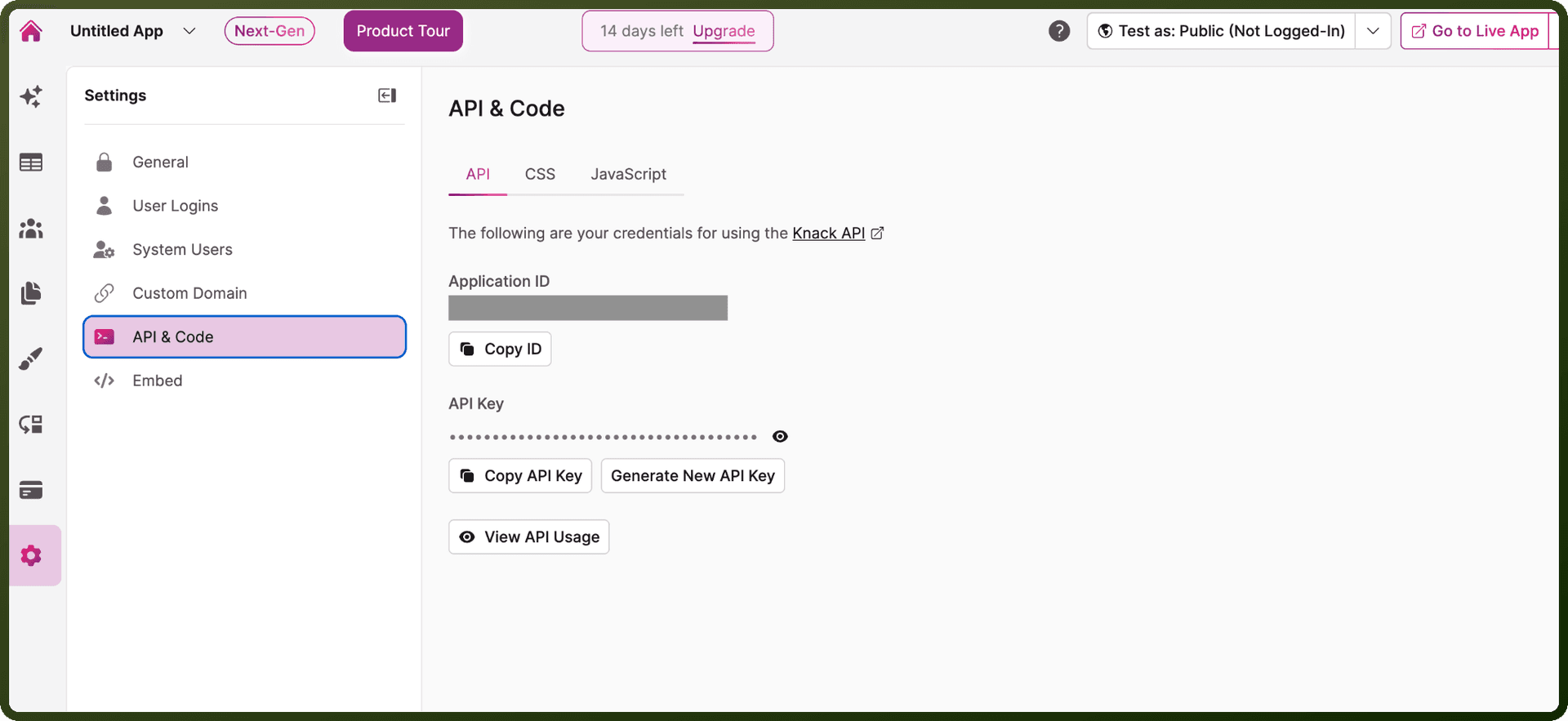
Log in to your Knack account and open the app you want to connect.
In the Builder, click Settings in the left-hand menu.
Click API & Code.
Click the API tab at the top of the page.
Copy the Application ID and API Key shown on this page and store them securely for authentication.
Authentication & setup
Knack supports two main authentication approaches:
API Key Authentication (for Object-Based Requests): Object-based requests require at least two headers: an application ID to identify the app whose records you are requesting, and an API key (which is specific to each app) to authenticate the request. However, it is strongly recommended that you do not use object-based requests from any client-side code, as this will expose your API key.
User Token Authentication (for View-Based Requests): View-based requests require a user token in the Authorization header, allowing you to make secure, cross-origin requests from client-side code without exposing an API key. To use this more secure application development pattern, leverage the Knack.getUserToken utility function.
Actions
Action Name | Description |
|---|---|
Create record | Creates a record in Knack |
Delete records | Deletes a record in Knack |
Get record | Gets a record in Knack |
Update record | Updates a record in Knack |
About the API
The Knack API is organized around REST with predictable, resource-oriented URLs, and uses HTTP response codes to indicate API errors. All data sent to and from the API must be in JSON format. The API includes features for webhooks management, authentication, identity protocols, SSO/social login, and various tools like an OAuth playground, GraphQL playground, and API Explorer.