


Use the Azure Service Bus connector to enable enterprise messaging and integration.
Integrating your application with Azure Service Bus lets you use these operations in an automation. It exposes 6 actions and 2 triggers, listed below. Add the connector from the Connections area, authenticate, then select its operations in the automation builder. Capabilities: actions, triggers.
Authentication
Before you begin, make sure you have the following information:
Connection Name: Choose a meaningful name for your connection. This name helps you identify the connection within your application or integration settings.
Authentication Type: Azure Service Bus supports the following authentication methods:
Credentials
Credentials without client configuration
Authentication & setup
Azure Service Bus supports OAuth 2.0 with Microsoft Entra ID (recommended) and Shared Access Signatures (SAS).
Microsoft Entra ID OAuth (Recommended)
How It Works: Microsoft Entra ID provides superior security and ease of use compared to shared access signatures.
Authentication Flow:
The security principal's identity is authenticated
An OAuth 2.0 token is returned for the resource
The resource name is:
https://servicebus.azure.netToken is passed in requests to authorize access to specified resources
Benefits:
No need to store tokens in your code
Eliminates potential security vulnerabilities
Role-based access control integration
Authorization with Azure RBAC
Microsoft Entra integration provides role-based access control. Built-in roles include:
Azure Service Bus Data Owner: Full access to all operations
Azure Service Bus Data Sender: Permission to send messages
Azure Service Bus Data Receiver: Permission to receive messages
Shared Access Signatures (SAS)
Alternative authentication method using access authorization rules.
How to Use SAS:
Create a shared access authorization rule
Clients receive a SAS token generated from the rule
Token includes an HMAC-SHA256 signature of a resource string
Use
SharedAccessKeyNameandSharedAccessKeyin your connection string
Access Key
Log in to the Azure Portal.
Search for and select Service Bus from the search bar.
Click on your target Namespace. This value fills the Namespace field in your form.
Under Entities in the left menu, select either Queues or Topics depending on your setup.
Copy the exact name of your queue or topic. This fills the Queue or Topic name field.
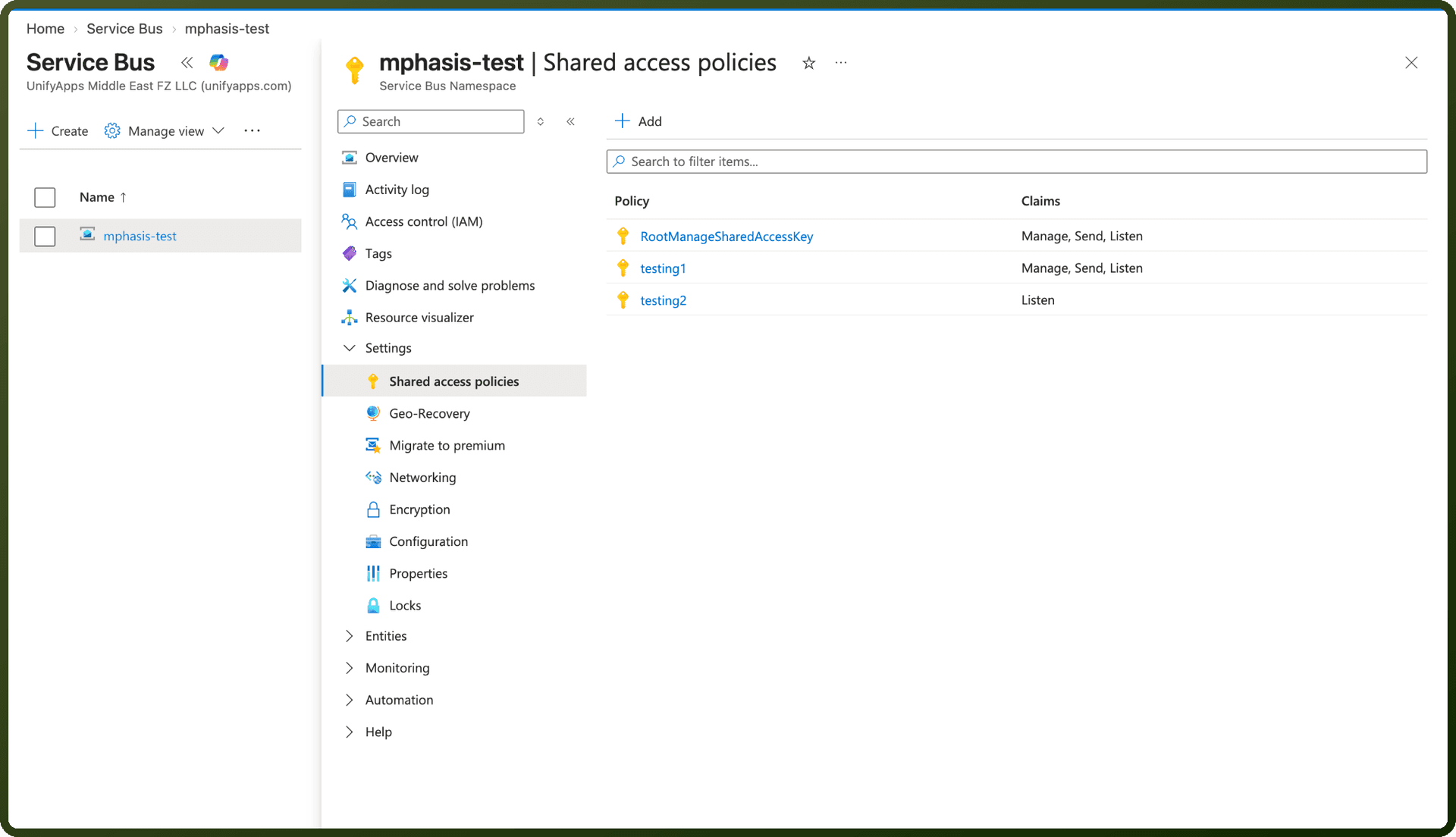
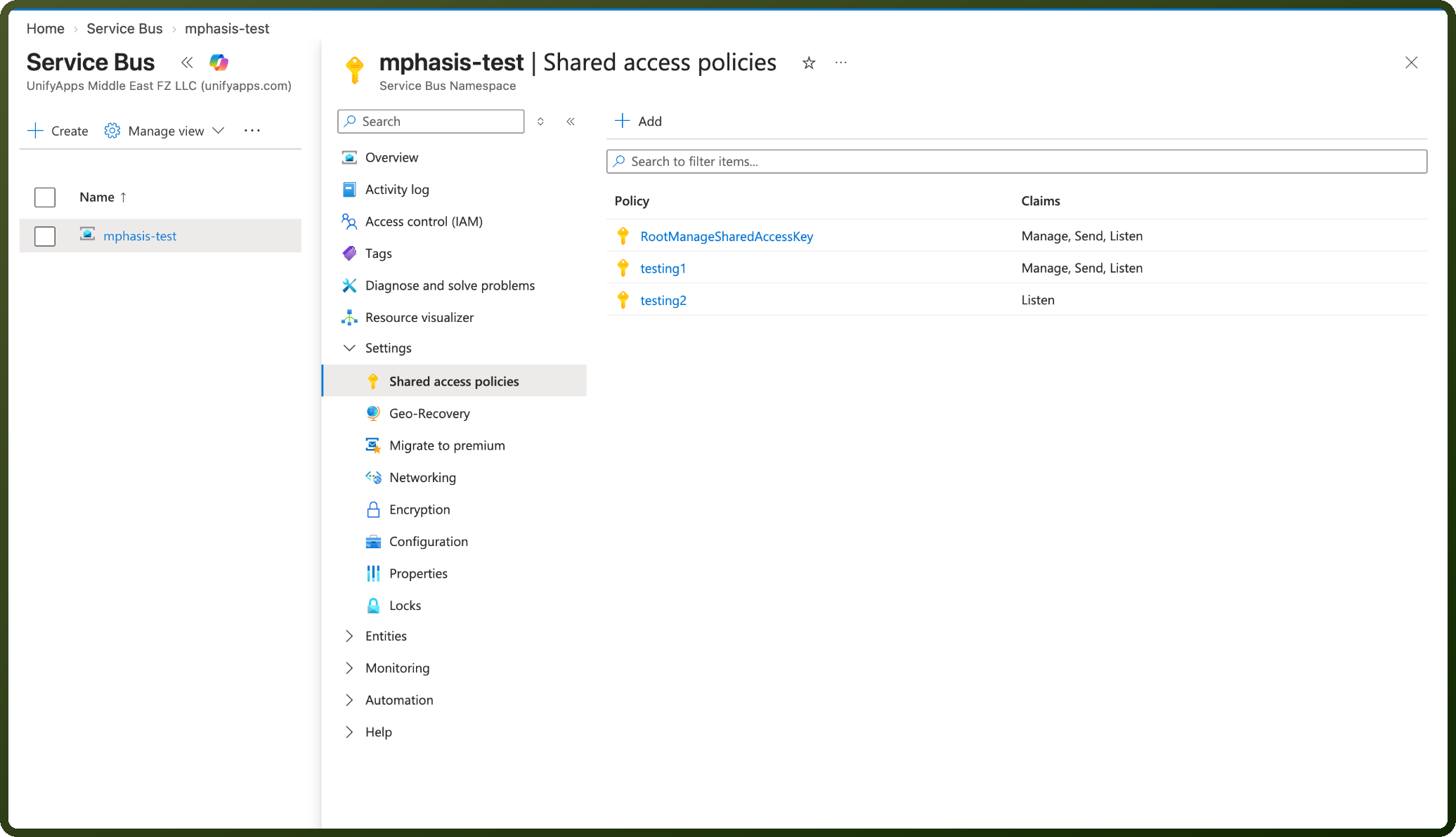
In the Azure Portal, open your Service Bus Namespace (or specific Queue/Topic if using entity-scoped policy).
On the left sidebar menu, navigate to Settings > Shared access policies.
Select an existing policy (e.g., RootManageSharedAccessKey or a custom policy) or click + Add to create a new policy with the required permissions (Send, Listen, or Manage).
Copy the policy name. This value fills the Authorization policy field.
Click on the policy name to open the details blade.
Copy the Primary Key. This fills the Access key field.
Actions
Action Name | Description |
|---|---|
Delete message | Deletes a message from a queue or topic in Azure Service Bus. |
List topics | Retrieves topics in Azure Service Bus |
Peek-Lock message | Retrieves and locks a message from a queue or topic in Azure Service Bus |
Receive and delete message | Retrieves and deletes a message from a queue or topic in Azure Service Bus. |
Send message | Sends a message to Azure Service Bus |
Send multiple messages | Sends multiple messages to Azure Service Bus. |
Triggers
Trigger Name | Description |
|---|---|
New message | New message in Azure Service Bus |
New message (Streaming) | New message in Azure Service Bus (Streaming) |
About the API
Azure Service Bus is a cloud-based messaging service providing:
Message Queues: Asynchronous message communication
Topics and Subscriptions: Publish-subscribe messaging patterns
Dead Letter Queues: Handling failed messages
Sessions: Message ordering and grouping
Transactions: ACID-compliant message operations
Scheduled Messages: Deferred message delivery
Enterprise Integration: Large-scale message processing