


Integrating your application with Contacts+'s REST API allows seamless access to contact management, synchronization and automation features. Before starting the integration process, ensure you have the following details:
Authentication
Connecting your application to Contacts+ allows you to automate and manage your contacts effectively. Make sure you have the following information ready:
Connection Name: Choose a unique and meaningful name for your connection. This name helps identify the connection within the UnifyApps platform, such as 'ContactsplusIntegration'.Authentication Type: Connecting your application to Contacts+ requires OAuth-based authentication.
OAuth-Based Authentication :
Log in to your Contacts+ account.
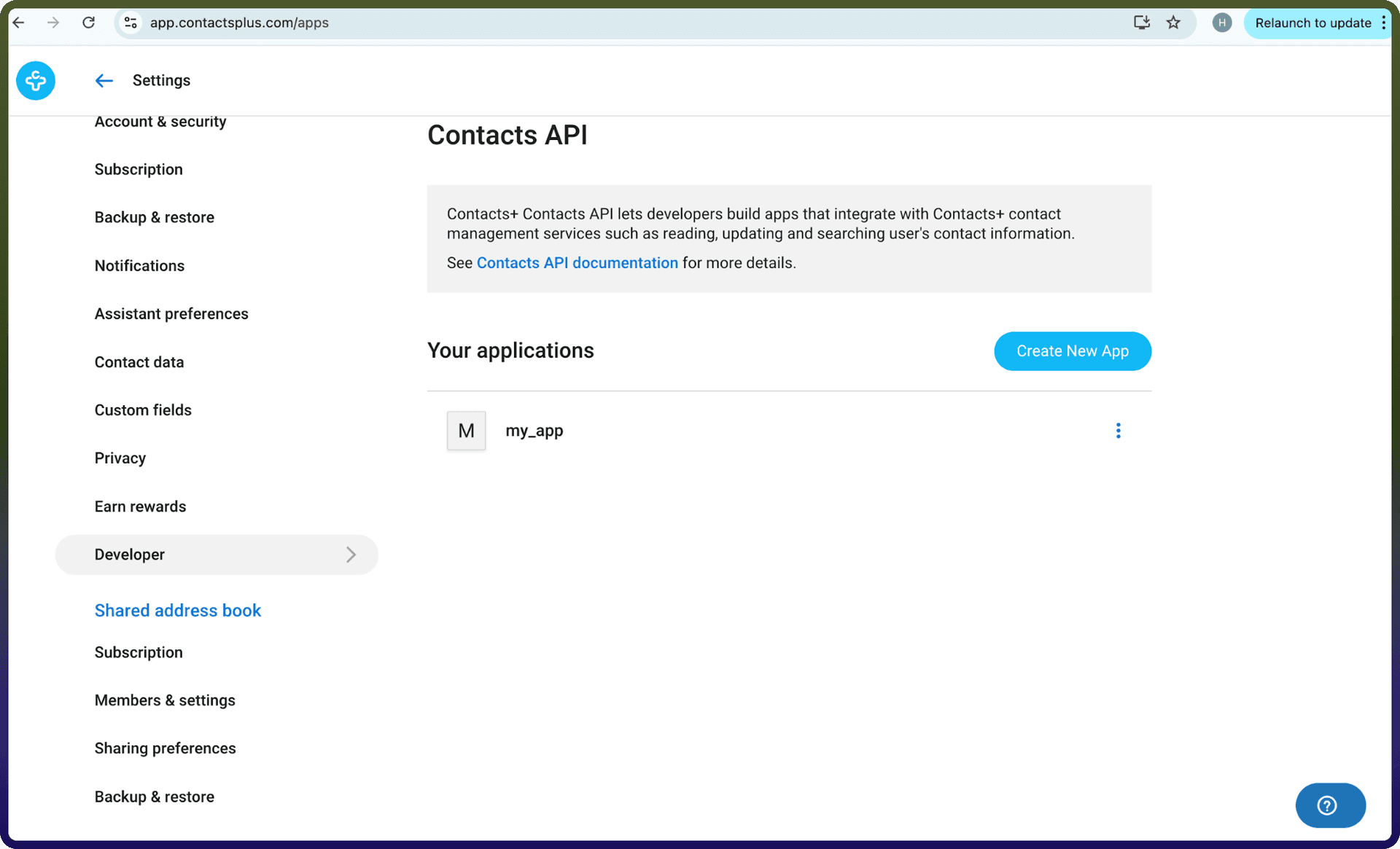
Navigate to the Developer section under Settings.
Locate your application. If you do not have an application created, you will need to create one first.
Once the application is created, you will be provided with a Client ID and Client Secret. Copy the Client Secret immediately, as it may not be visible again after you leave the page.
Ensure that your application is configured with the correct redirect URLs and required permissions.
Use the Client ID and Client Secret to complete the OAuth authentication flow during setup.
A screenshot of the webpage where you can find the above details is provided below for reference:
Actions :
Action Name | Description |
| Creates a new contact in Contacts+ |
| Creates a new tag in Contacts+ |
| Deletes a contact from Contacts+ |
| Deletes a tag from Contacts+ |
| Edits a tag in Contacts+ |
| Fetches the authenticated user’s account information including name, photo, emails and more from Contacts+ |
| Returns a list of contacts from Contacts+ |
| Retrieves one or more contacts by contact IDs from Contacts+ |
| Returns a list of tags from Contacts+ |
| Retrieves one or more tags by tag IDs from Contacts+ |
| Gets list of teams that the user is a member of in Contacts+ |
| Adds or removes tags from multiple contacts in Contacts+ |
| Searches contacts by name, company, email, phone, or any combination in Contacts+ |
| Updates an existing contact in Contacts+ |
| Adds a new photo to a contact, making it the default profile photo in Contacts+ |
Triggers :
Trigger Name | Description |
| Triggers when a new contact is created on Contacts+ |
| Triggers when a new tag is created on Contacts+ |
| Triggers when a contact is deleted on Contacts+ |
| Triggers when a tag is deleted on Contacts+ |
| Triggers when a contact is updated on Contacts+ |
| Triggers when a tag is updated on Contacts+ |